HIKO Social Login

HIKO Social Login

Let shoppers sign in with the accounts they already have — or with a link sent to their email.

Social Login Google One Tap Email Link Login Customer Data Klaviyo Headless Analytics Shopify App

Web search preview

apps.shopify.com
HIKO Social Login - Effortless and secure customer registration and login

Add 20+ social sign-in options and passwordless email link login to your Shopify store. Collect the customer details you actually need, sync them to Klaviyo, Mailchimp, Omnisend and Contlo, and see which methods your shoppers really use. Free plan available.

HIKO Social Login removes the password from the hardest moment in the funnel — the point where a shopper has to create an account. Customers sign in with Google, Facebook, Apple, LINE, Kakao, Naver, X and more than a dozen other platforms, or with a one-time link sent to their email address. While they do, you can ask for exactly the details your store needs — phone number, full name, country — and have them land in Shopify as a proper customer record. Those profiles flow straight into Klaviyo, Mailchimp, Omnisend or Contlo, and a reporting dashboard shows which platforms, devices, browsers and regions your sign-ins actually come from. Everything the shopper sees is yours to shape: button layout, logo colours, column count, custom CSS, and the consent screen under your own developer credentials. For stores that are not running a Liquid theme there are REST APIs, Shopify Hydrogen support and a React widget component.
Features

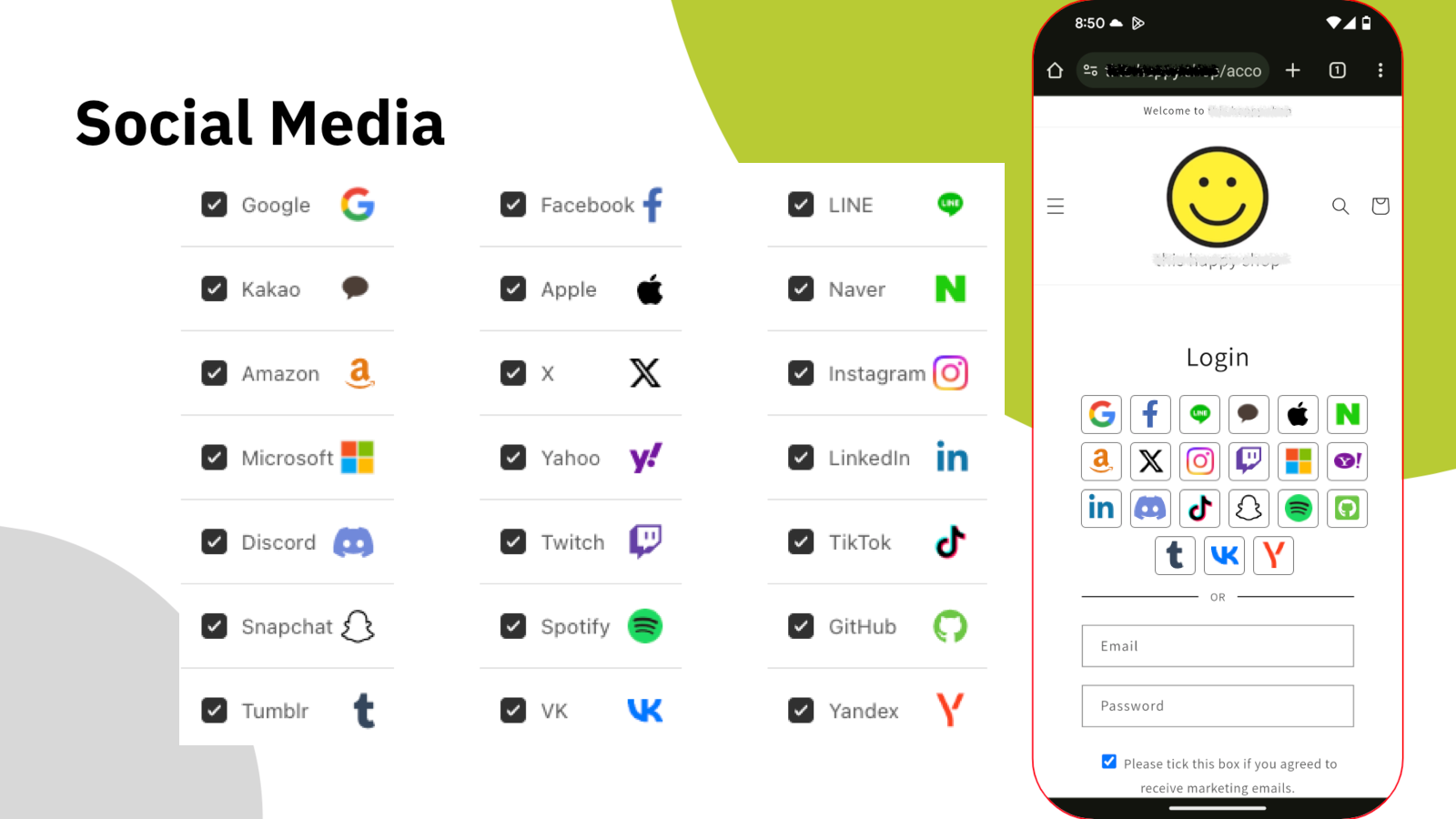
HIKO Social Login — social platforms and the storefront sign-in widget

Pick the platforms your shoppers use. The widget takes care of the rest.

Social Login

Sign In With an Account They Already Trust

A new password is one more reason to leave. HIKO Social Login puts more than twenty providers into a single sign-in block on your storefront — Google, Facebook, Apple, LINE, Kakao, Naver, Amazon, X, Instagram, Microsoft, LinkedIn, Discord, TikTok and more. Shoppers pick the one they are already signed in to, and they are through.

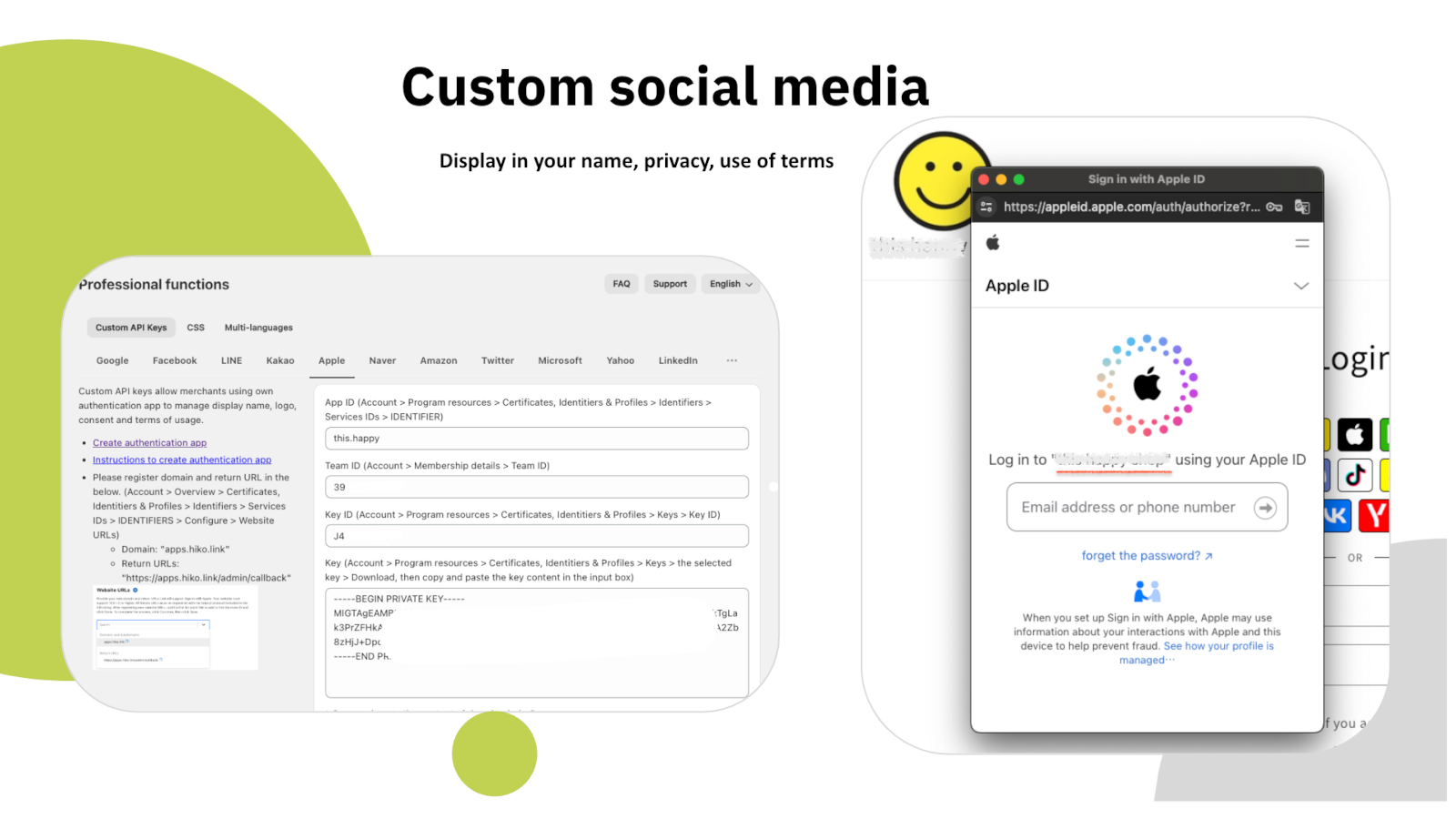
On the paid plans you can register your own developer application with each platform and paste in your own API keys, so the consent screen shows your store's name and logo instead of ours — along with your own privacy policy and terms of use.

  • 20+ global and regional platforms in one block
  • Your own API keys, so consent screens carry your branding
  • Works with the registration form or the login form
  • Every sign-in becomes a normal Shopify customer

Your own credentials

Custom social platform API keys and an Apple sign-in consent screen

Instant Returns

One Tap and They Are Back In

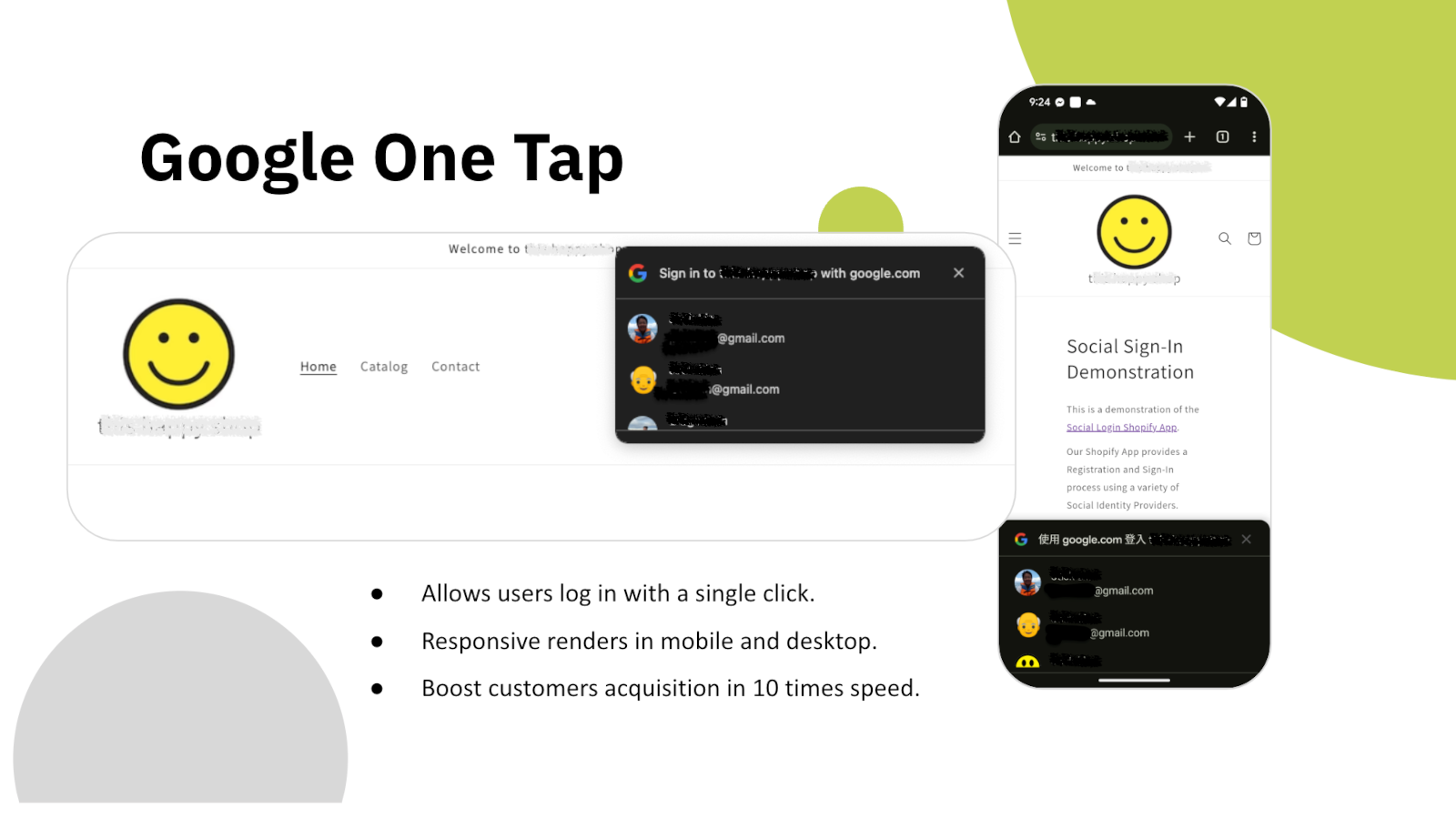
Google One Tap greets returning shoppers with their own Google account the moment the page loads. No form, no provider picker, no redirect — one tap and the session is theirs again.

It renders on mobile and desktop alike, and sits above whatever theme you are running. For a shopper who already bought from you once, the sign-in step effectively disappears.

  • Sign in with a single click, no form to open
  • Responsive on both mobile and desktop
  • Apple and X sign-in available on the same plan
  • A login popup you can open from anywhere in the theme

Google One Tap

Google One Tap prompt on a storefront, shown on mobile and desktop

Customer Data

Ask For What You Actually Need

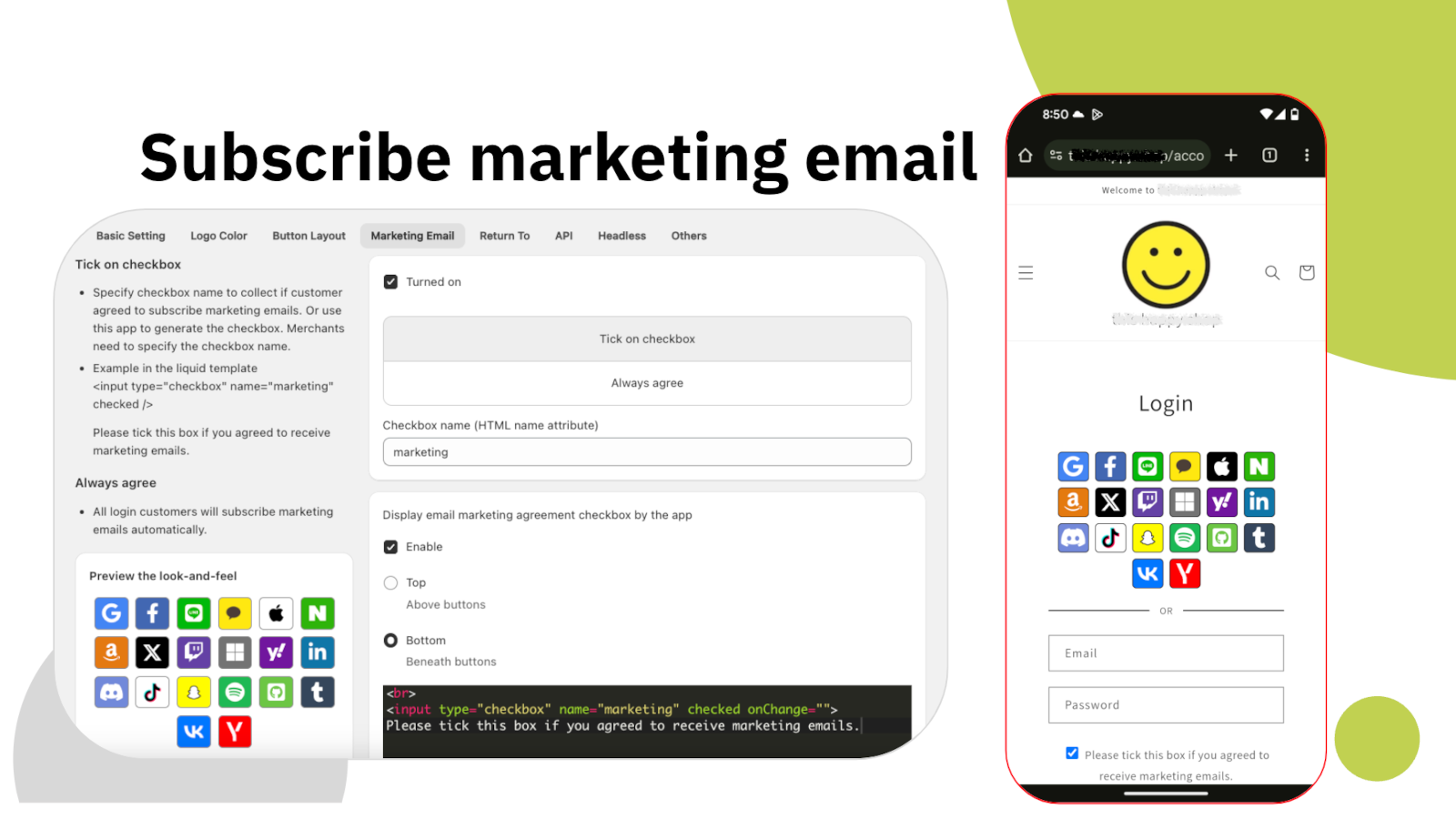
A social account gives you an email address and a name. Most stores need more than that — a phone number for delivery, a country for tax and shipping rules, a marketing opt-in that is genuinely informed. HIKO Social Login collects those at sign-up, in the same step, instead of chasing them later.

The marketing consent checkbox is yours to configure: where it sits, what it says, whether it is ticked by default, and which HTML name it submits under. Consent is recorded on the Shopify customer, so the rest of your stack sees it the same way it sees any other subscriber.

  • Phone number, full name and country at sign-up
  • A marketing consent checkbox you position and word yourself
  • Consent written to the Shopify customer record
  • Tag every customer who registers through the app

Marketing opt-in

Marketing email subscription settings and the resulting storefront checkbox

Marketing

Straight Into the Tools You Already Pay For

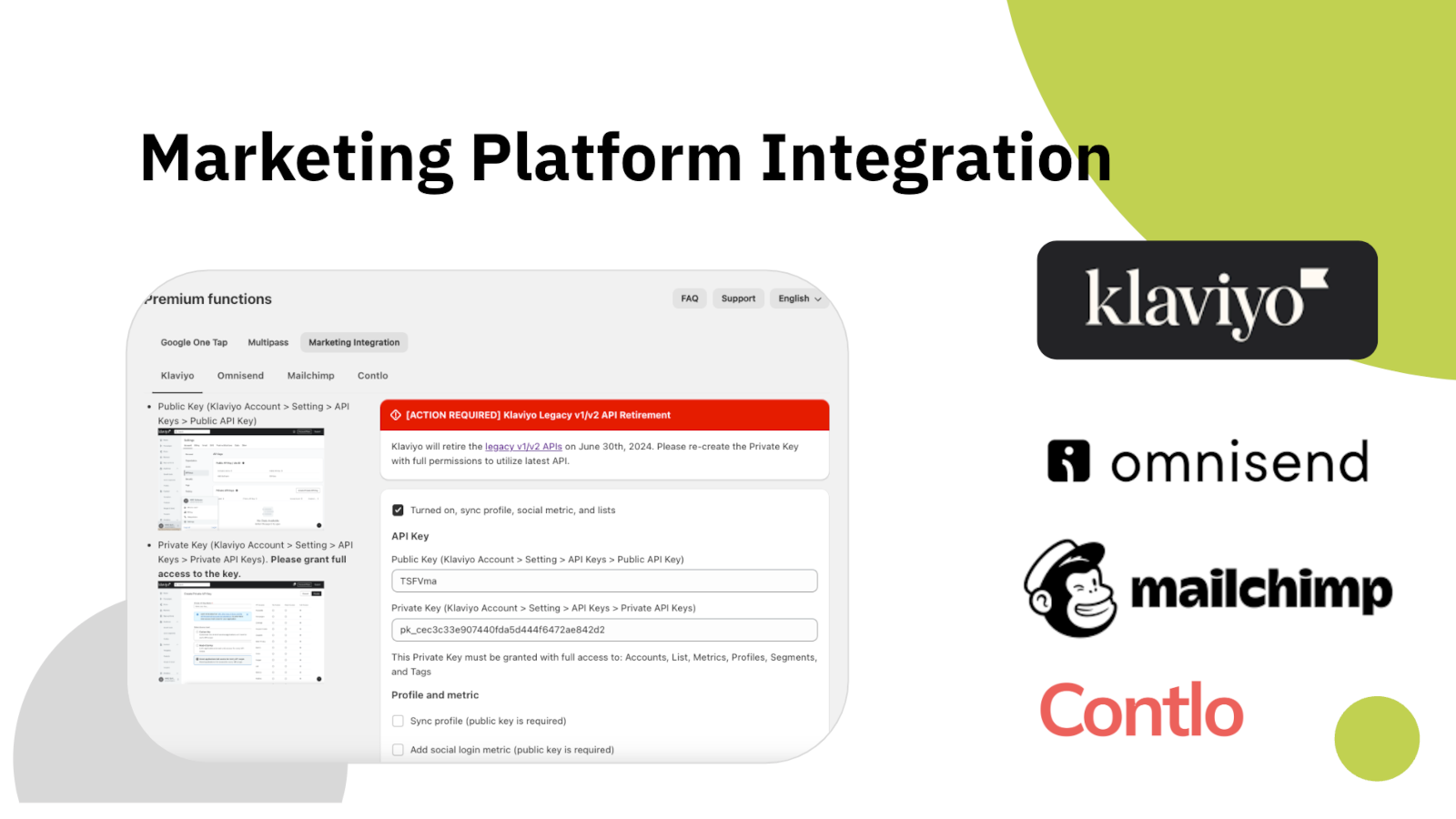
A customer who signs in and never reaches your email platform is a customer you cannot talk to. HIKO Social Login pushes the profile to Klaviyo, Mailchimp, Omnisend or Contlo as it is created, with the provider they used recorded alongside it.

You connect each platform with your own API key, and you choose what travels: profile fields, login metrics, or both. Nothing is sent that you did not switch on.

  • Klaviyo, Mailchimp, Omnisend and Contlo
  • Your own API keys, scoped to the permissions you grant
  • Sync the profile, the login metric, or both
  • The sign-in provider travels with the profile

Marketing platforms

Klaviyo, Omnisend, Mailchimp and Contlo integration settings

Analytics

See How Your Shoppers Actually Sign In

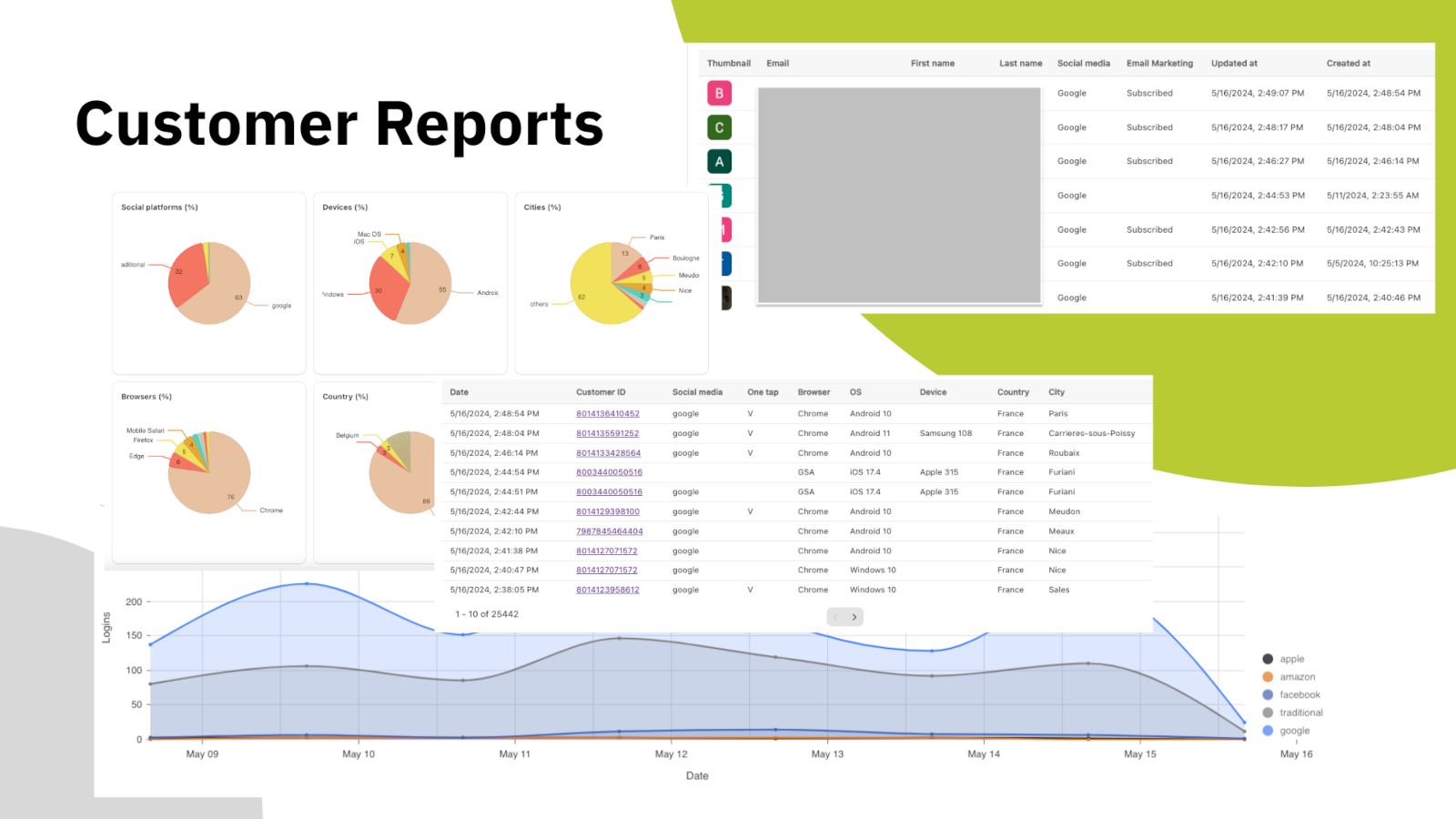
Guessing which providers to offer is expensive — every extra button is a decision you are asking a shopper to make. The dashboard shows the real split: which social platforms are used, on which devices and browsers, from which countries and cities, and how the daily login volume moves over time.

Underneath the charts is the customer list itself, with the platform each person used, their marketing subscription state, and when they first signed in. Export it and take it wherever you work.

  • Usage by platform, device, browser, country and city
  • Daily login trend over time
  • Per-customer table with provider and subscription state
  • Available on every plan, including Free

Customer reports

Dashboard with sign-in breakdown by platform, device, browser and region

Headless & API

Not Running a Liquid Theme? Still Works

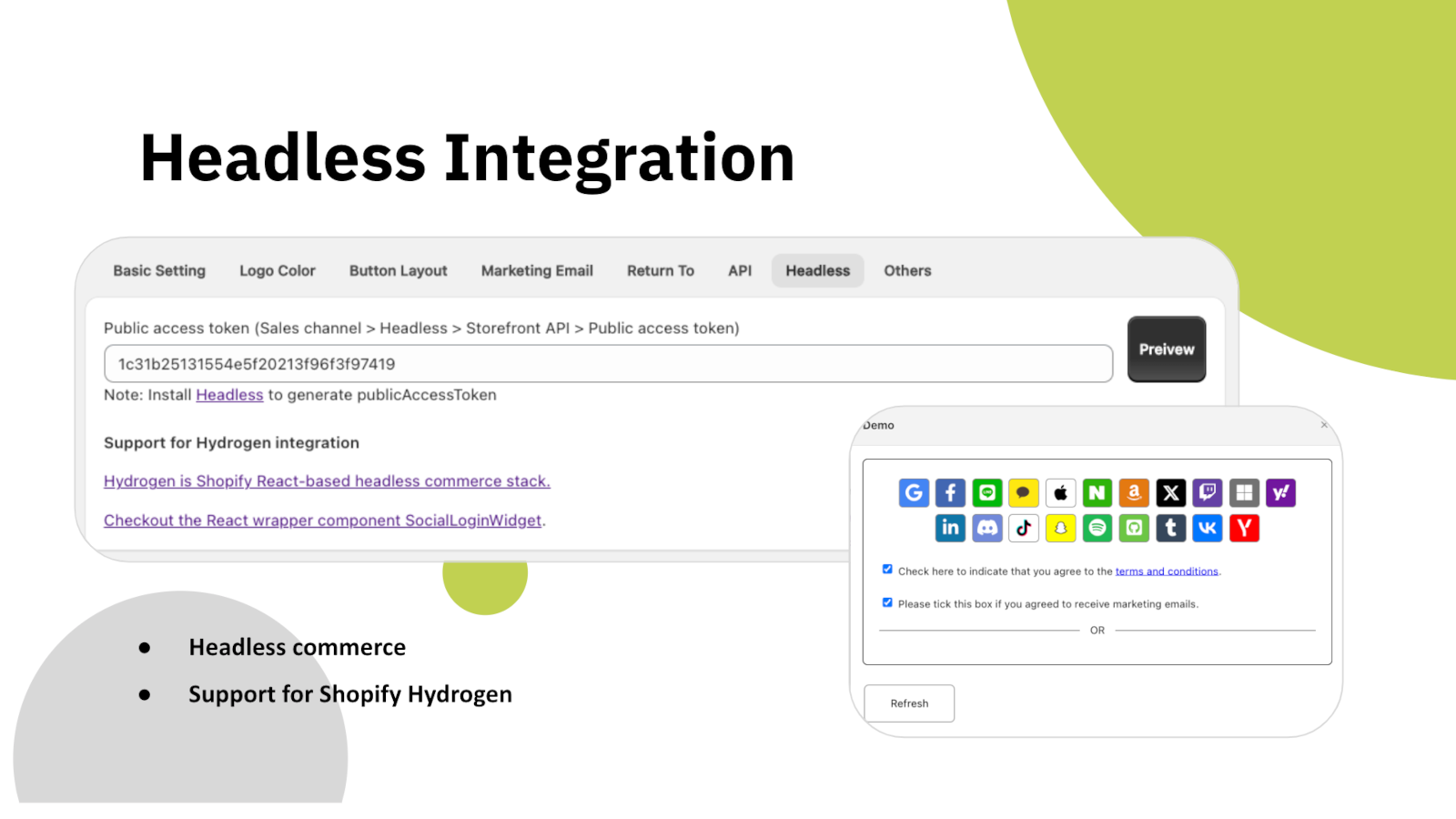
If your storefront is built on Shopify Hydrogen or your own React front end, the sign-in block ships as a drop-in widget component rather than a theme block. It talks to the same backend and creates the same customer records.

There is also a REST API for reading customer data programmatically, authenticated with an access token you generate yourself. Social login data is stored on the Shopify customer through metafields, so it stays in your store rather than in ours.

  • Shopify Hydrogen and React storefronts supported
  • A drop-in SocialLoginWidget component for React
  • REST API with your own access token
  • Data kept on the Shopify customer, not in the app

Headless integration

Headless settings with a public access token and the React widget demo

Make It Yours

Set Up in Minutes, Styled to Match

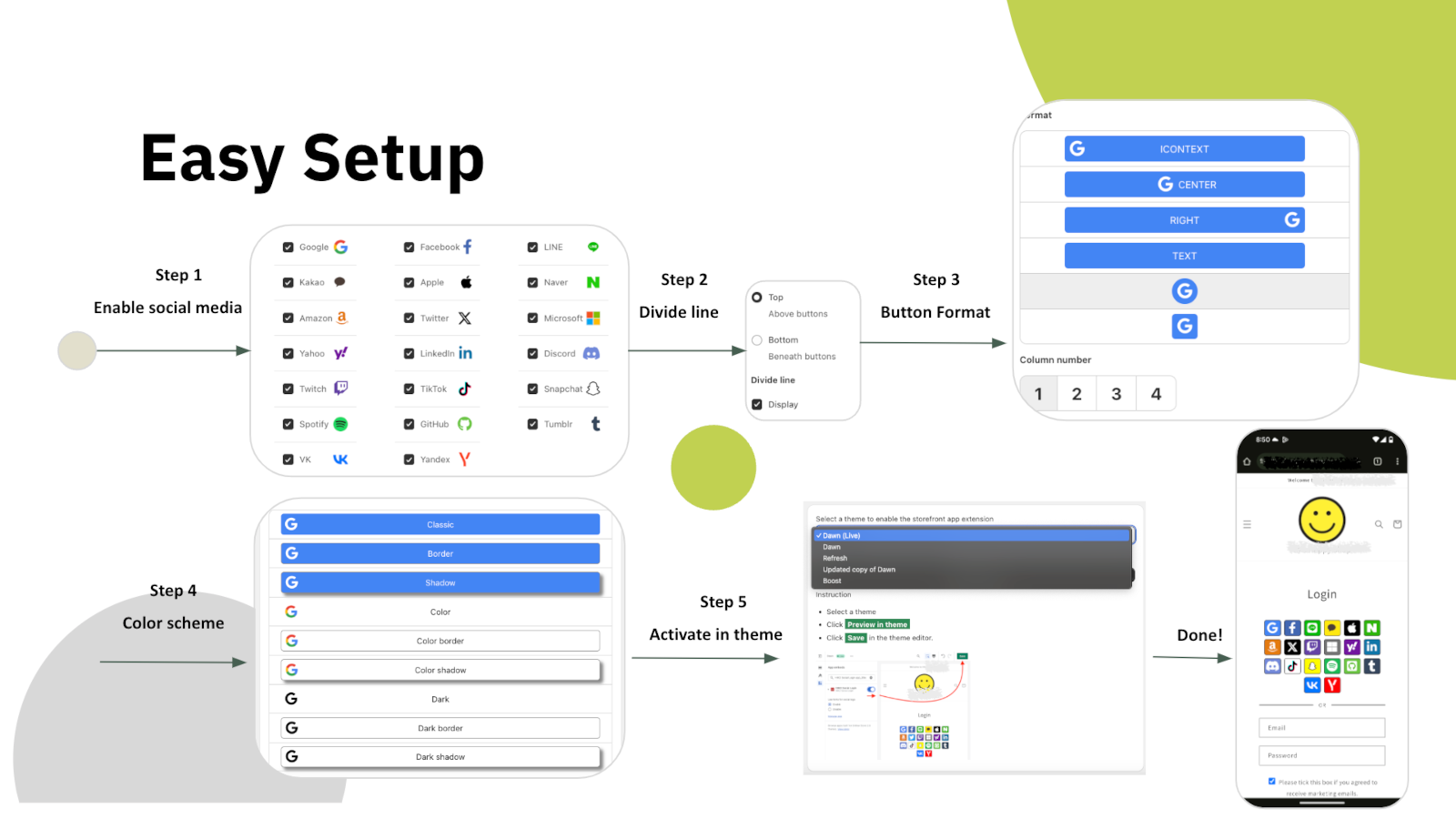
Setup is five steps in the app's own settings: choose your platforms, decide whether a divider separates them from the email form, pick the button format, set the colours, then switch the block on in your theme. No theme code to edit.

From there everything about the block is adjustable — icon or text buttons, how many columns, button size and spacing, border and shadow, logo and background colours per platform, and the order they appear in. If that is still not enough, add your own CSS. The app interface itself is available in ten languages.

  • Five-step setup, no theme code required
  • Button format, column count, size, border and shadow
  • Per-platform logo, background and text colours
  • Custom CSS, and ten languages in the app interface

Easy setup

Five-step setup flow from choosing platforms to activating the theme block

Why Merchants Choose HIKO Social Login

Six reasons to add it to your Shopify store today

🚀

Fewer Abandoned Sign-Ups

Every password you do not ask for is a customer you do not lose at the door.

📱

One Tap to Return

Google One Tap brings repeat shoppers straight back in, on mobile and desktop.

🌎

Built for Your Markets

LINE, Kakao, Naver and VK sit next to the global platforms, not behind them.

📧

Lists That Fill Themselves

New customers reach Klaviyo, Mailchimp, Omnisend or Contlo as they sign up.

🧩

Headless Ready

Hydrogen, React and a REST API for storefronts that are not Liquid themes.

📊

Decisions With Data

Reports by platform, device and region show which buttons earn their place.

Pricing Plans

Start free, upgrade when the volume is there

Free

Everything you need to try it on a live store

$0 / month
  • Connect up to 18 social platforms
  • Customer usage reports
  • Up to 30 logins per day
  • Hydrogen and API integration

Professional

For stores past the daily login limit

$2.49 / month
  • Unlimited logins
  • Collect customer information
  • Custom social platforms with your own API keys
  • Multilingual and custom CSS support

Prices shown in USD and billed monthly by Shopify. HIKO Social Login works with legacy customer accounts.

Frequently Asked Questions

Getting started

This app requires legacy customer accounts

Your store is currently not using legacy customer accounts, which is not compatible with this app.

Non-legacy customer accounts use a completely different authentication system that does not allow third-party apps to customize the login experience. Because of this technical limitation, features such as social login, custom registration fields, and login page customization are only available with legacy customer accounts. Learn more from Shopify's official documentation.

My store already uses new customer accounts. What are my options?

New customer accounts sign in with a one-time code sent by email and give no third-party app a way to complete a login, so social login cannot be offered on them. Switching back from Shopify admin > Settings > Customer accounts restores the classic login form and this app starts working immediately. Your customers and their orders are not affected by the switch.

If you need to stay on new customer accounts, the app can still be used on a headless storefront, where your own code controls the login step.

Shopify Starter is not supported

The app does not support the Shopify Starter plan because that plan has no membership feature.

Manual install

Automatic installation hardly fits all themes. In such case, the custom tags need to be inserted manually in the proper location in the theme templates. You can try to insert the tags manually:

Optional attributes on the container:

  • type: register or login, which decides whether the block renders the registration or the login buttons.
  • ignore: skip the automatic layout and keep your own styles and markup.
  • register_tag: the value is added as a tag on every customer who registers through this block, which is how you tell apart sign-ups from different pages.
Change the button display sequence

App admin > Logo Color > Sequence , click on the up and down arrows

Customize login button width

In some themes the login form is so wide that the login buttons in the block stretch with it. The width can be customized in CSS. For example:

How signing in works

After customers sign in with a social media account, they cannot sign in with their original password.

The app will reset the customer password by a randomly generated string when the customer uses the social media account to login, unless Shopify's Multipass protocol is enabled. To restore the password, the customer can use the forget the password flow. The app will never store, log, or display the string in any form or storage. Multipass protocol lets the customer login using an encrypted login token by the multipass secret. Multipass is provided on a Shopify Plus plan only.

Multipass is enabled in Premium > Multipass using the secret from Shopify admin > Settings > Customer accounts. With it the app hands Shopify a signed login token instead of a password, so the customer's own password is never touched. Multipass is only available on a Shopify Plus plan.

How do I turn on Google One Tap?

Premium > Google One Tap. One Tap shows a Google account chooser on your storefront without the customer clicking anything, so it only appears to visitors who are already signed in to Google.

If you use your own Google API key, your storefront domain must be listed as an authorized JavaScript origin in the Google Cloud console. Without it Google refuses the request with origin_mismatch and nothing is shown at all, with no visible error on the page.

Can I disable hCaptcha during customer login?

Yes, you can disable it via: Online Store > Preferences > Spam protection > uncheck Enable hCaptcha on login, create account and password recovery pages

You do not have to turn it off. The app goes through Shopify's own captcha protection before submitting the login form, so social login works with hCaptcha left on. Switching it off is a decision about friction at the login step, not a requirement of this app.

Customer data and privacy

Will this app collect and store personal customer data?

This app will request access to your customer's email, first name, last name, phone number, and marketing consent.

The social profile data goes into your own store's customer metafields, not into a copy on our side. Our server keeps only what running the login needs: your store's settings, the link between a social account and a Shopify customer, and the operational logging we are required to keep. Uninstalling removes all of it.

What happens to my customer data when I uninstall the app?

Nothing is removed from Shopify. The social profile data this app writes lives in each customer's hiko.socials metafield, which belongs to your store, so your customers, their orders and that metafield all stay exactly as they are.

On our side, uninstalling removes your store's settings and its social account bindings from our server, and Shopify revokes the app's access to your store at the same moment. Only the minimal logging we are required to keep is retained.

Social platforms

Can I customize the consent screen for social login to display my store's name and logo?

To display your store's name and logo on the social login consent screen, you'll need to register your own app with the social platform and obtain their approval. Once approved, you can integrate the API key and secret into our app: Professional > Custom API Keys, this app will handle the authentication flow for you. For further detail, you can check an industrial standard OAuth2.

To enable social login, you'll need to register an application on the social platform for your store. This involves agreeing to usage terms and requesting necessary permissions. Once approved, the social platform will provide an API key and secret. When a customer signs in using their social account, they'll be redirected to the social platform's authorization server for verification and consent. The authorization server will display your store's name, terms, and requested permissions for the customer to approve.


Below are the references for all social platforms:

Apple private email relay

Customers signing in with Apple can choose to hide their email address. When choosing hide, Apple will create a unique, random email address to keep the personal email private. The domain of the generated email address will be privaterelay.appleid.com. The emails will be able to send and receive messages to and from customers using Apple's private email relay service.

Is Amazon login supported on amazon.co.jp and amazon.co.uk?

Yes, it does. Amazon has 3 different regions, North America (amazon.com), Europe (amazon.co.uk), and Far East (amazon.co.jp). Each of them holds customer accounts separately. You can choose one of the 3 regions for your store from Professional > Custom API Keys > Amazon > .

Plans and billing

Will my store be charged twice if I reinstall and re-subscribe to this app?

No, it won't. Shopify resumes the original installation's billing cycle and does not charge the merchant until the end of that cycle.

The plan shown in the app is not the one I am subscribed to

The plan is read from your store's active subscription in Shopify every time the app opens, so it follows Shopify billing rather than a copy kept on our side. Reload the page after any change made in Subscription.

If it still looks wrong, the active charge recorded by Shopify is the authority. Send us a screenshot of Subscription and we will compare it against Shopify's record.

Troubleshooting

Google login error with 403 disallowed_useragent

Google has discontinued support for embedded webviews and unknown browsers for logins since September 30, 2021. Embedded webviews are web browsers within mobile apps. For example, clicking a store link from Facebook would open Facebook's own browser, not a standard one like Chrome or Safari. Google considers third-party webviews a security risk. Get more details .

There is nothing to configure away, because the restriction is Google's and applies to every site. The customer needs to open your store in a normal browser rather than the one built into the app they came from, usually through that app's Open in browser menu.

Google One-Tap popup not shown

Google One-Tap will not display in the same browser or the last website visited for a period of time if the user closes One Tap with the 'X' button. This is called exponential cool-down. In such case, you can clear all the browser's application data to restore it. In example of Chrome, F12 > Chrome Developer Tools > Application tab > Clear storage in left tree > Select all data items > click Clear site data

One Tap is also hidden on iOS and in Safari unless ITP support is ticked in Premium > Google One Tap. Note that those browsers do not support automatic sign-in even with it on.

A customer cannot sign in and the error mentions a phone number or email already taken

Shopify refuses a customer record whose phone number or email already belongs to another customer in the same store, and that refusal is what the customer sees. It is a duplicate in your customer list, not a problem with the social account.

Find the other customer holding that phone number or email in Shopify admin > Customers, then merge the two or clear the duplicated field. A phone number has to be unique across the whole store, which is the most common cause.

I defined the hiko.socials metafield myself and the social data is not being written

The app writes hiko.socials as json. If your store already defines that metafield as another type, Shopify refuses the write and the social profile data is skipped. Signing in still works and the account binding is still recorded, only the metafield copy is left alone.

To get the data back, change the definition in Shopify admin > Settings > Custom data > Customers to the JSON type, or remove your definition entirely and let the app create it.

Developers

Accessing the social media data stored on the customer

The data from social media is stored in the customer metafields in JSON format. The JSON schema is:

A liquid example of accessing the social media data in the customer metafields:

The metafield is namespace hiko, key socials, type json. Which fields are present depends on what the social platform returned, so check for a field before using it.

How do I integrate a headless or Hydrogen storefront?

Settings > Headless. Requests are signed with your store's Hydrogen public access token, and for React and Hydrogen storefronts there is a ready-made component package, hiko-social-login-react.

Contact support for the full endpoint reference, including the request signing recipe.

Ready to Remove the Password?

Rated 4.5 out of 5 by Shopify merchants. Start on the free plan — no card required.

View on App Store