دع عملاءك يسجّلون الدخول بالحساب الذي يملكونه بالفعل — أو برابط يصل إلى بريدهم.
معاينة في نتائج البحث
أضف أكثر من 20 طريقة لتسجيل الدخول عبر الشبكات الاجتماعية، والدخول برابط البريد دون كلمة مرور، إلى متجر Shopify. اجمع عند التسجيل بيانات العملاء التي تحتاجها فعلاً، وزامنها مع Klaviyo وMailchimp وOmnisend وContlo، واعرف أي الطرق يستخدمها عملاؤك حقاً. تتوفر خطة مجانية.
أصعب لحظة في رحلة الشراء هي اللحظة التي يُطلب فيها من العميل إنشاء حساب، ومن هناك تحديداً يزيل HIKO Social Login كلمة المرور. يسجّل العملاء الدخول عبر Google وFacebook وApple وLINE وKakao وNaver وX وأكثر من عشر منصات أخرى، أو برابط لمرة واحدة يصل إلى بريدهم. وفي الخطوة نفسها يمكنك طلب ما يحتاجه متجرك بالضبط — رقم الهاتف والاسم الكامل والدولة — فيُسجَّل العميل في Shopify كسجلّ عميل كامل. تنتقل هذه البيانات مباشرة إلى Klaviyo أو Mailchimp أو Omnisend أو Contlo، بينما تُظهر لوحة التقارير من أين تأتي عمليات الدخول فعلياً: المنصات والأجهزة والمتصفحات والمناطق. وكل ما يراه العميل تتحكم فيه أنت: ترتيب الأزرار وألوان الشعارات وعدد الأعمدة وCSS خاص بك وشاشة الموافقة تحت بيانات اعتماد المطوّر الخاصة بك. أما المتاجر التي لا تعمل بقالب Liquid، فلها واجهات REST API ودعم Shopify Hydrogen ومكوّن أداة بلغة React.
اختر المنصات التي يستخدمها عملاؤك، وستتكفّل الأداة بالباقي.
تسجيل دخول اجتماعي
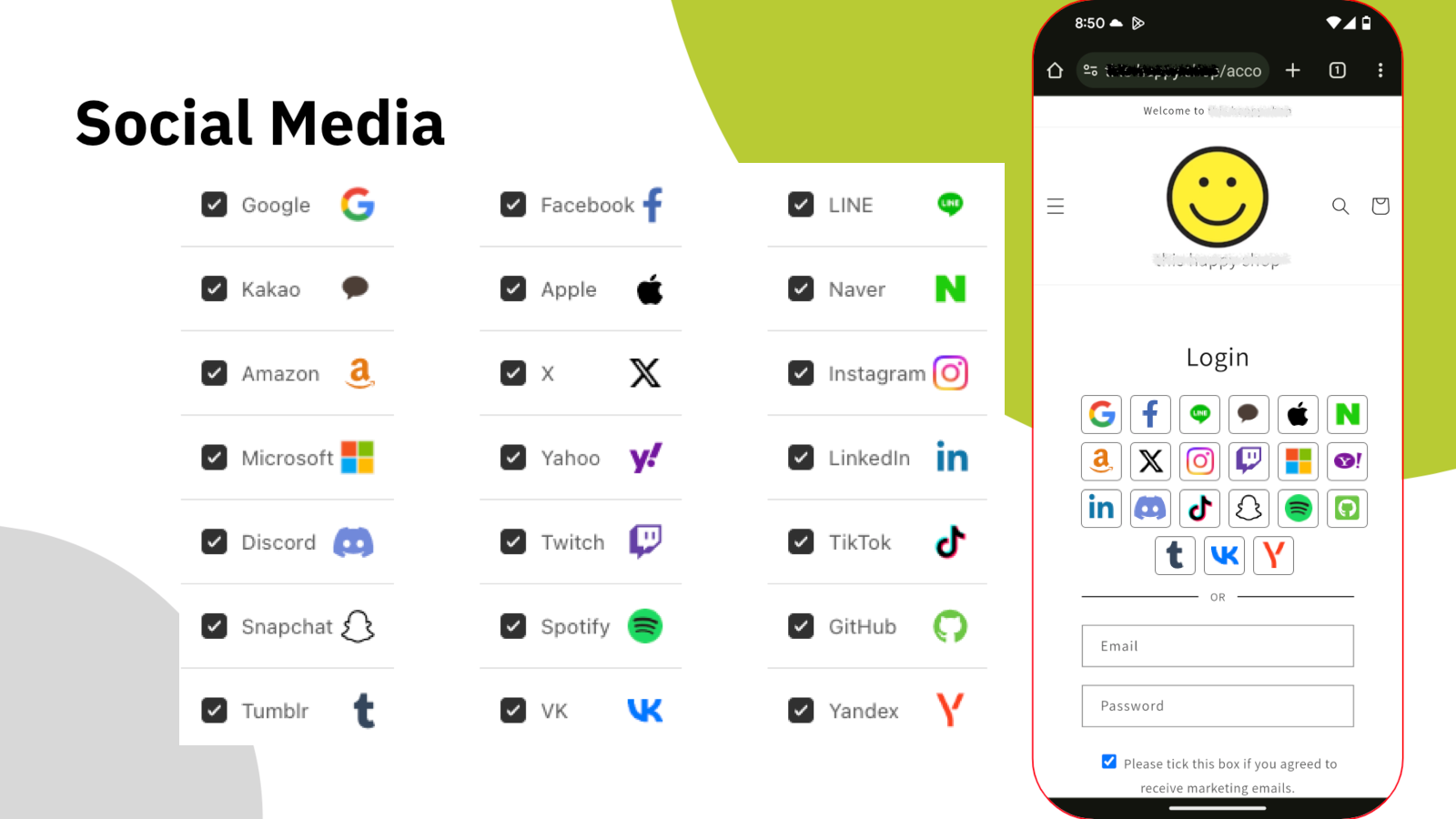
كل كلمة مرور جديدة سبب إضافي للمغادرة. يجمع HIKO Social Login أكثر من عشرين مزوّداً في قسم دخول واحد داخل متجرك: Google وFacebook وApple وLINE وKakao وNaver وAmazon وX وInstagram وMicrosoft وLinkedIn وDiscord وTikTok وغيرها. يختار العميل المنصة التي يكون مسجّلاً بها بالفعل، فيدخل مباشرة.
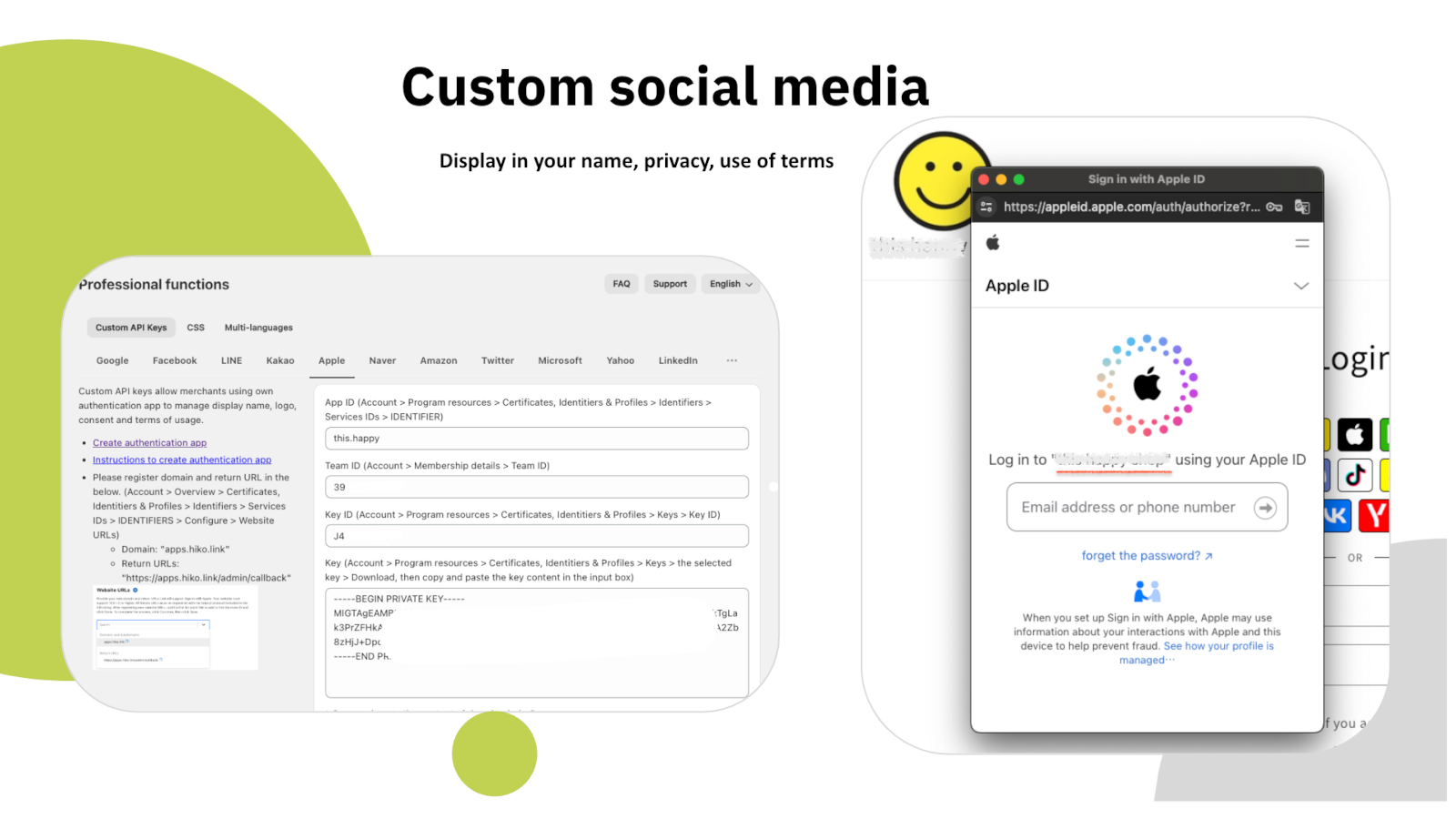
في الخطط المدفوعة يمكنك تسجيل تطبيق مطوّر خاص بك لدى كل منصة وإدخال مفاتيح API الخاصة بك، فتظهر على شاشة الموافقة اسم متجرك وشعاره بدلاً من اسمنا وشعارنا، إلى جانب سياسة الخصوصية وشروط الاستخدام الخاصة بك.
عودة بلا عوائق
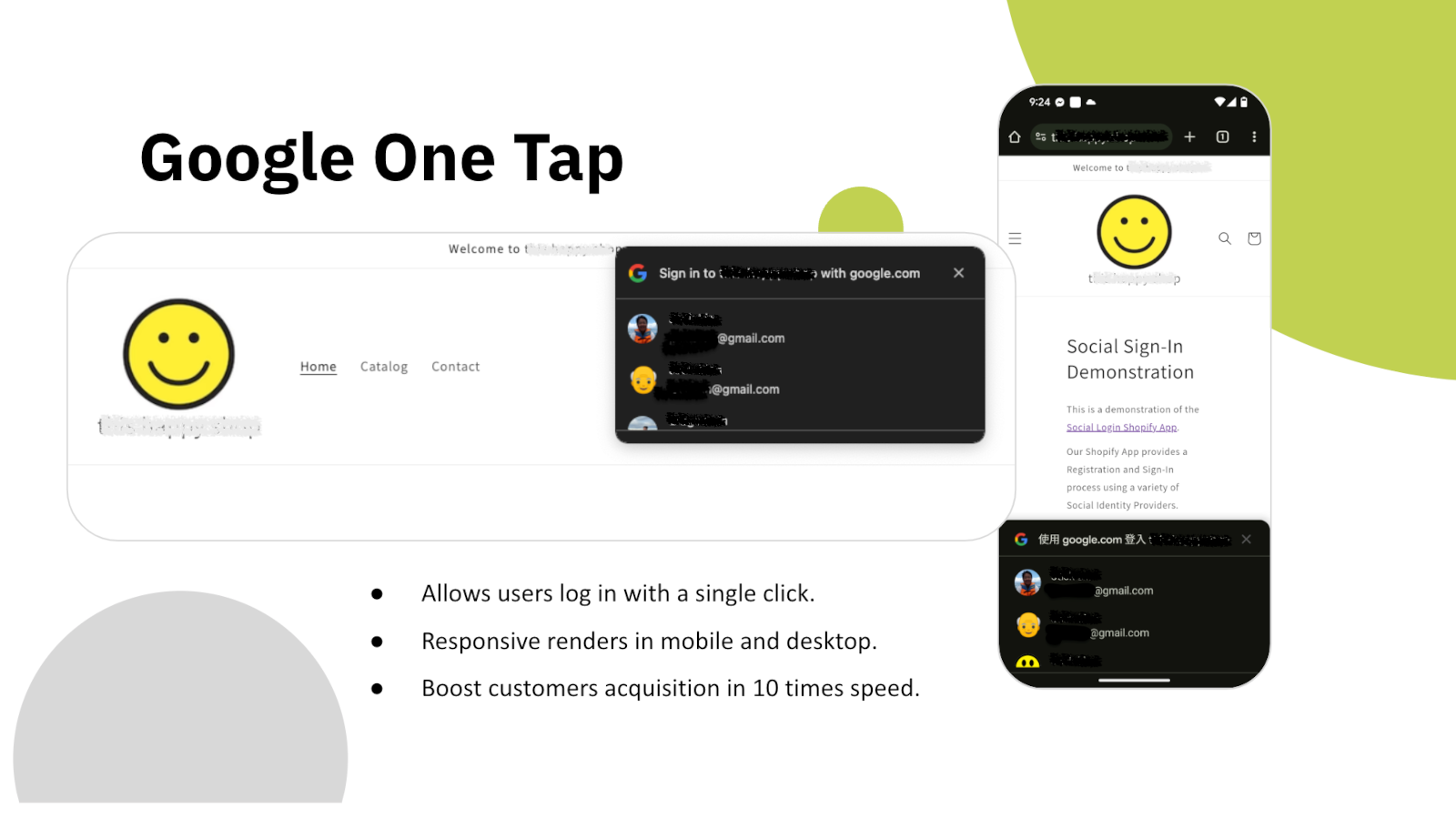
بمجرد تحميل الصفحة، يستقبل Google One Tap العميل العائد بحساب Google الخاص به. لا نموذج ولا اختيار مزوّد ولا إعادة توجيه — نقرة واحدة وتعود الجلسة إليه.
يظهر على الهاتف وسطح المكتب على حد سواء، ويعمل فوق أي قالب تستخدمه. وبالنسبة لمن اشترى منك مرة من قبل، تكاد خطوة تسجيل الدخول تختفي تماماً.
بيانات العملاء
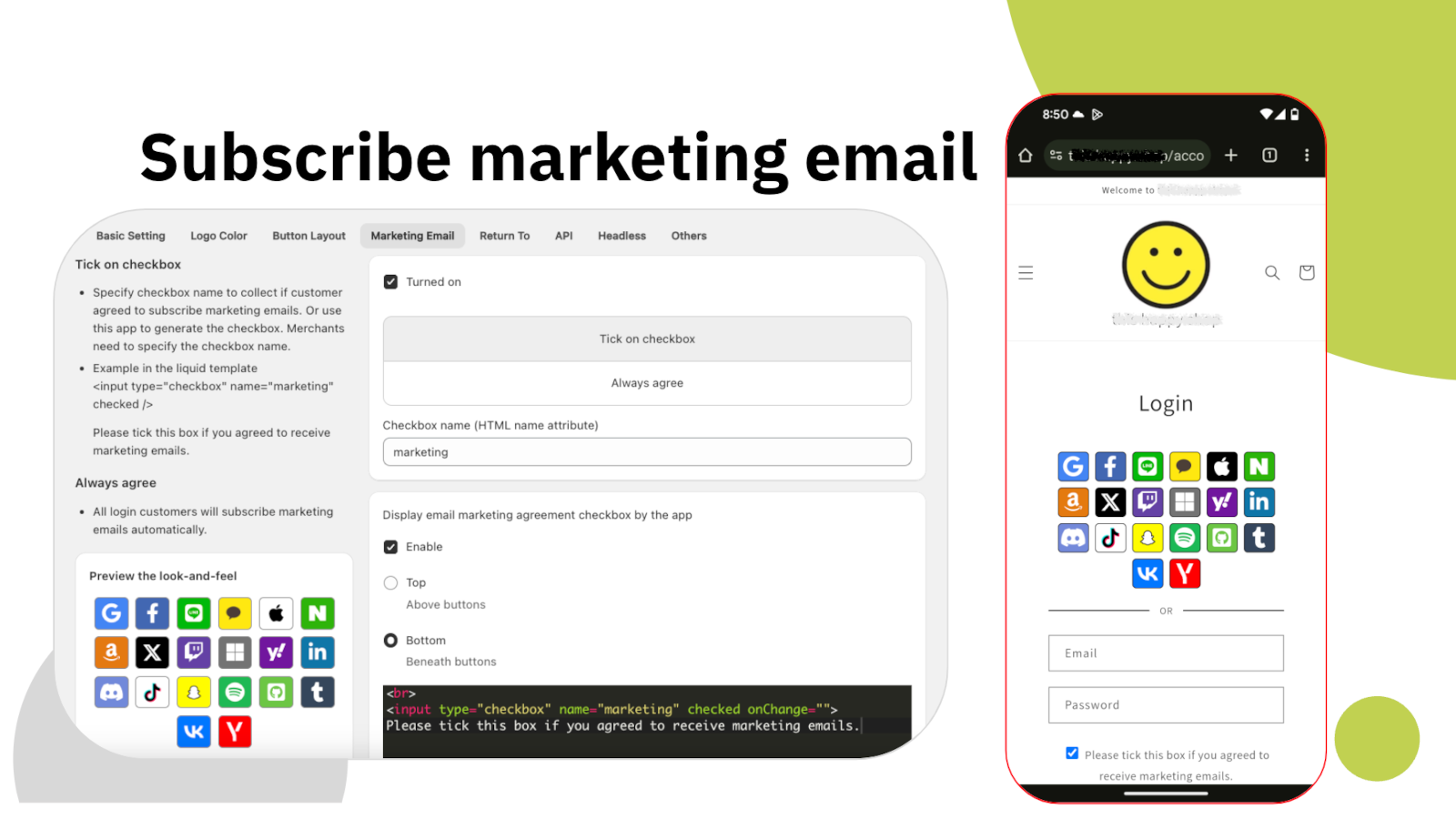
الحساب الاجتماعي يمنحك بريداً إلكترونياً واسماً فقط، بينما تحتاج معظم المتاجر إلى أكثر من ذلك: رقم هاتف للتوصيل، ودولة لقواعد الضريبة والشحن، وموافقة تسويقية مبنية على علم حقيقي. يجمع HIKO Social Login هذه البيانات عند التسجيل، في الخطوة نفسها، بدل ملاحقتها لاحقاً.
مربع الموافقة التسويقية تضبطه بالكامل: موضعه ونصه وما إذا كان محدّداً افتراضياً واسم HTML الذي يُرسل به. تُسجَّل الموافقة في سجلّ العميل لدى Shopify، فتراها بقية أدواتك تماماً كما ترى أي مشترك آخر.
التسويق
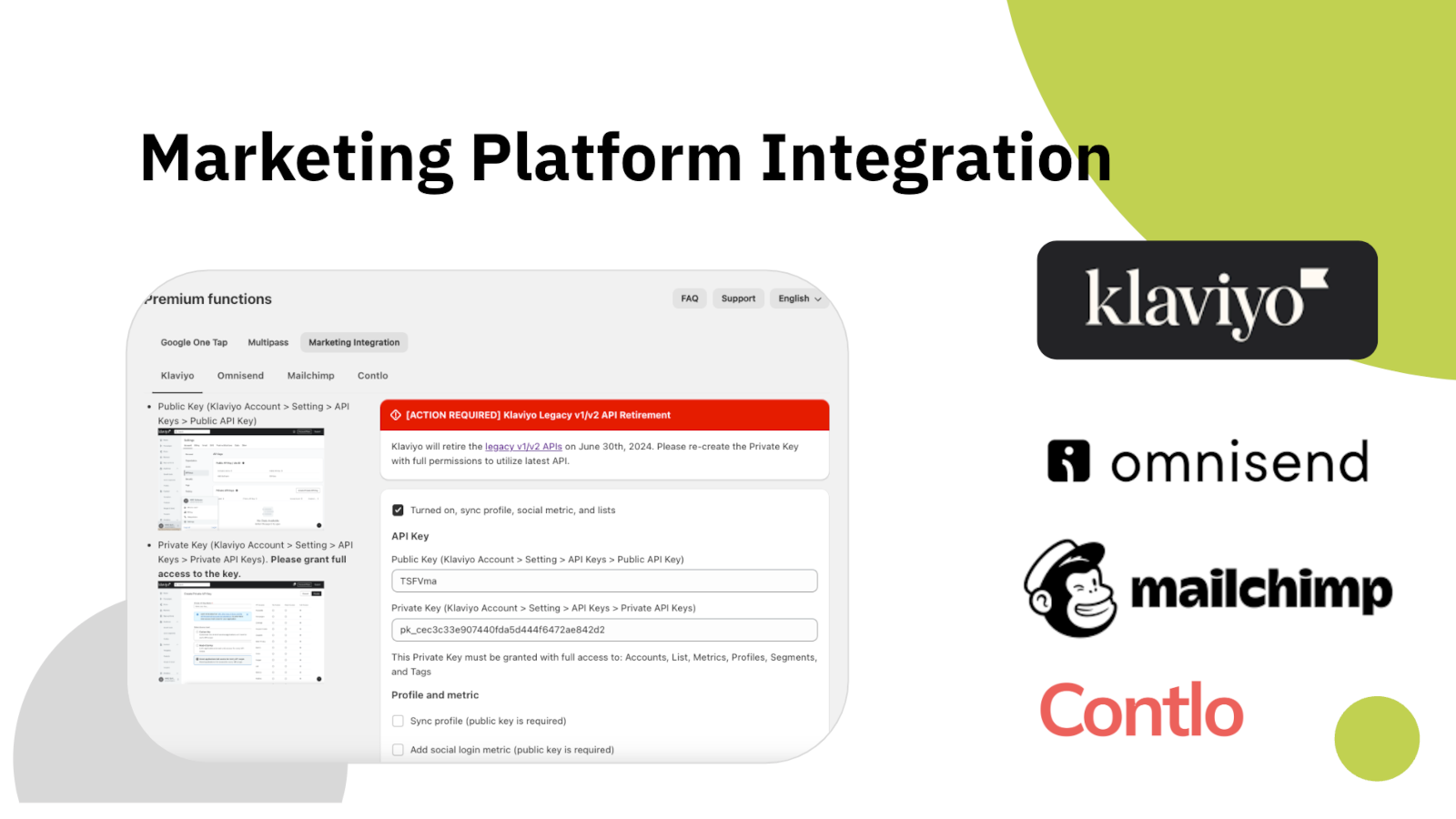
العميل الذي يسجّل الدخول ولا يصل أبداً إلى منصة بريدك هو عميل لا تستطيع مخاطبته. يرسل HIKO Social Login بياناته إلى Klaviyo أو Mailchimp أو Omnisend أو Contlo لحظة إنشائها، مع تسجيل المنصة التي استخدمها.
تربط كل منصة بمفتاح API خاص بك، وتختار ما يُرسل: حقول الملف الشخصي أو مؤشرات الدخول أو كليهما. ولا يُرسل أي شيء لم تفعّله بنفسك.
التحليلات
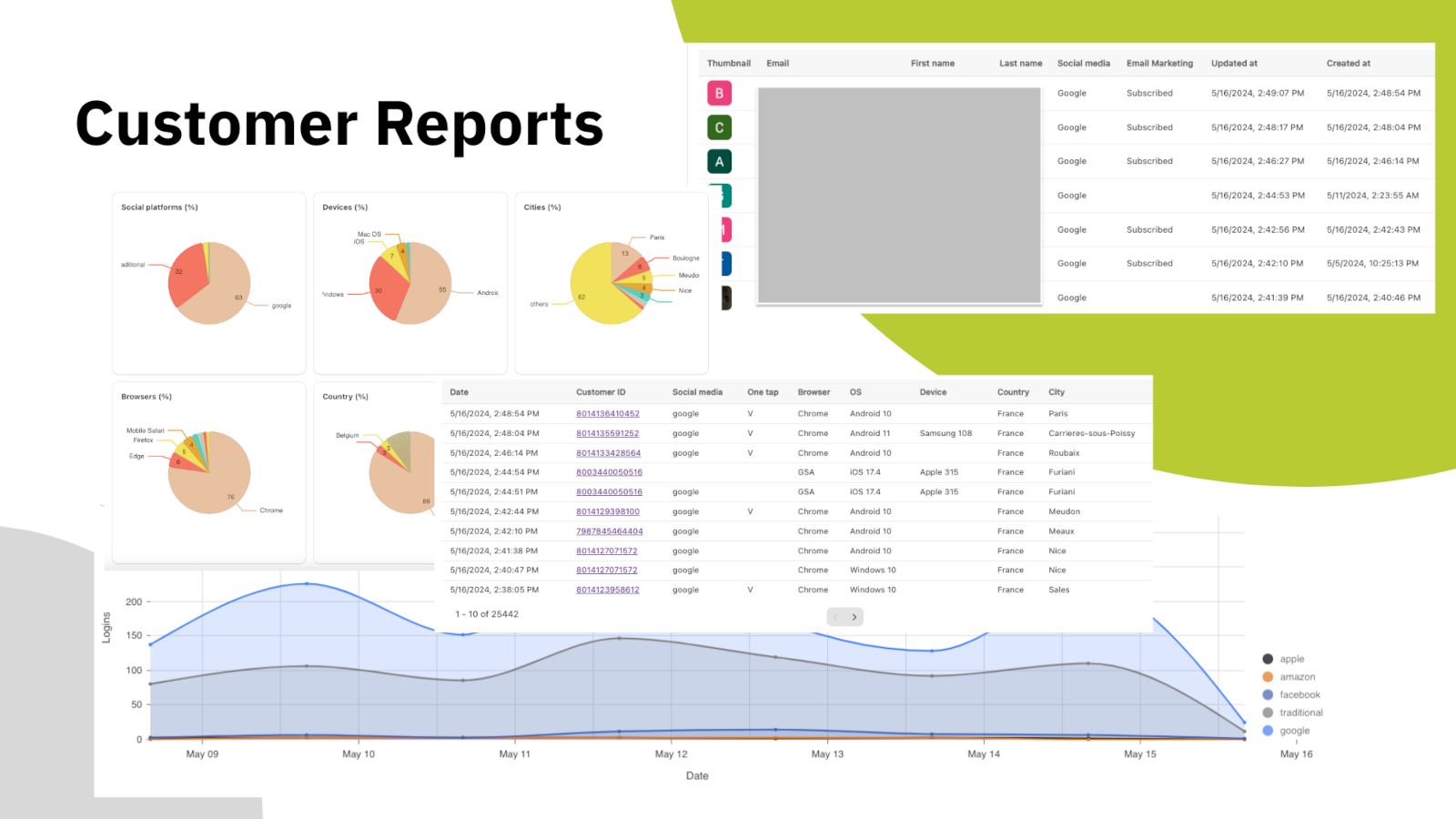
تخمين المنصات التي ينبغي عرضها مكلف، فكل زر إضافي قرار جديد تطلب من العميل اتخاذه. تعرض اللوحة التوزيع الحقيقي: أي المنصات تُستخدم، وعلى أي أجهزة ومتصفحات، ومن أي دول ومدن، وكيف يتغير عدد عمليات الدخول اليومية مع الوقت.
وتحت الرسوم البيانية تجد قائمة العملاء نفسها، وفيها المنصة التي استخدمها كل عميل وحالة اشتراكه التسويقي وتاريخ أول دخول له. صدّرها وخذها إلى حيث تعمل.
Headless وواجهات API
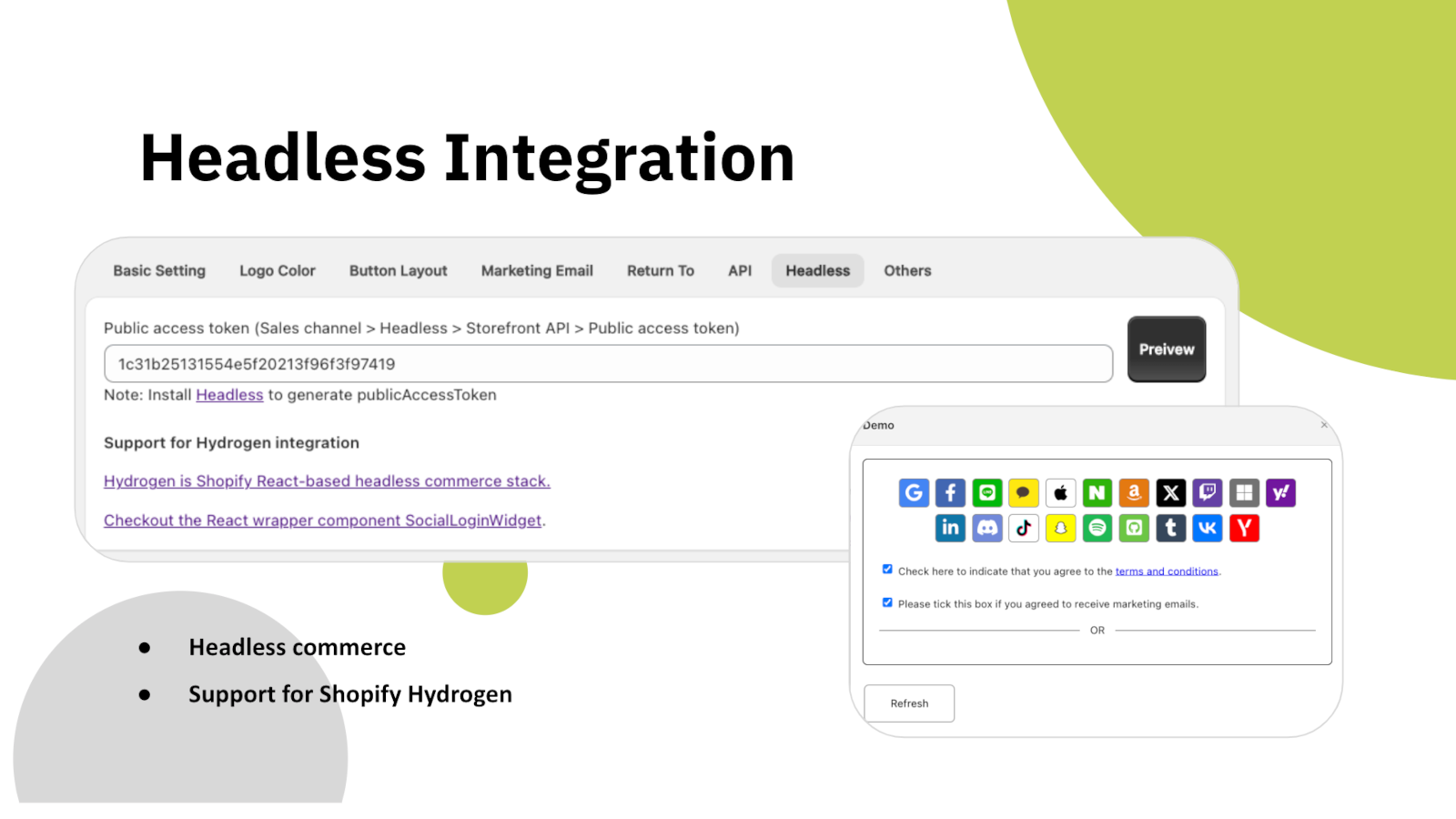
إذا كان متجرك مبنياً على Shopify Hydrogen أو على واجهة React خاصة بك، فإن قسم الدخول يُقدَّم كمكوّن أداة جاهز للإدراج بدل أن يكون قسماً في القالب. وهو يتصل بالخادم نفسه وينشئ سجلات العملاء نفسها.
تتوفر كذلك واجهة REST API لقراءة بيانات العملاء برمجياً، بمصادقة عبر رمز وصول تنشئه بنفسك. وتُحفظ بيانات الدخول الاجتماعي في سجلّ العميل لدى Shopify عبر الحقول الوصفية، أي أنها تبقى في متجرك لا عندنا.
اجعله على هواك
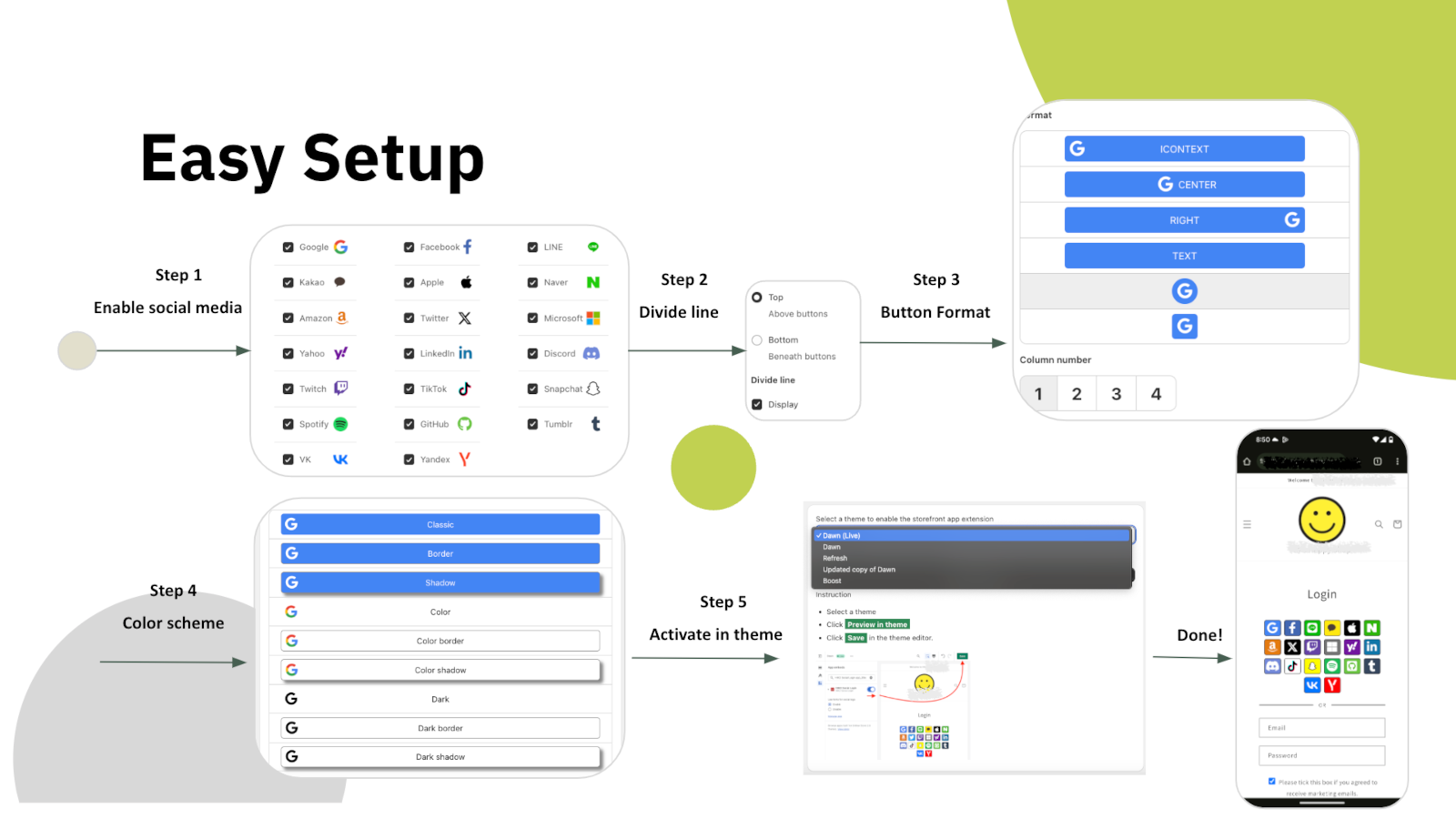
الإعداد خمس خطوات داخل إعدادات التطبيق نفسه: اختر المنصات، وحدّد ما إذا كان فاصل يفصلها عن نموذج البريد، واختر شكل الأزرار، واضبط الألوان، ثم فعّل القسم في قالبك. لا حاجة لتعديل أي شيفرة في القالب.
بعد ذلك يصبح كل شيء في القسم قابلاً للضبط: أزرار برموز أو بنصوص، وعدد الأعمدة، وحجم الأزرار والمسافات بينها، والإطار والظل، وألوان الشعار والخلفية لكل منصة، وترتيب ظهورها. وإن لم يكفِ ذلك، أضف CSS خاصاً بك. وواجهة التطبيق نفسها متوفرة بعشر لغات.
ستة أسباب لإضافته إلى متجر Shopify اليوم
كل كلمة مرور لا تطلبها تعني عميلاً لا تخسره عند الباب.
يعيد Google One Tap العملاء المتكررين مباشرة، على الهاتف وسطح المكتب.
تقف LINE وKakao وNaver وVK إلى جانب المنصات العالمية لا خلفها.
يصل العملاء الجدد إلى Klaviyo أو Mailchimp أو Omnisend أو Contlo لحظة تسجيلهم.
Hydrogen وReact وواجهة REST API للمتاجر التي لا تستخدم قوالب Liquid.
تقارير حسب المنصة والجهاز والمنطقة تكشف أي الأزرار يستحق مكانه.
ابدأ مجاناً وارتقِ بالخطة عندما يزداد الحجم
كل ما تحتاجه لتجربته على متجر حقيقي
للمتاجر التي تجاوزت الحد اليومي لعمليات الدخول
دخول بنقرة واحدة، وبريد بلا كلمة مرور، ومزامنة تسويقية
الأسعار بالدولار الأمريكي وتحصّلها Shopify شهرياً. يعمل HIKO Social Login مع حسابات العملاء الكلاسيكية.
Your store is currently not using legacy customer accounts, which is not compatible with this app.
Non-legacy customer accounts use a completely different authentication system that does not allow third-party apps to customize the login experience. Because of this technical limitation, features such as social login, custom registration fields, and login page customization are only available with legacy customer accounts. Learn more from Shopify's official documentation.
New customer accounts sign in with a one-time code sent by email and give no third-party app a way to complete a login, so social login cannot be offered on them. Switching back from Shopify admin > Settings > Customer accounts restores the classic login form and this app starts working immediately. Your customers and their orders are not affected by the switch.
If you need to stay on new customer accounts, the app can still be used on a headless storefront, where your own code controls the login step.
The app does not support the Shopify Starter plan because that plan has no membership feature.
Automatic installation hardly fits all themes. In such case, the custom tags need to be inserted manually in the proper location in the theme templates. You can try to insert the tags manually:
Optional attributes on the container:
type: register or login, which decides whether the block renders the registration or the login buttons.ignore: skip the automatic layout and keep your own styles and markup.register_tag: the value is added as a tag on every customer who registers through this block, which is how you tell apart sign-ups from different pages.App admin > Logo Color > Sequence , click on the up and down arrows
In some themes the login form is so wide that the login buttons in the block stretch with it. The width can be customized in CSS. For example:
The app will reset the customer password by a randomly generated string when the customer uses the social media account to login, unless Shopify's Multipass protocol is enabled. To restore the password, the customer can use the forget the password flow. The app will never store, log, or display the string in any form or storage. Multipass protocol lets the customer login using an encrypted login token by the multipass secret. Multipass is provided on a Shopify Plus plan only.
Multipass is enabled in Premium > Multipass using the secret from Shopify admin > Settings > Customer accounts. With it the app hands Shopify a signed login token instead of a password, so the customer's own password is never touched. Multipass is only available on a Shopify Plus plan.
Premium > Google One Tap. One Tap shows a Google account chooser on your storefront without the customer clicking anything, so it only appears to visitors who are already signed in to Google.
If you use your own Google API key, your storefront domain must be listed as an authorized JavaScript origin in the Google Cloud console. Without it Google refuses the request with origin_mismatch and nothing is shown at all, with no visible error on the page.
Yes, you can disable it via: Online Store > Preferences > Spam protection > uncheck Enable hCaptcha on login, create account and password recovery pages
You do not have to turn it off. The app goes through Shopify's own captcha protection before submitting the login form, so social login works with hCaptcha left on. Switching it off is a decision about friction at the login step, not a requirement of this app.
This app will request access to your customer's email, first name, last name, phone number, and marketing consent.
The social profile data goes into your own store's customer metafields, not into a copy on our side. Our server keeps only what running the login needs: your store's settings, the link between a social account and a Shopify customer, and the operational logging we are required to keep. Uninstalling removes all of it.
Nothing is removed from Shopify. The social profile data this app writes lives in each customer's hiko.socials metafield, which belongs to your store, so your customers, their orders and that metafield all stay exactly as they are.
On our side, uninstalling removes your store's settings and its social account bindings from our server, and Shopify revokes the app's access to your store at the same moment. Only the minimal logging we are required to keep is retained.
To display your store's name and logo on the social login consent screen, you'll need to register your own app with the social platform and obtain their approval. Once approved, you can integrate the API key and secret into our app: Professional > Custom API Keys, this app will handle the authentication flow for you. For further detail, you can check an industrial standard OAuth2.
To enable social login, you'll need to register an application on the social platform for your store. This involves agreeing to usage terms and requesting necessary permissions. Once approved, the social platform will provide an API key and secret. When a customer signs in using their social account, they'll be redirected to the social platform's authorization server for verification and consent. The authorization server will display your store's name, terms, and requested permissions for the customer to approve.
Below are the references for all social platforms:
Customers signing in with Apple can choose to hide their email address. When choosing hide, Apple will create a unique, random email address to keep the personal email private. The domain of the generated email address will be privaterelay.appleid.com. The emails will be able to send and receive messages to and from customers using Apple's private email relay service.
Yes, it does. Amazon has 3 different regions, North America (amazon.com), Europe (amazon.co.uk), and Far East (amazon.co.jp). Each of them holds customer accounts separately. You can choose one of the 3 regions for your store from Professional > Custom API Keys > Amazon > .
No, it won't. Shopify resumes the original installation's billing cycle and does not charge the merchant until the end of that cycle.
The plan is read from your store's active subscription in Shopify every time the app opens, so it follows Shopify billing rather than a copy kept on our side. Reload the page after any change made in Subscription.
If it still looks wrong, the active charge recorded by Shopify is the authority. Send us a screenshot of Subscription and we will compare it against Shopify's record.
Google has discontinued support for embedded webviews and unknown browsers for logins since September 30, 2021. Embedded webviews are web browsers within mobile apps. For example, clicking a store link from Facebook would open Facebook's own browser, not a standard one like Chrome or Safari. Google considers third-party webviews a security risk. Get more details .
There is nothing to configure away, because the restriction is Google's and applies to every site. The customer needs to open your store in a normal browser rather than the one built into the app they came from, usually through that app's Open in browser menu.
Google One-Tap will not display in the same browser or the last website visited for a period of time if the user closes One Tap with the 'X' button. This is called exponential cool-down. In such case, you can clear all the browser's application data to restore it. In example of Chrome, F12 > Chrome Developer Tools > Application tab > Clear storage in left tree > Select all data items > click Clear site data
One Tap is also hidden on iOS and in Safari unless ITP support is ticked in Premium > Google One Tap. Note that those browsers do not support automatic sign-in even with it on.
Shopify refuses a customer record whose phone number or email already belongs to another customer in the same store, and that refusal is what the customer sees. It is a duplicate in your customer list, not a problem with the social account.
Find the other customer holding that phone number or email in Shopify admin > Customers, then merge the two or clear the duplicated field. A phone number has to be unique across the whole store, which is the most common cause.
The app writes hiko.socials as json. If your store already defines that metafield as another type, Shopify refuses the write and the social profile data is skipped. Signing in still works and the account binding is still recorded, only the metafield copy is left alone.
To get the data back, change the definition in Shopify admin > Settings > Custom data > Customers to the JSON type, or remove your definition entirely and let the app create it.
The data from social media is stored in the customer metafields in JSON format. The JSON schema is:
A liquid example of accessing the social media data in the customer metafields:
The metafield is namespace hiko, key socials, type json. Which fields are present depends on what the social platform returned, so check for a field before using it.
Settings > Headless. Requests are signed with your store's Hydrogen public access token, and for React and Hydrogen storefronts there is a ready-made component package, hiko-social-login-react.
Contact support for the full endpoint reference, including the request signing recipe.
تقييم 4.5 من 5 من تجّار Shopify. ابدأ بالخطة المجانية دون الحاجة إلى بطاقة.
عرض في App Store