HIKO Social Login

HIKO Social Login

ให้ลูกค้าเข้าสู่ระบบด้วยบัญชีที่เขามีอยู่แล้ว หรือด้วยลิงก์ที่ส่งไปยังอีเมลของเขา

เข้าสู่ระบบด้วยโซเชียล Google One Tap เข้าสู่ระบบด้วยลิงก์อีเมล ข้อมูลลูกค้า Klaviyo Headless การวิเคราะห์ข้อมูล แอป Shopify

ตัวอย่างในผลการค้นหา

apps.shopify.com
HIKO Social Login — สมัครและเข้าสู่ระบบได้ง่ายและปลอดภัย

เพิ่มการเข้าสู่ระบบด้วยโซเชียลกว่า 20 ช่องทาง และการเข้าสู่ระบบด้วยลิงก์อีเมลโดยไม่ต้องใช้รหัสผ่าน ให้ร้าน Shopify ของคุณ เก็บข้อมูลลูกค้าที่จำเป็นจริง ๆ ตั้งแต่ตอนสมัคร ซิงก์ไปยัง Klaviyo, Mailchimp, Omnisend และ Contlo และดูว่าลูกค้าใช้วิธีไหนกันจริง ๆ มีแพ็กเกจฟรีให้ใช้งาน

จุดที่ลูกค้าหลุดจากเส้นทางการซื้อมากที่สุดคือตอนที่ต้องสร้างบัญชี และ HIKO Social Login ตัดรหัสผ่านออกไปจากจุดนั้น ลูกค้าเข้าสู่ระบบด้วย Google, Facebook, Apple, LINE, Kakao, Naver, X และแพลตฟอร์มอื่นอีกนับสิบ หรือด้วยลิงก์ใช้ครั้งเดียวที่ส่งไปยังอีเมลของเขา ในขั้นตอนเดียวกันนั้น คุณสามารถขอข้อมูลที่ร้านของคุณต้องการได้ตรง ๆ ทั้งเบอร์โทร ชื่อเต็ม และประเทศ แล้วได้เป็นระเบียนลูกค้าที่สมบูรณ์ใน Shopify ข้อมูลเหล่านี้ไหลตรงไปยัง Klaviyo, Mailchimp, Omnisend หรือ Contlo ส่วนแดชบอร์ดรายงานจะบอกว่าการเข้าสู่ระบบมาจากแพลตฟอร์ม อุปกรณ์ เบราว์เซอร์ และภูมิภาคใดจริง ๆ ทุกอย่างที่ลูกค้าเห็นอยู่ในมือคุณ ทั้งการจัดวางปุ่ม สีโลโก้ จำนวนคอลัมน์ CSS ของคุณเอง และหน้าจอขอความยินยอมภายใต้ข้อมูลนักพัฒนาของคุณ สำหรับร้านที่ไม่ได้ใช้ธีม Liquid ก็มี REST API การรองรับ Shopify Hydrogen และคอมโพเนนต์วิดเจ็ตแบบ React ให้ใช้
ความสามารถ

HIKO Social Login — แพลตฟอร์มโซเชียลและวิดเจ็ตเข้าสู่ระบบบนหน้าร้าน

เลือกแพลตฟอร์มที่ลูกค้าของคุณใช้ ที่เหลือวิดเจ็ตจัดการให้

เข้าสู่ระบบด้วยโซเชียล

เข้าสู่ระบบด้วยบัญชีที่เขาไว้ใจอยู่แล้ว

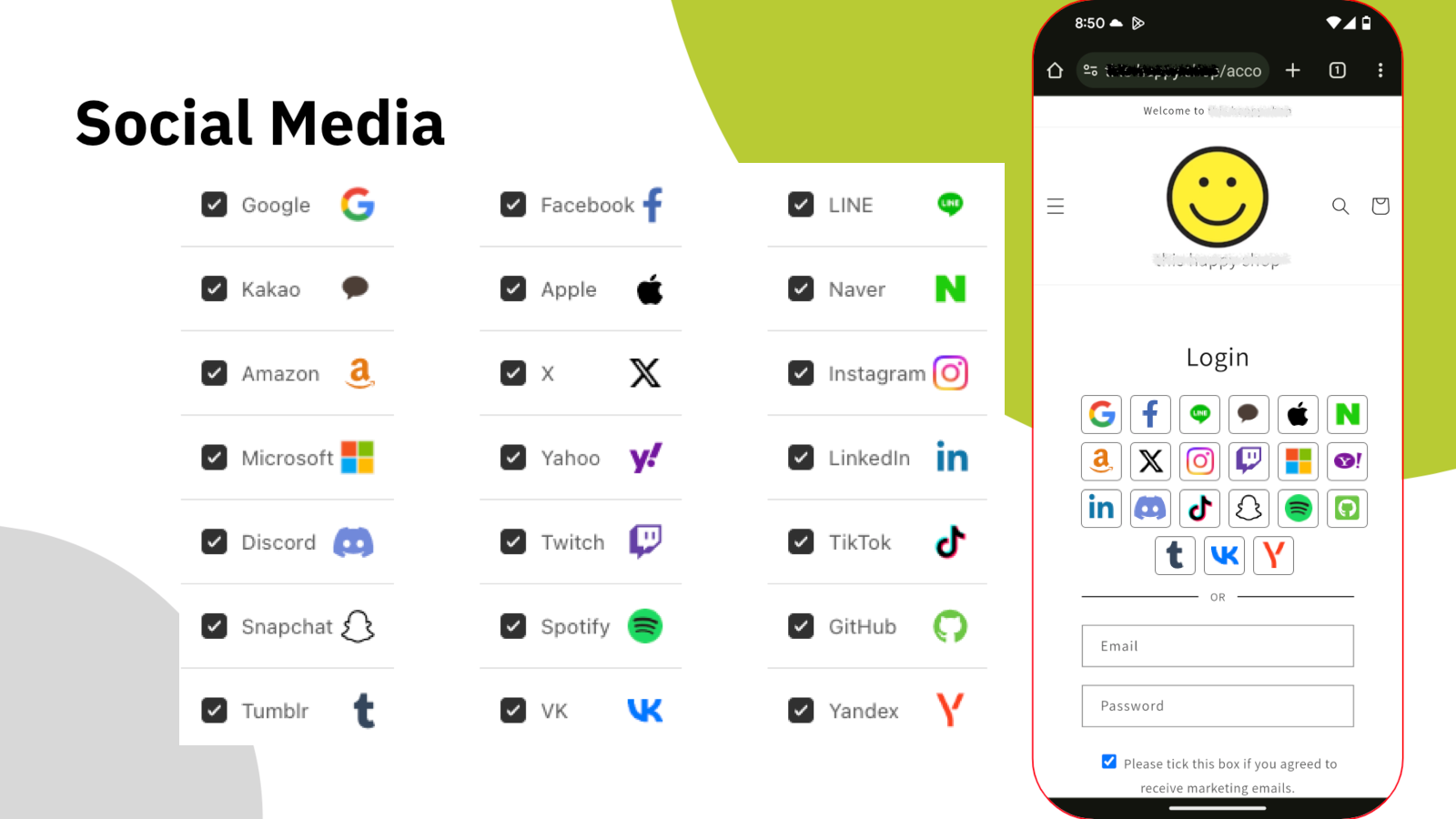
รหัสผ่านใหม่ทุกชุดคือเหตุผลอีกข้อที่ทำให้ลูกค้าเดินจากไป HIKO Social Login รวมผู้ให้บริการกว่ายี่สิบรายไว้ในบล็อกเข้าสู่ระบบเดียวบนหน้าร้านของคุณ ทั้ง Google, Facebook, Apple, LINE, Kakao, Naver, Amazon, X, Instagram, Microsoft, LinkedIn, Discord, TikTok และอื่น ๆ ลูกค้าเลือกอันที่เขาล็อกอินค้างไว้อยู่แล้ว แล้วก็ผ่านเข้ามาได้เลย

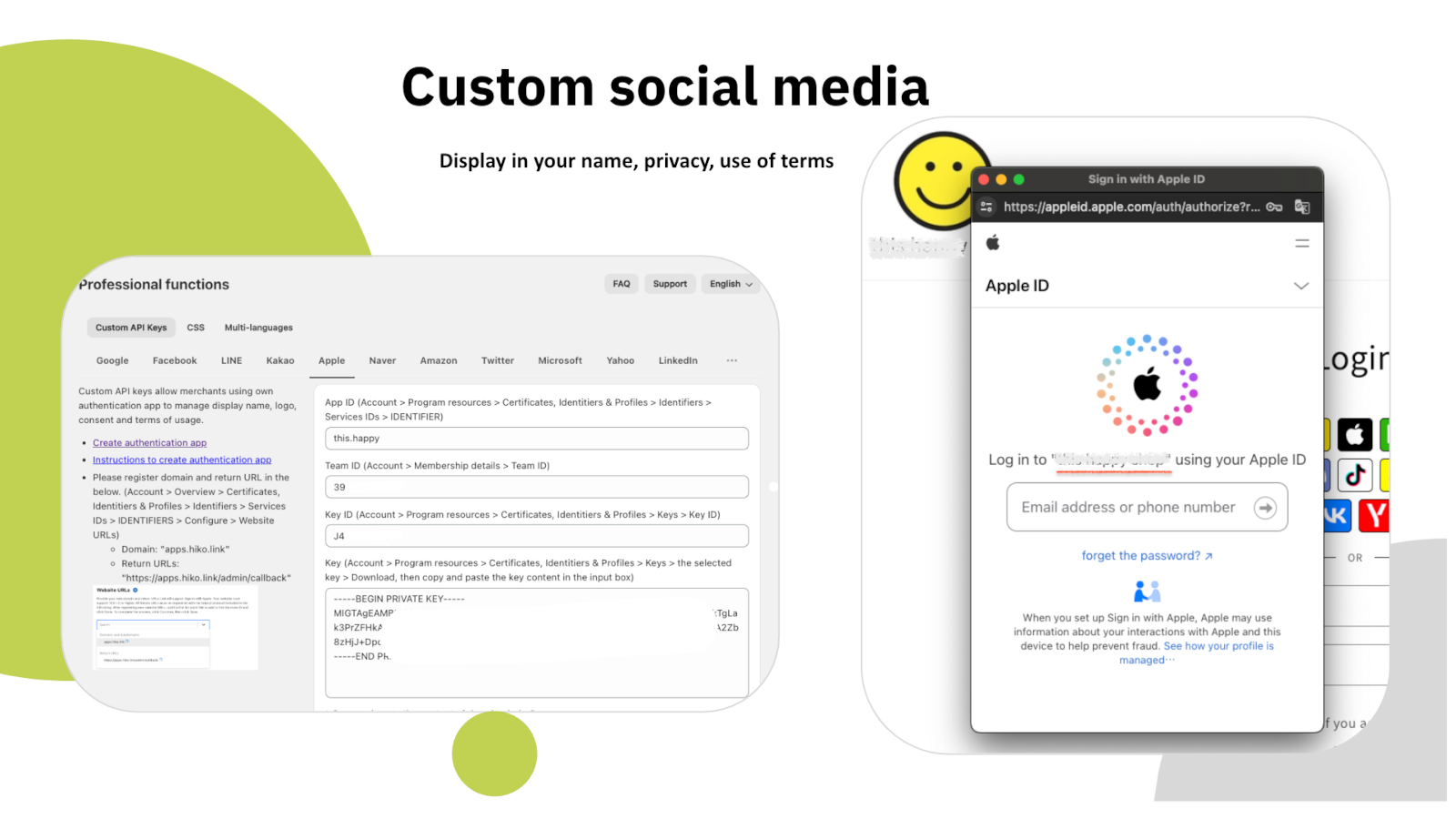
ในแพ็กเกจแบบเสียค่าบริการ คุณสามารถลงทะเบียนแอปนักพัฒนาของคุณเองกับแต่ละแพลตฟอร์มและใส่คีย์ API ของคุณเอง หน้าจอขอความยินยอมจึงแสดงชื่อและโลโก้ร้านของคุณแทนของเรา พร้อมนโยบายความเป็นส่วนตัวและเงื่อนไขการใช้งานของคุณเอง

  • แพลตฟอร์มระดับโลกและระดับภูมิภาคกว่า 20 รายในบล็อกเดียว
  • ใช้คีย์ API ของคุณเอง หน้าจอขอความยินยอมจึงเป็นแบรนด์ของคุณ
  • ใช้ได้ทั้งกับฟอร์มสมัครและฟอร์มเข้าสู่ระบบ
  • ทุกการเข้าสู่ระบบกลายเป็นระเบียนลูกค้า Shopify ตามปกติ

ข้อมูลรับรองของคุณเอง

คีย์ API ของแพลตฟอร์มที่กำหนดเอง และหน้าจอขอความยินยอมของ Apple

กลับมาได้ไม่มีสะดุด

แตะครั้งเดียวก็กลับเข้ามาแล้ว

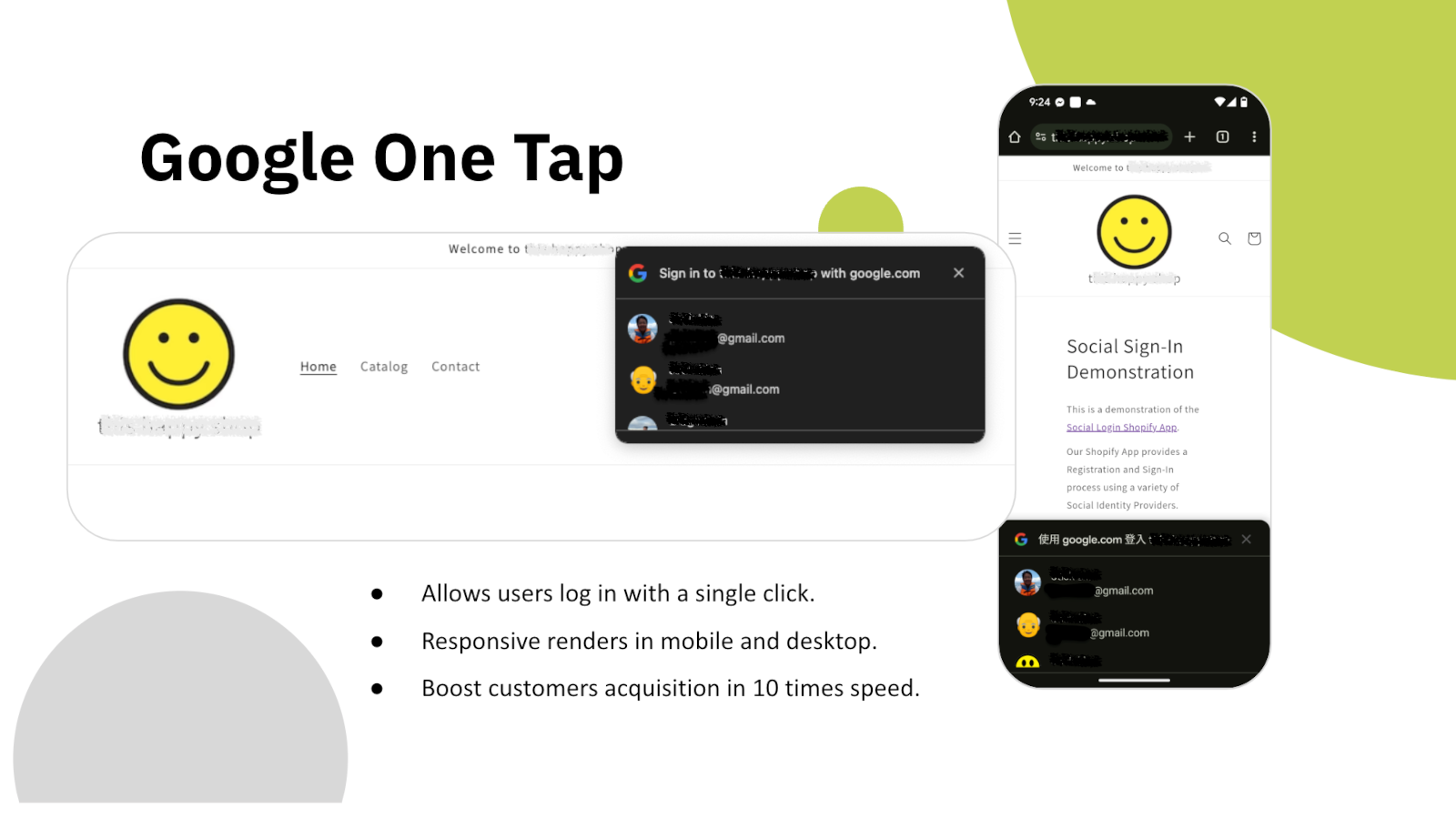
ทันทีที่หน้าเว็บโหลด Google One Tap จะทักลูกค้าที่กลับมาด้วยบัญชี Google ของเขาเอง ไม่ต้องกรอกฟอร์ม ไม่ต้องเลือกผู้ให้บริการ ไม่ต้องเปลี่ยนหน้า แตะครั้งเดียวเซสชันก็กลับมาเป็นของเขา

แสดงผลได้ทั้งบนมือถือและเดสก์ท็อป และทำงานทับธีมใดก็ได้ที่คุณใช้อยู่ สำหรับคนที่เคยซื้อกับคุณมาแล้วครั้งหนึ่ง ขั้นตอนเข้าสู่ระบบแทบจะหายไปเลย

  • เข้าสู่ระบบด้วยคลิกเดียว ไม่ต้องเปิดฟอร์ม
  • รองรับทั้งมือถือและเดสก์ท็อป
  • เข้าสู่ระบบด้วย Apple และ X อยู่ในแพ็กเกจเดียวกัน
  • ป๊อปอัปเข้าสู่ระบบที่เปิดได้จากทุกจุดในธีม

Google One Tap

กล่อง Google One Tap บนหน้าร้าน ทั้งบนมือถือและเดสก์ท็อป

ข้อมูลลูกค้า

ถามเฉพาะสิ่งที่คุณต้องการจริง ๆ

บัญชีโซเชียลให้คุณแค่อีเมลกับชื่อ แต่ร้านส่วนใหญ่ต้องการมากกว่านั้น ทั้งเบอร์โทรสำหรับจัดส่ง ประเทศสำหรับกฎภาษีและค่าขนส่ง และความยินยอมด้านการตลาดที่ลูกค้าเข้าใจจริง ๆ HIKO Social Login เก็บสิ่งเหล่านี้ตั้งแต่ตอนสมัครในขั้นตอนเดียวกัน แทนที่จะต้องตามเก็บทีหลัง

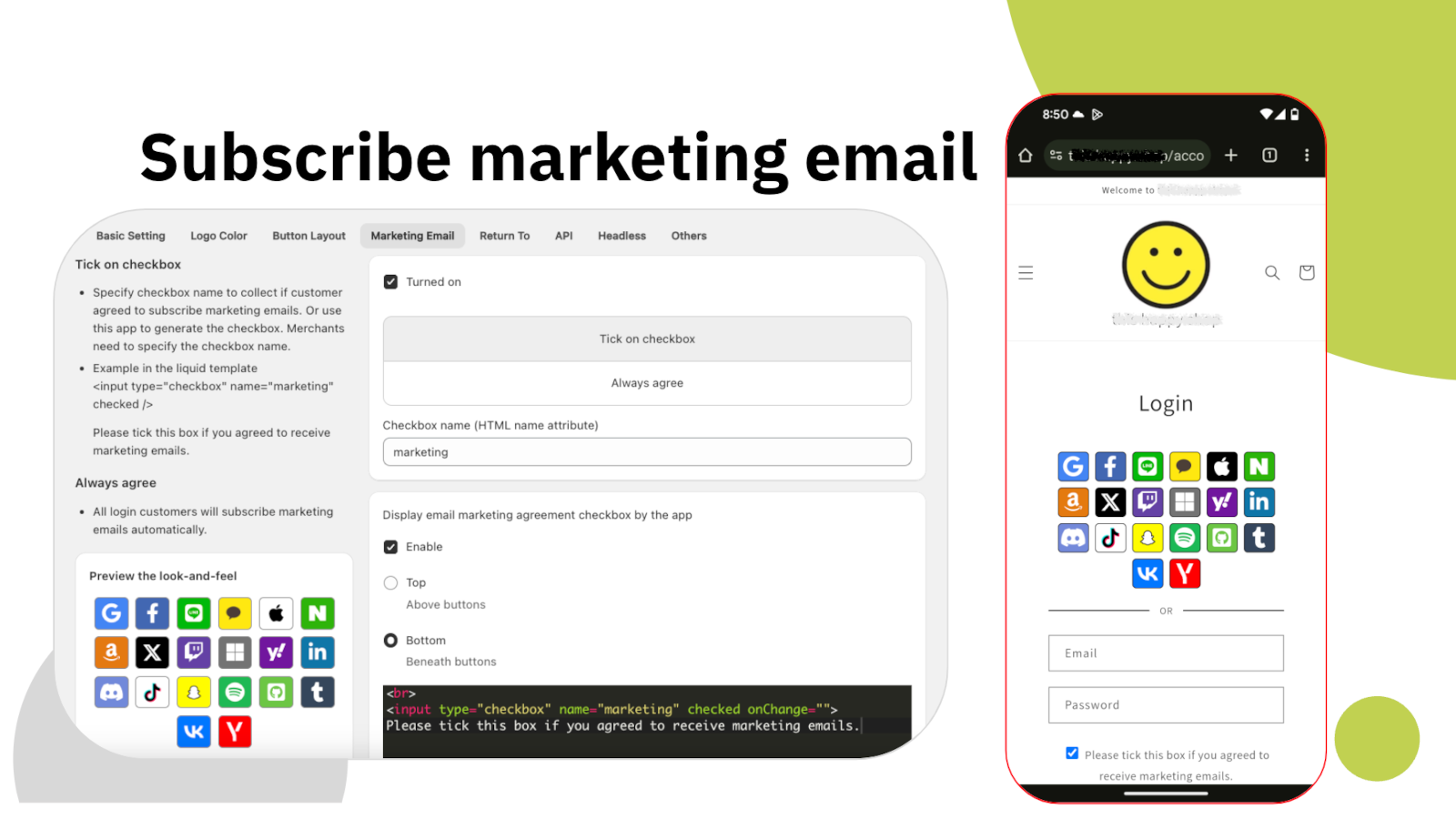
ช่องติ๊กยินยอมรับการตลาดตั้งค่าได้ทั้งหมด ทั้งตำแหน่ง ข้อความ จะติ๊กไว้ล่วงหน้าหรือไม่ และส่งด้วยชื่อ HTML อะไร ความยินยอมจะถูกบันทึกไว้ที่ระเบียนลูกค้าใน Shopify เครื่องมืออื่น ๆ ของคุณจึงเห็นเหมือนผู้สมัครรับข่าวสารรายอื่นทุกประการ

  • เบอร์โทร ชื่อเต็ม และประเทศ ตั้งแต่ตอนสมัคร
  • ช่องยินยอมที่คุณกำหนดตำแหน่งและข้อความเอง
  • บันทึกความยินยอมลงในระเบียนลูกค้าของ Shopify
  • ติดแท็กให้ลูกค้าทุกคนที่สมัครผ่านแอปโดยอัตโนมัติ

ความยินยอมด้านการตลาด

การตั้งค่าการสมัครรับอีเมลการตลาด และช่องติ๊กที่ปรากฏบนหน้าร้าน

การตลาด

ตรงเข้าสู่เครื่องมือที่คุณจ่ายค่าบริการอยู่แล้ว

ลูกค้าที่เข้าสู่ระบบแล้วแต่ไม่เคยไปถึงระบบอีเมลของคุณ ก็คือลูกค้าที่คุณพูดด้วยไม่ได้ HIKO Social Login ส่งข้อมูลลูกค้าไปยัง Klaviyo, Mailchimp, Omnisend หรือ Contlo ตั้งแต่ตอนที่ข้อมูลถูกสร้างขึ้น พร้อมบันทึกแพลตฟอร์มที่เขาใช้ไว้ด้วย

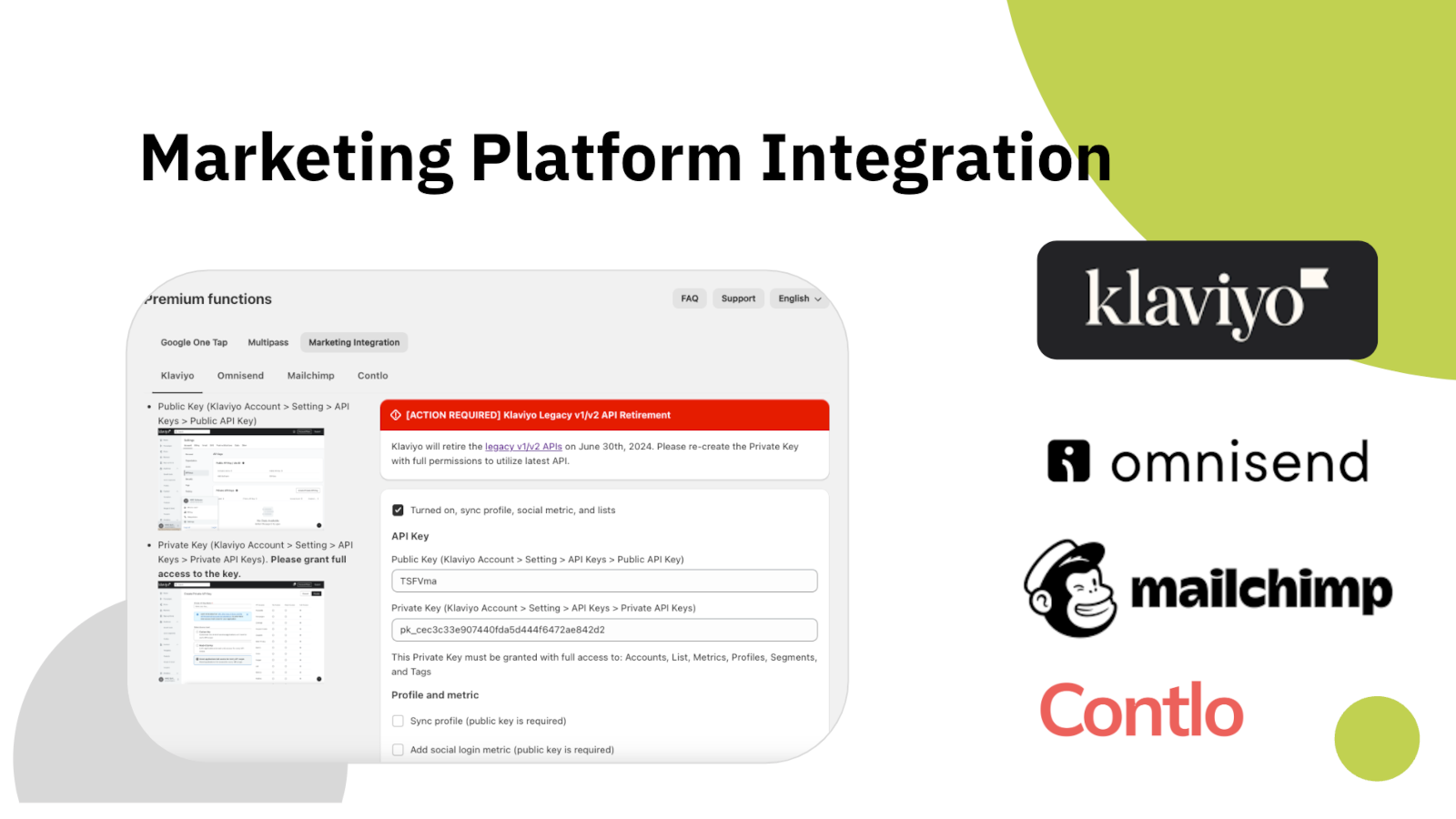
คุณเชื่อมต่อแต่ละแพลตฟอร์มด้วยคีย์ API ของคุณเอง และเลือกได้ว่าจะส่งอะไร ทั้งฟิลด์ข้อมูลลูกค้า ตัวชี้วัดการเข้าสู่ระบบ หรือทั้งสองอย่าง สิ่งที่คุณไม่ได้เปิดใช้จะไม่ถูกส่งออกไป

  • Klaviyo, Mailchimp, Omnisend และ Contlo
  • คีย์ API ของคุณเอง จำกัดตามสิทธิ์ที่คุณให้
  • ซิงก์ข้อมูลลูกค้า ตัวชี้วัดการเข้าสู่ระบบ หรือทั้งสองอย่าง
  • แพลตฟอร์มที่ใช้เข้าสู่ระบบถูกส่งไปพร้อมข้อมูลลูกค้า

แพลตฟอร์มการตลาด

การตั้งค่าเชื่อมต่อกับ Klaviyo, Omnisend, Mailchimp และ Contlo

การวิเคราะห์ข้อมูล

ดูว่าลูกค้าของคุณเข้าสู่ระบบอย่างไรจริง ๆ

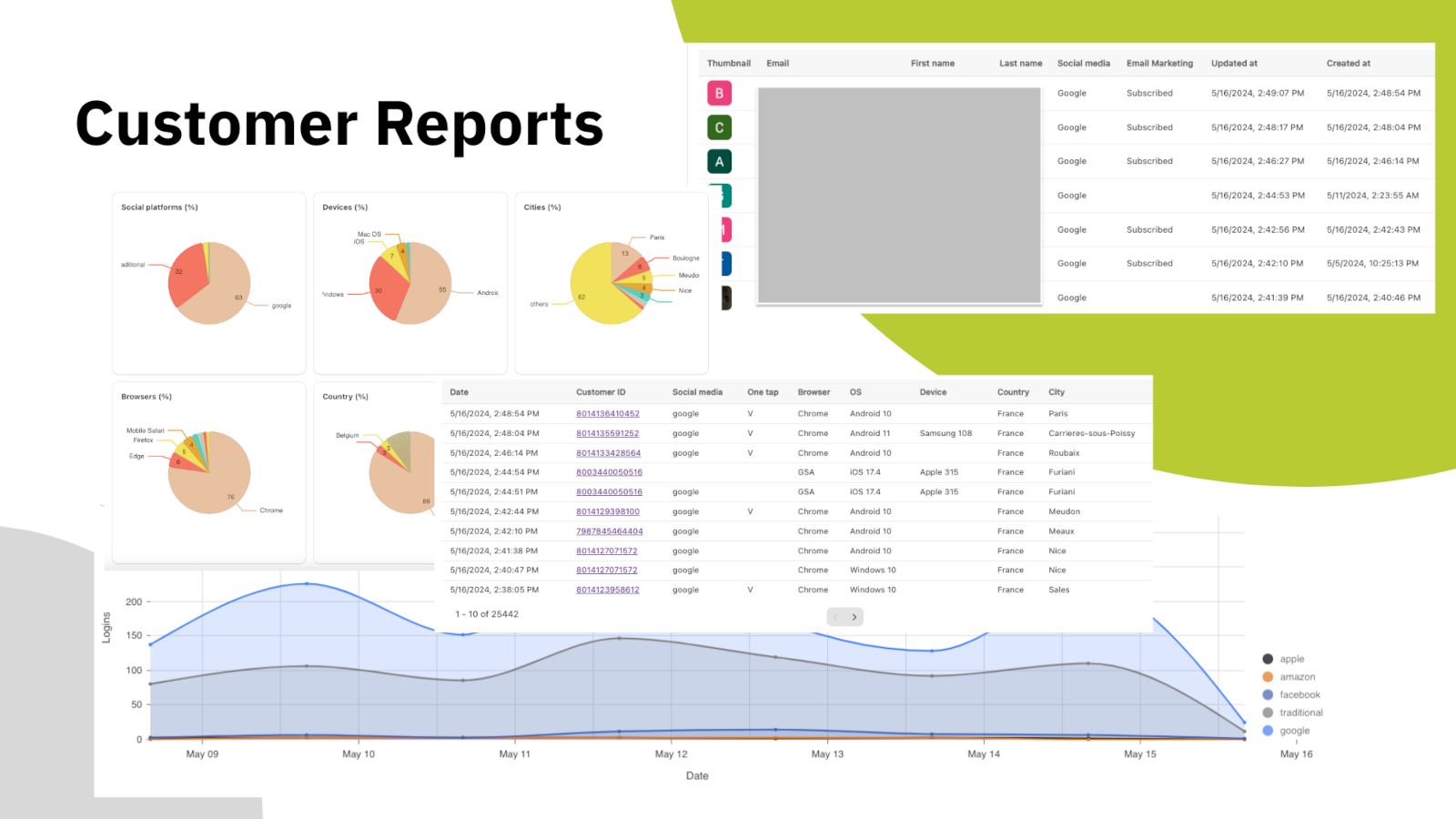
การเดาว่าควรเปิดผู้ให้บริการรายไหนนั้นมีราคาแพง เพราะทุกปุ่มที่เพิ่มขึ้นคือการตัดสินใจอีกหนึ่งครั้งที่คุณขอจากลูกค้า แดชบอร์ดแสดงสัดส่วนจริง ทั้งแพลตฟอร์มที่ถูกใช้ อุปกรณ์และเบราว์เซอร์ ประเทศและเมืองที่มาจาก รวมถึงแนวโน้มจำนวนการเข้าสู่ระบบรายวัน

ใต้กราฟคือรายชื่อลูกค้าเอง พร้อมแพลตฟอร์มที่แต่ละคนใช้ สถานะการสมัครรับข่าวสาร และเวลาที่เข้าสู่ระบบครั้งแรก ส่งออกแล้วนำไปใช้ที่ไหนก็ได้

  • การใช้งานแยกตามแพลตฟอร์ม อุปกรณ์ เบราว์เซอร์ ประเทศ และเมือง
  • แนวโน้มการเข้าสู่ระบบรายวัน
  • ตารางรายลูกค้าพร้อมแพลตฟอร์มและสถานะการสมัคร
  • มีในทุกแพ็กเกจ รวมถึงแพ็กเกจฟรี

รายงานลูกค้า

แดชบอร์ดแยกการเข้าสู่ระบบตามแพลตฟอร์ม อุปกรณ์ เบราว์เซอร์ และภูมิภาค

Headless และ API

ไม่ได้ใช้ธีม Liquid? ก็ยังใช้งานได้

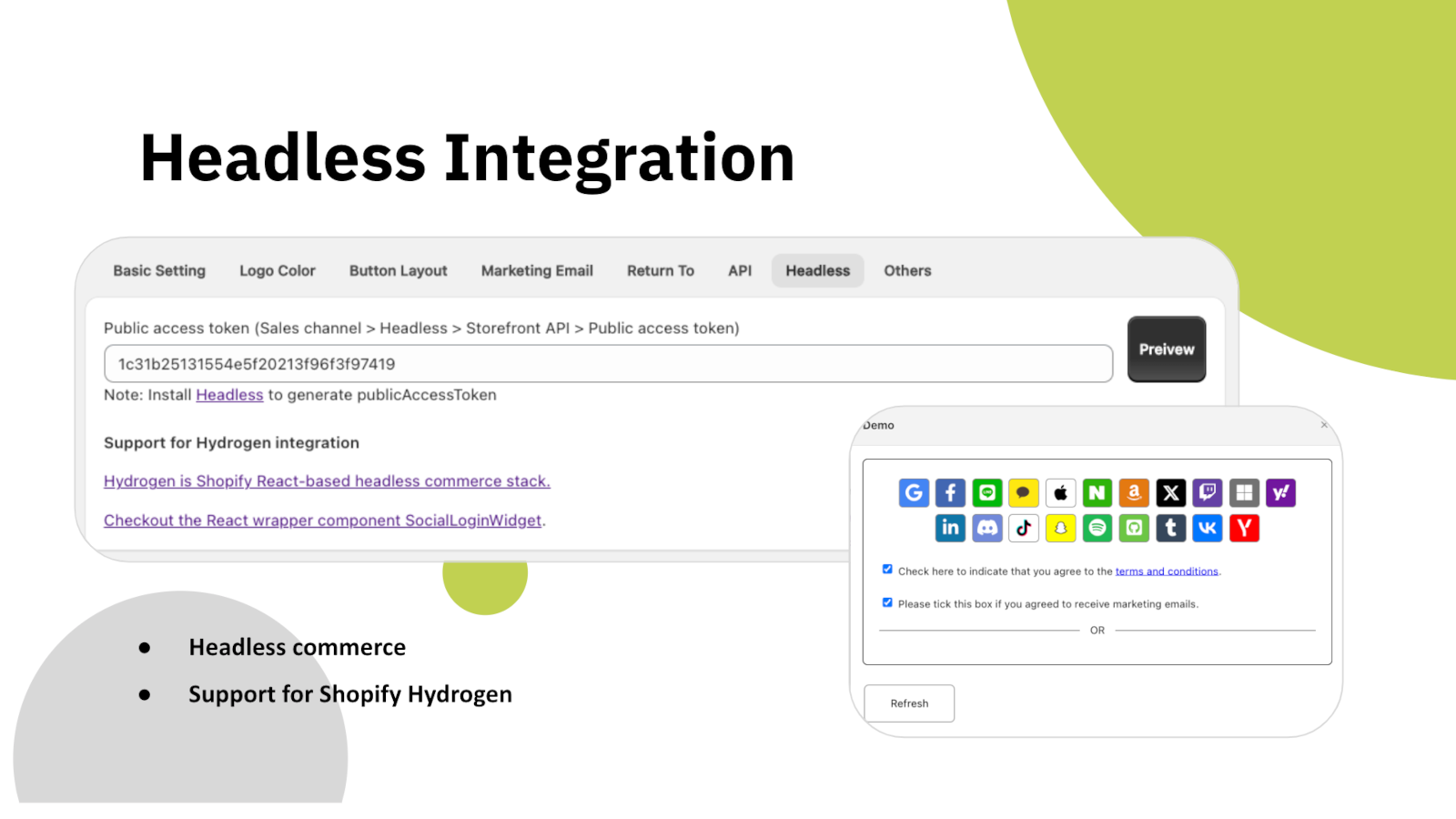
ถ้าหน้าร้านของคุณสร้างบน Shopify Hydrogen หรือฟรอนต์เอนด์ React ของคุณเอง บล็อกเข้าสู่ระบบจะมาในรูปคอมโพเนนต์วิดเจ็ตที่นำไปวางได้เลย แทนที่จะเป็นบล็อกของธีม โดยเชื่อมต่อกับระบบหลังบ้านเดียวกันและสร้างระเบียนลูกค้าแบบเดียวกัน

นอกจากนี้ยังมี REST API สำหรับอ่านข้อมูลลูกค้าด้วยโปรแกรม โดยยืนยันตัวตนด้วยโทเคนการเข้าถึงที่คุณสร้างเอง ข้อมูลการเข้าสู่ระบบด้วยโซเชียลถูกเก็บไว้ที่ระเบียนลูกค้าของ Shopify ผ่าน metafield จึงอยู่ในร้านของคุณ ไม่ได้อยู่ที่เรา

  • รองรับหน้าร้าน Shopify Hydrogen และ React
  • คอมโพเนนต์ SocialLoginWidget ที่นำไปวางใน React ได้เลย
  • REST API พร้อมโทเคนการเข้าถึงของคุณเอง
  • ข้อมูลเก็บไว้ที่ระเบียนลูกค้าของ Shopify ไม่ได้เก็บในแอป

การเชื่อมต่อแบบ Headless

การตั้งค่า Headless พร้อมโทเคนการเข้าถึงสาธารณะและตัวอย่างวิดเจ็ต React

ปรับให้เป็นของคุณ

ตั้งค่าเสร็จในไม่กี่นาที หน้าตาเข้ากับร้าน

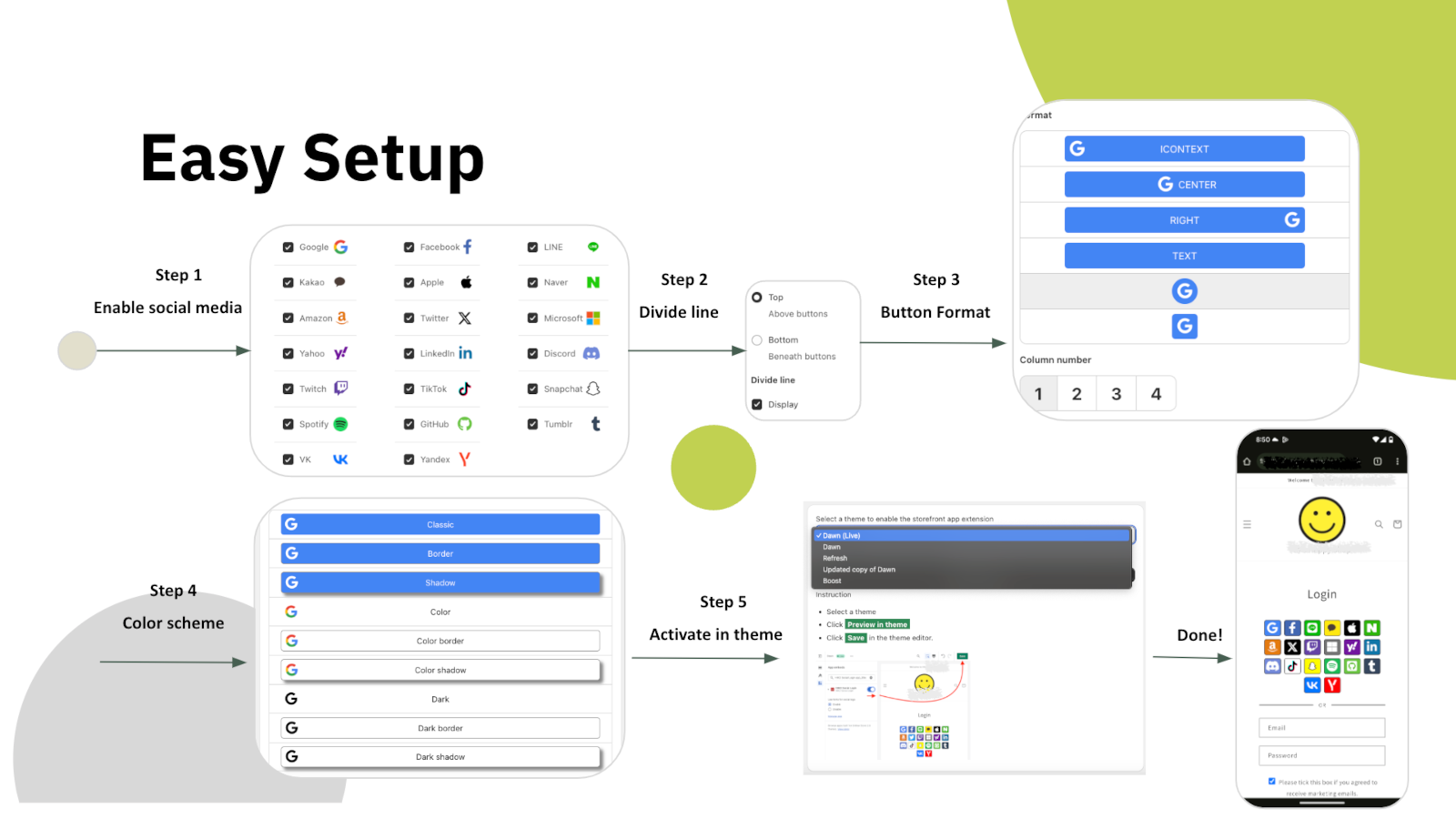
การตั้งค่ามี 5 ขั้นตอนในหน้าตั้งค่าของแอปเอง เลือกแพลตฟอร์ม ตัดสินใจว่าจะมีเส้นคั่นระหว่างแพลตฟอร์มกับฟอร์มอีเมลหรือไม่ เลือกรูปแบบปุ่ม กำหนดสี แล้วเปิดใช้บล็อกในธีมของคุณ ไม่ต้องแก้โค้ดธีมเลย

จากนั้นทุกอย่างในบล็อกปรับได้หมด ทั้งปุ่มแบบไอคอนหรือข้อความ จำนวนคอลัมน์ ขนาดปุ่มและระยะห่าง เส้นขอบและเงา สีโลโก้และสีพื้นหลังของแต่ละแพลตฟอร์ม รวมถึงลำดับการแสดงผล ถ้ายังไม่พอก็เพิ่ม CSS ของคุณเองได้ ส่วนหน้าจอของแอปเองรองรับสิบภาษา

  • ตั้งค่า 5 ขั้นตอน ไม่ต้องแก้โค้ดธีม
  • รูปแบบปุ่ม จำนวนคอลัมน์ ขนาด เส้นขอบ และเงา
  • สีโลโก้ พื้นหลัง และข้อความของแต่ละแพลตฟอร์ม
  • CSS ของคุณเอง และหน้าจอแอปรองรับสิบภาษา

ตั้งค่าง่าย

ขั้นตอนตั้งค่า 5 ขั้น ตั้งแต่เลือกแพลตฟอร์มจนถึงเปิดใช้บล็อกในธีม

ทำไมร้านค้าจึงเลือก HIKO Social Login

หกเหตุผลที่ควรเพิ่มลงร้าน Shopify ของคุณวันนี้

🚀

การสมัครที่ถูกทิ้งกลางคันน้อยลง

ทุกรหัสผ่านที่คุณไม่ถาม คือลูกค้าหนึ่งคนที่คุณไม่เสียไปตั้งแต่หน้าประตู

📱

แตะครั้งเดียวก็กลับมา

Google One Tap พาลูกค้าประจำกลับเข้ามาได้ทันที ทั้งบนมือถือและเดสก์ท็อป

🌎

สร้างมาเพื่อตลาดของคุณ

LINE, Kakao, Naver และ VK อยู่เคียงข้างแพลตฟอร์มระดับโลก ไม่ได้ถูกจัดไว้ข้างหลัง

📧

รายชื่อที่เติบโตเอง

ลูกค้าใหม่เข้าสู่ Klaviyo, Mailchimp, Omnisend หรือ Contlo ตั้งแต่ตอนสมัคร

🧩

พร้อมสำหรับ Headless

Hydrogen, React และ REST API สำหรับหน้าร้านที่ไม่ได้ใช้ธีม Liquid

📊

ตัดสินใจด้วยข้อมูล

รายงานแยกตามแพลตฟอร์ม อุปกรณ์ และภูมิภาค บอกว่าปุ่มไหนคุ้มค่าที่จะเก็บไว้

แพ็กเกจและราคา

เริ่มฟรี แล้วค่อยอัปเกรดเมื่อปริมาณมากขึ้น

ฟรี

ทุกอย่างที่ต้องใช้เพื่อทดลองบนร้านจริง

$0 / เดือน
  • เชื่อมต่อได้สูงสุด 18 แพลตฟอร์ม
  • รายงานการใช้งานของลูกค้า
  • เข้าสู่ระบบได้สูงสุด 30 ครั้งต่อวัน
  • เชื่อมต่อกับ Hydrogen และ API

Professional

สำหรับร้านที่เกินขีดจำกัดการเข้าสู่ระบบต่อวัน

$2.49 / เดือน
  • เข้าสู่ระบบได้ไม่จำกัด
  • เก็บข้อมูลลูกค้า
  • แพลตฟอร์มที่กำหนดเองด้วยคีย์ API ของคุณ
  • รองรับหลายภาษาและ CSS ที่กำหนดเอง

ราคาแสดงเป็นดอลลาร์สหรัฐและเรียกเก็บรายเดือนโดย Shopify HIKO Social Login ใช้งานได้กับบัญชีลูกค้าแบบคลาสสิก

Frequently Asked Questions

Getting started

This app requires legacy customer accounts

Your store is currently not using legacy customer accounts, which is not compatible with this app.

Non-legacy customer accounts use a completely different authentication system that does not allow third-party apps to customize the login experience. Because of this technical limitation, features such as social login, custom registration fields, and login page customization are only available with legacy customer accounts. Learn more from Shopify's official documentation.

My store already uses new customer accounts. What are my options?

New customer accounts sign in with a one-time code sent by email and give no third-party app a way to complete a login, so social login cannot be offered on them. Switching back from Shopify admin > Settings > Customer accounts restores the classic login form and this app starts working immediately. Your customers and their orders are not affected by the switch.

If you need to stay on new customer accounts, the app can still be used on a headless storefront, where your own code controls the login step.

Shopify Starter is not supported

The app does not support the Shopify Starter plan because that plan has no membership feature.

Manual install

Automatic installation hardly fits all themes. In such case, the custom tags need to be inserted manually in the proper location in the theme templates. You can try to insert the tags manually:

Optional attributes on the container:

  • type: register or login, which decides whether the block renders the registration or the login buttons.
  • ignore: skip the automatic layout and keep your own styles and markup.
  • register_tag: the value is added as a tag on every customer who registers through this block, which is how you tell apart sign-ups from different pages.
Change the button display sequence

App admin > Logo Color > Sequence , click on the up and down arrows

Customize login button width

In some themes the login form is so wide that the login buttons in the block stretch with it. The width can be customized in CSS. For example:

How signing in works

After customers sign in with a social media account, they cannot sign in with their original password.

The app will reset the customer password by a randomly generated string when the customer uses the social media account to login, unless Shopify's Multipass protocol is enabled. To restore the password, the customer can use the forget the password flow. The app will never store, log, or display the string in any form or storage. Multipass protocol lets the customer login using an encrypted login token by the multipass secret. Multipass is provided on a Shopify Plus plan only.

Multipass is enabled in Premium > Multipass using the secret from Shopify admin > Settings > Customer accounts. With it the app hands Shopify a signed login token instead of a password, so the customer's own password is never touched. Multipass is only available on a Shopify Plus plan.

How do I turn on Google One Tap?

Premium > Google One Tap. One Tap shows a Google account chooser on your storefront without the customer clicking anything, so it only appears to visitors who are already signed in to Google.

If you use your own Google API key, your storefront domain must be listed as an authorized JavaScript origin in the Google Cloud console. Without it Google refuses the request with origin_mismatch and nothing is shown at all, with no visible error on the page.

Can I disable hCaptcha during customer login?

Yes, you can disable it via: Online Store > Preferences > Spam protection > uncheck Enable hCaptcha on login, create account and password recovery pages

You do not have to turn it off. The app goes through Shopify's own captcha protection before submitting the login form, so social login works with hCaptcha left on. Switching it off is a decision about friction at the login step, not a requirement of this app.

Customer data and privacy

Will this app collect and store personal customer data?

This app will request access to your customer's email, first name, last name, phone number, and marketing consent.

The social profile data goes into your own store's customer metafields, not into a copy on our side. Our server keeps only what running the login needs: your store's settings, the link between a social account and a Shopify customer, and the operational logging we are required to keep. Uninstalling removes all of it.

What happens to my customer data when I uninstall the app?

Nothing is removed from Shopify. The social profile data this app writes lives in each customer's hiko.socials metafield, which belongs to your store, so your customers, their orders and that metafield all stay exactly as they are.

On our side, uninstalling removes your store's settings and its social account bindings from our server, and Shopify revokes the app's access to your store at the same moment. Only the minimal logging we are required to keep is retained.

Social platforms

Can I customize the consent screen for social login to display my store's name and logo?

To display your store's name and logo on the social login consent screen, you'll need to register your own app with the social platform and obtain their approval. Once approved, you can integrate the API key and secret into our app: Professional > Custom API Keys, this app will handle the authentication flow for you. For further detail, you can check an industrial standard OAuth2.

To enable social login, you'll need to register an application on the social platform for your store. This involves agreeing to usage terms and requesting necessary permissions. Once approved, the social platform will provide an API key and secret. When a customer signs in using their social account, they'll be redirected to the social platform's authorization server for verification and consent. The authorization server will display your store's name, terms, and requested permissions for the customer to approve.


Below are the references for all social platforms:

Apple private email relay

Customers signing in with Apple can choose to hide their email address. When choosing hide, Apple will create a unique, random email address to keep the personal email private. The domain of the generated email address will be privaterelay.appleid.com. The emails will be able to send and receive messages to and from customers using Apple's private email relay service.

Is Amazon login supported on amazon.co.jp and amazon.co.uk?

Yes, it does. Amazon has 3 different regions, North America (amazon.com), Europe (amazon.co.uk), and Far East (amazon.co.jp). Each of them holds customer accounts separately. You can choose one of the 3 regions for your store from Professional > Custom API Keys > Amazon > .

Plans and billing

Will my store be charged twice if I reinstall and re-subscribe to this app?

No, it won't. Shopify resumes the original installation's billing cycle and does not charge the merchant until the end of that cycle.

The plan shown in the app is not the one I am subscribed to

The plan is read from your store's active subscription in Shopify every time the app opens, so it follows Shopify billing rather than a copy kept on our side. Reload the page after any change made in Subscription.

If it still looks wrong, the active charge recorded by Shopify is the authority. Send us a screenshot of Subscription and we will compare it against Shopify's record.

Troubleshooting

Google login error with 403 disallowed_useragent

Google has discontinued support for embedded webviews and unknown browsers for logins since September 30, 2021. Embedded webviews are web browsers within mobile apps. For example, clicking a store link from Facebook would open Facebook's own browser, not a standard one like Chrome or Safari. Google considers third-party webviews a security risk. Get more details .

There is nothing to configure away, because the restriction is Google's and applies to every site. The customer needs to open your store in a normal browser rather than the one built into the app they came from, usually through that app's Open in browser menu.

Google One-Tap popup not shown

Google One-Tap will not display in the same browser or the last website visited for a period of time if the user closes One Tap with the 'X' button. This is called exponential cool-down. In such case, you can clear all the browser's application data to restore it. In example of Chrome, F12 > Chrome Developer Tools > Application tab > Clear storage in left tree > Select all data items > click Clear site data

One Tap is also hidden on iOS and in Safari unless ITP support is ticked in Premium > Google One Tap. Note that those browsers do not support automatic sign-in even with it on.

A customer cannot sign in and the error mentions a phone number or email already taken

Shopify refuses a customer record whose phone number or email already belongs to another customer in the same store, and that refusal is what the customer sees. It is a duplicate in your customer list, not a problem with the social account.

Find the other customer holding that phone number or email in Shopify admin > Customers, then merge the two or clear the duplicated field. A phone number has to be unique across the whole store, which is the most common cause.

I defined the hiko.socials metafield myself and the social data is not being written

The app writes hiko.socials as json. If your store already defines that metafield as another type, Shopify refuses the write and the social profile data is skipped. Signing in still works and the account binding is still recorded, only the metafield copy is left alone.

To get the data back, change the definition in Shopify admin > Settings > Custom data > Customers to the JSON type, or remove your definition entirely and let the app create it.

Developers

Accessing the social media data stored on the customer

The data from social media is stored in the customer metafields in JSON format. The JSON schema is:

A liquid example of accessing the social media data in the customer metafields:

The metafield is namespace hiko, key socials, type json. Which fields are present depends on what the social platform returned, so check for a field before using it.

How do I integrate a headless or Hydrogen storefront?

Settings > Headless. Requests are signed with your store's Hydrogen public access token, and for React and Hydrogen storefronts there is a ready-made component package, hiko-social-login-react.

Contact support for the full endpoint reference, including the request signing recipe.

พร้อมจะตัดรหัสผ่านออกหรือยัง

ได้คะแนน 4.5 จาก 5 จากร้านค้าบน Shopify เริ่มต้นด้วยแพ็กเกจฟรี ไม่ต้องใช้บัตร

ดูใน App Store