Пусть покупатели входят через аккаунт, который у них уже есть, — или по ссылке из письма.
Предпросмотр в поиске
Добавьте в магазин Shopify более 20 способов входа через соцсети и вход по ссылке в письме без пароля. Собирайте при регистрации те данные клиентов, которые вам действительно нужны, синхронизируйте их с Klaviyo, Mailchimp, Omnisend и Contlo и смотрите, какими способами покупатели пользуются на самом деле. Есть бесплатный тариф.
Самое узкое место воронки — момент, когда покупателю нужно завести аккаунт. Именно оттуда HIKO Social Login убирает пароль. Клиенты входят через Google, Facebook, Apple, LINE, Kakao, Naver, X и ещё десяток платформ либо по одноразовой ссылке, отправленной на их адрес. В том же шаге вы можете запросить ровно то, что нужно вашему магазину, — телефон, полное имя, страну — и получить полноценную карточку клиента в Shopify. Эти профили сразу уходят в Klaviyo, Mailchimp, Omnisend или Contlo, а панель отчётов показывает, откуда на самом деле приходят входы: платформы, устройства, браузеры и регионы. Всё, что видит покупатель, настраиваете вы: расположение кнопок, цвета логотипов, число колонок, собственный CSS и экран согласия под вашими учётными данными разработчика. Для магазинов без темы Liquid есть REST API, поддержка Shopify Hydrogen и React-компонент виджета.
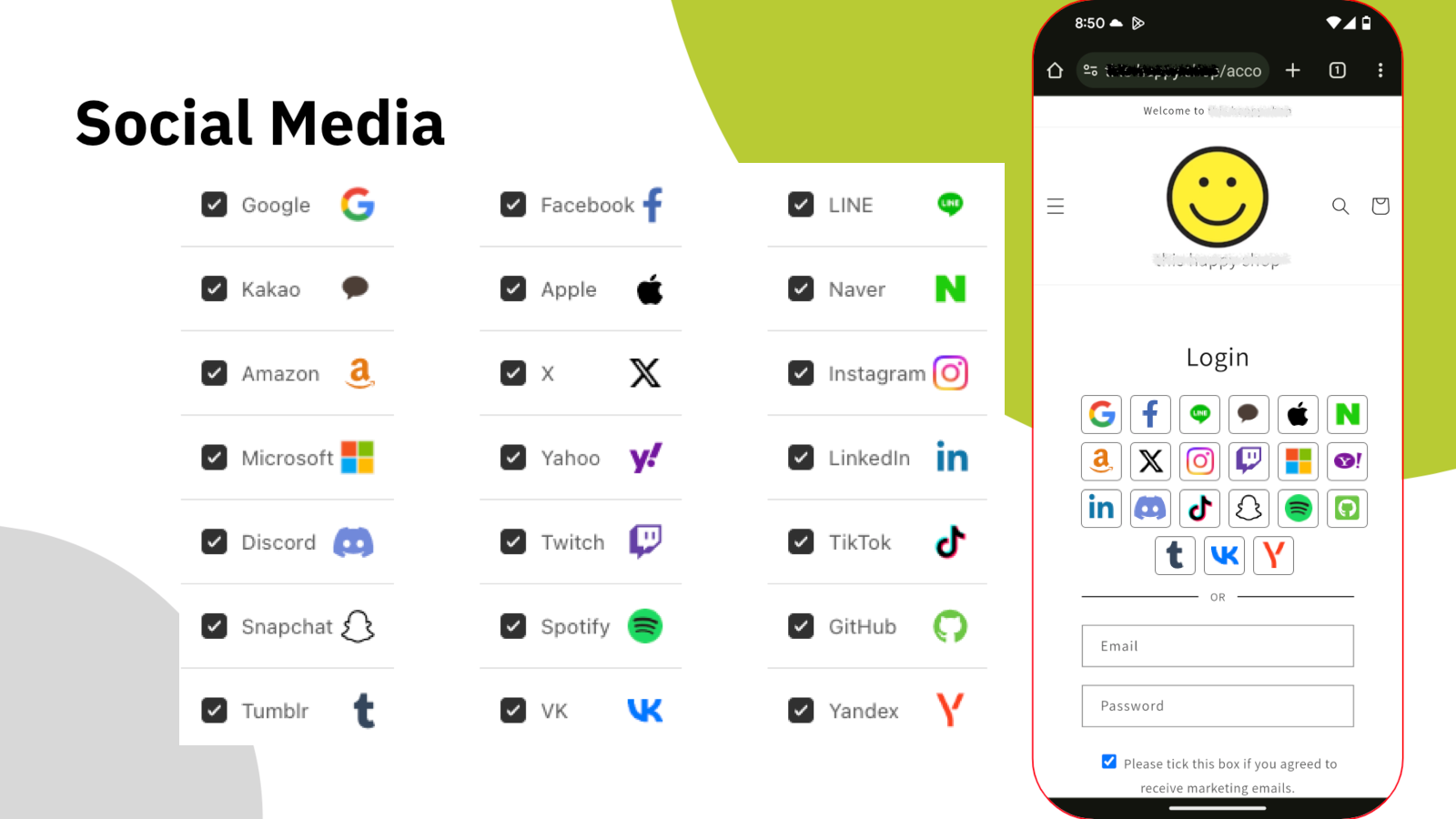
Выберите платформы, которыми пользуются ваши покупатели. Остальное сделает виджет.
Вход через соцсети
Каждый новый пароль — ещё один повод уйти. HIKO Social Login собирает более двадцати провайдеров в один блок входа в вашей витрине: Google, Facebook, Apple, LINE, Kakao, Naver, Amazon, X, Instagram, Microsoft, LinkedIn, Discord, TikTok и другие. Покупатель выбирает тот, где уже авторизован, — и он внутри.
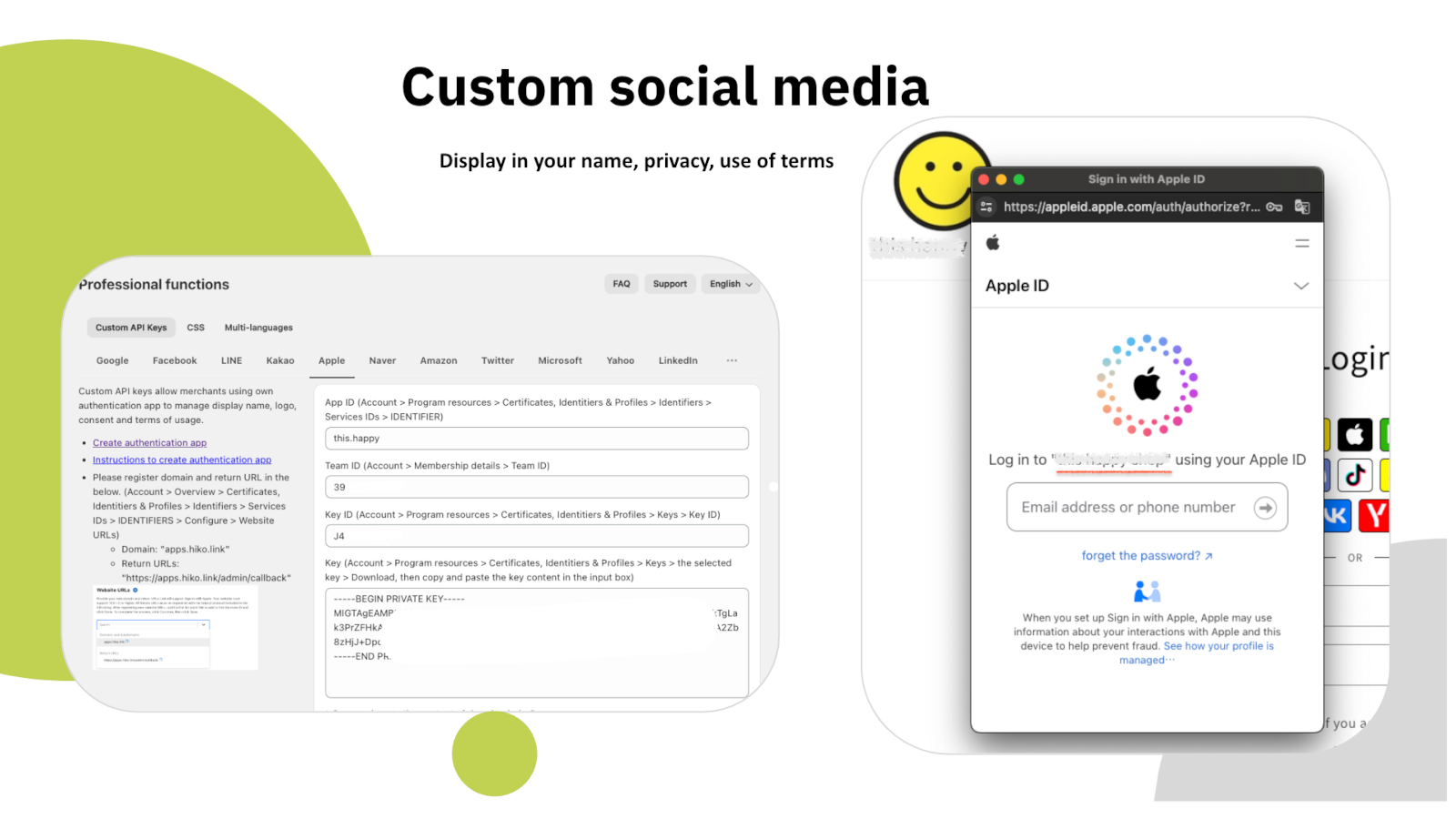
На платных тарифах вы регистрируете собственное приложение разработчика у каждой платформы и указываете свои API-ключи: на экране согласия появятся название и логотип вашего магазина вместо наших, а также ваша политика конфиденциальности и условия использования.
Возвращение без трения
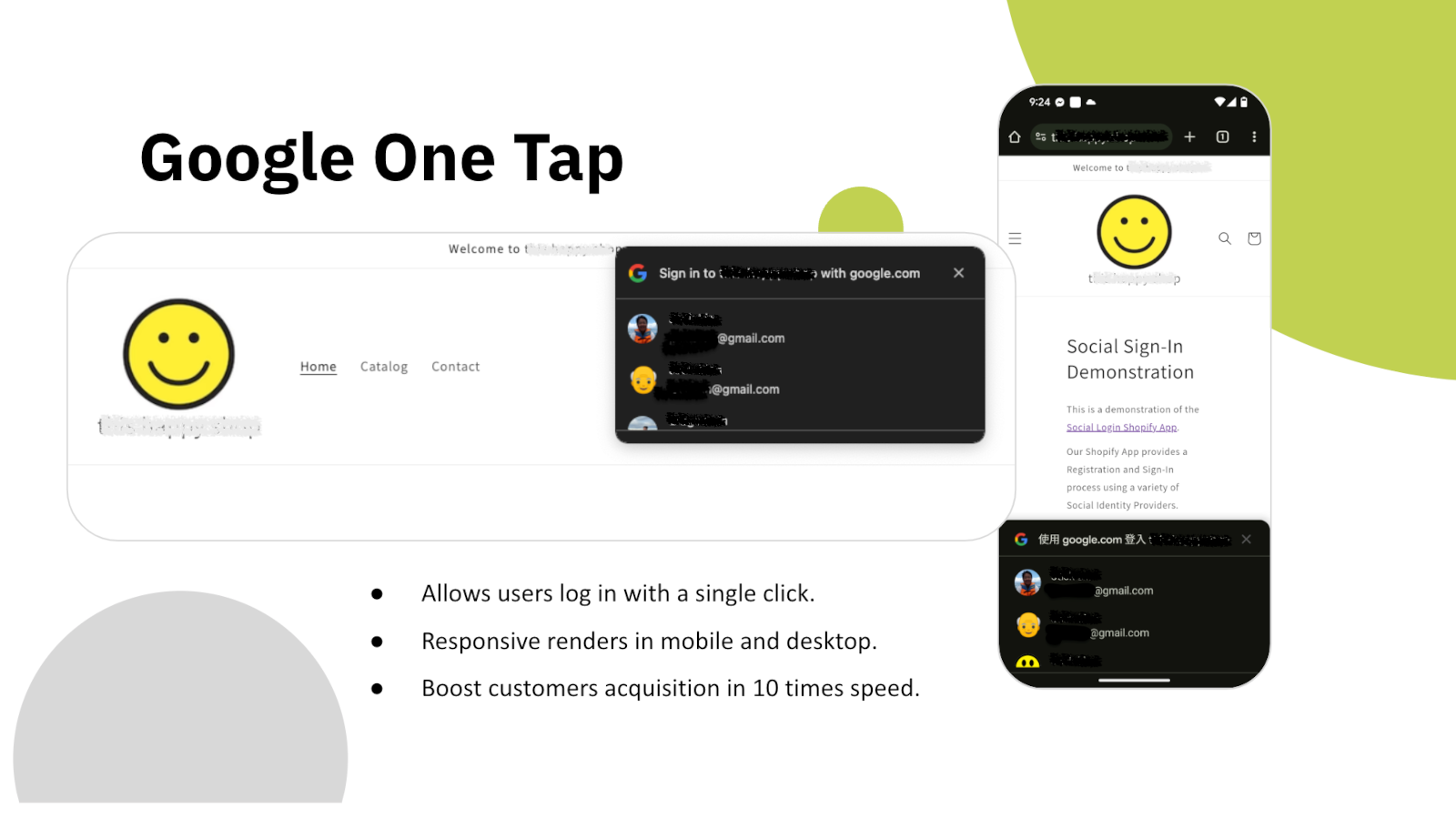
Как только страница загружается, Google One Tap встречает вернувшегося покупателя его же аккаунтом Google. Ни формы, ни выбора провайдера, ни перенаправления — одно касание, и сессия снова его.
Он одинаково отображается на мобильном и на компьютере и работает поверх любой вашей темы. Для того, кто уже покупал у вас, шаг входа фактически исчезает.
Данные клиентов
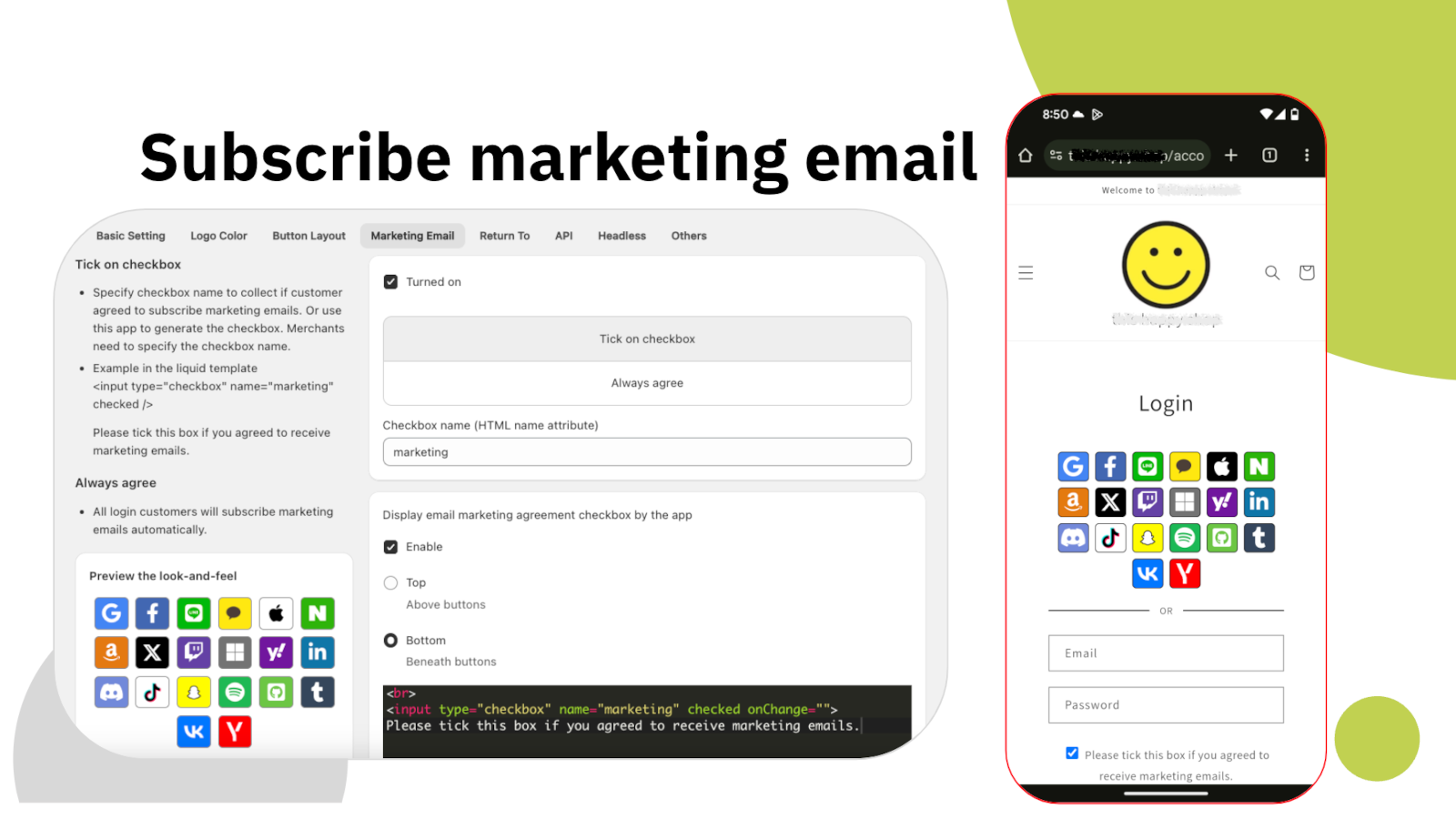
Аккаунт в соцсети даёт вам адрес электронной почты и имя. Большинству магазинов нужно больше: телефон для доставки, страна для правил налогообложения и отправки и действительно осознанное согласие на маркетинг. HIKO Social Login собирает это при регистрации, в том же шаге, вместо того чтобы добирать потом.
Флажок согласия на маркетинг настраивается полностью: где он стоит, что на нём написано, отмечен ли он по умолчанию и под каким HTML-именем отправляется. Согласие записывается в карточку клиента Shopify, поэтому остальные ваши инструменты видят его так же, как у любого другого подписчика.
Маркетинг
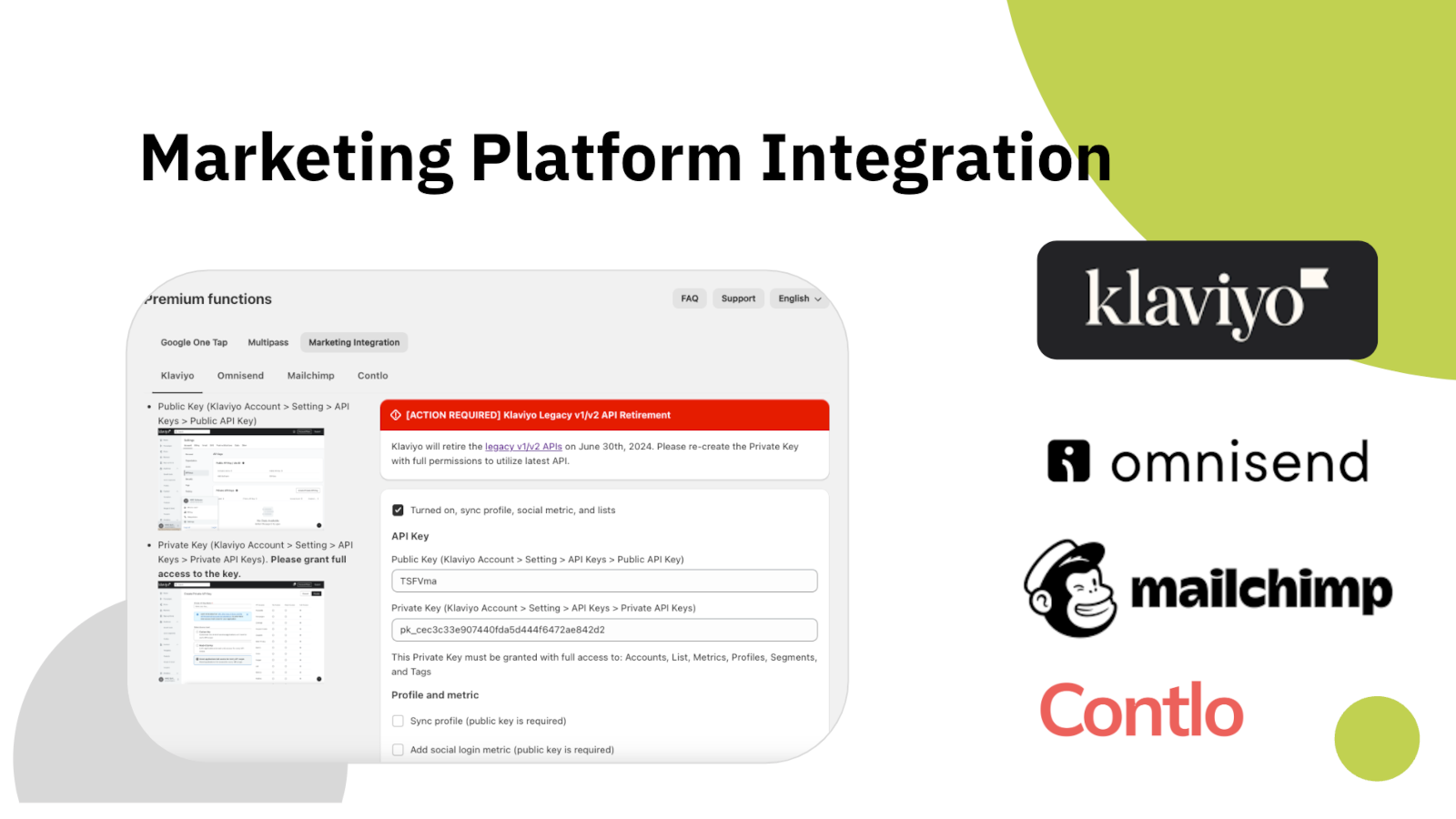
Клиент, который вошёл, но так и не попал в вашу почтовую платформу, — это клиент, с которым вы не можете говорить. HIKO Social Login отправляет профиль в Klaviyo, Mailchimp, Omnisend или Contlo в момент его создания, записывая рядом и использованную платформу.
Каждую платформу вы подключаете своим API-ключом и сами решаете, что уходит: поля профиля, метрики входа или и то и другое. Ничего не отправляется без вашего включения.
Аналитика
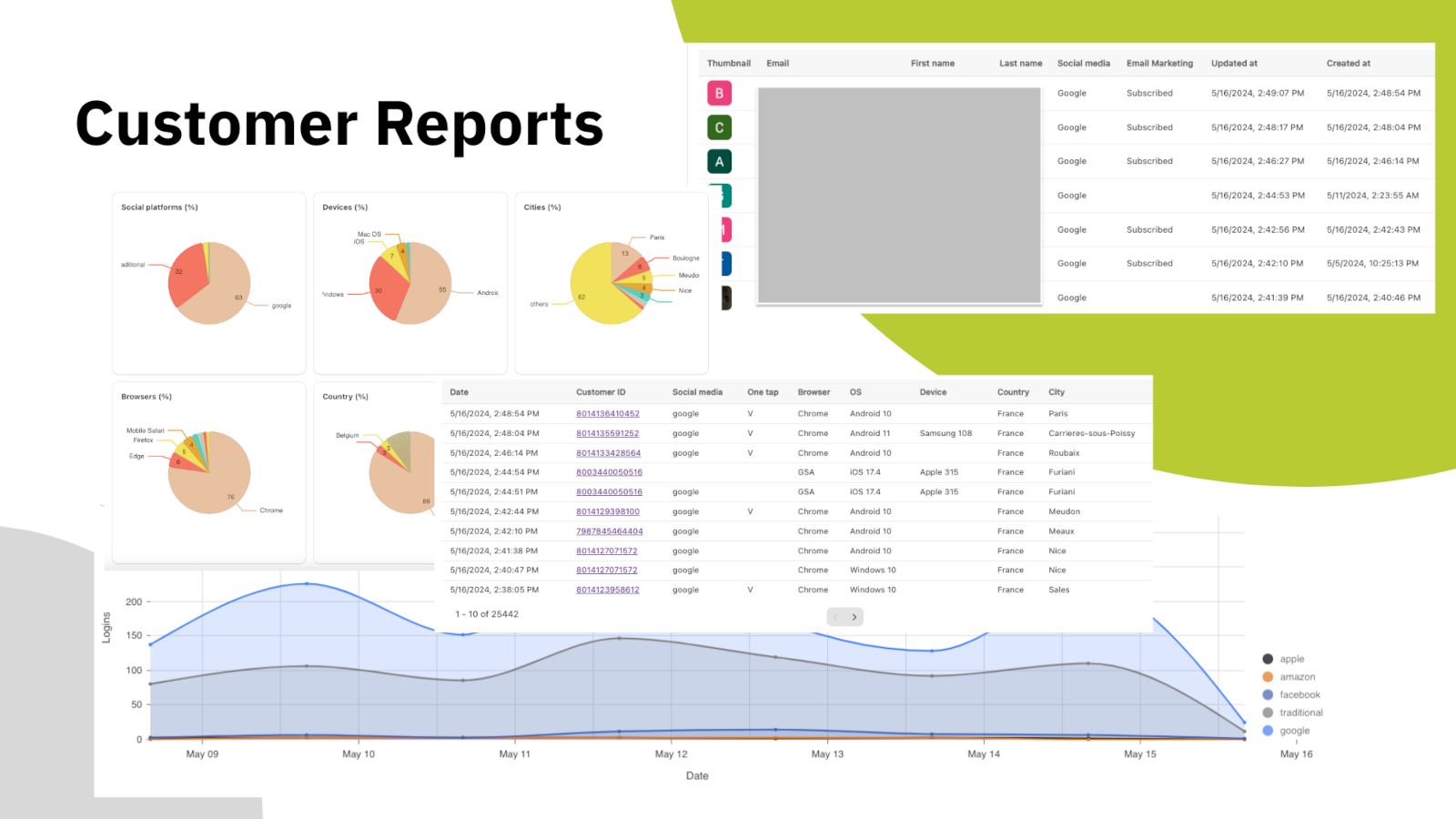
Угадывать, какие провайдеры предлагать, дорого: каждая лишняя кнопка — это ещё одно решение, которое вы просите принять покупателя. Панель показывает реальное распределение: какие соцсети используются, на каких устройствах и в каких браузерах, из каких стран и городов и как меняется дневной объём входов.
Под графиками — сам список клиентов: платформа каждого, состояние маркетинговой подписки и дата первого входа. Выгрузите его и работайте с ним где угодно.
Headless и API
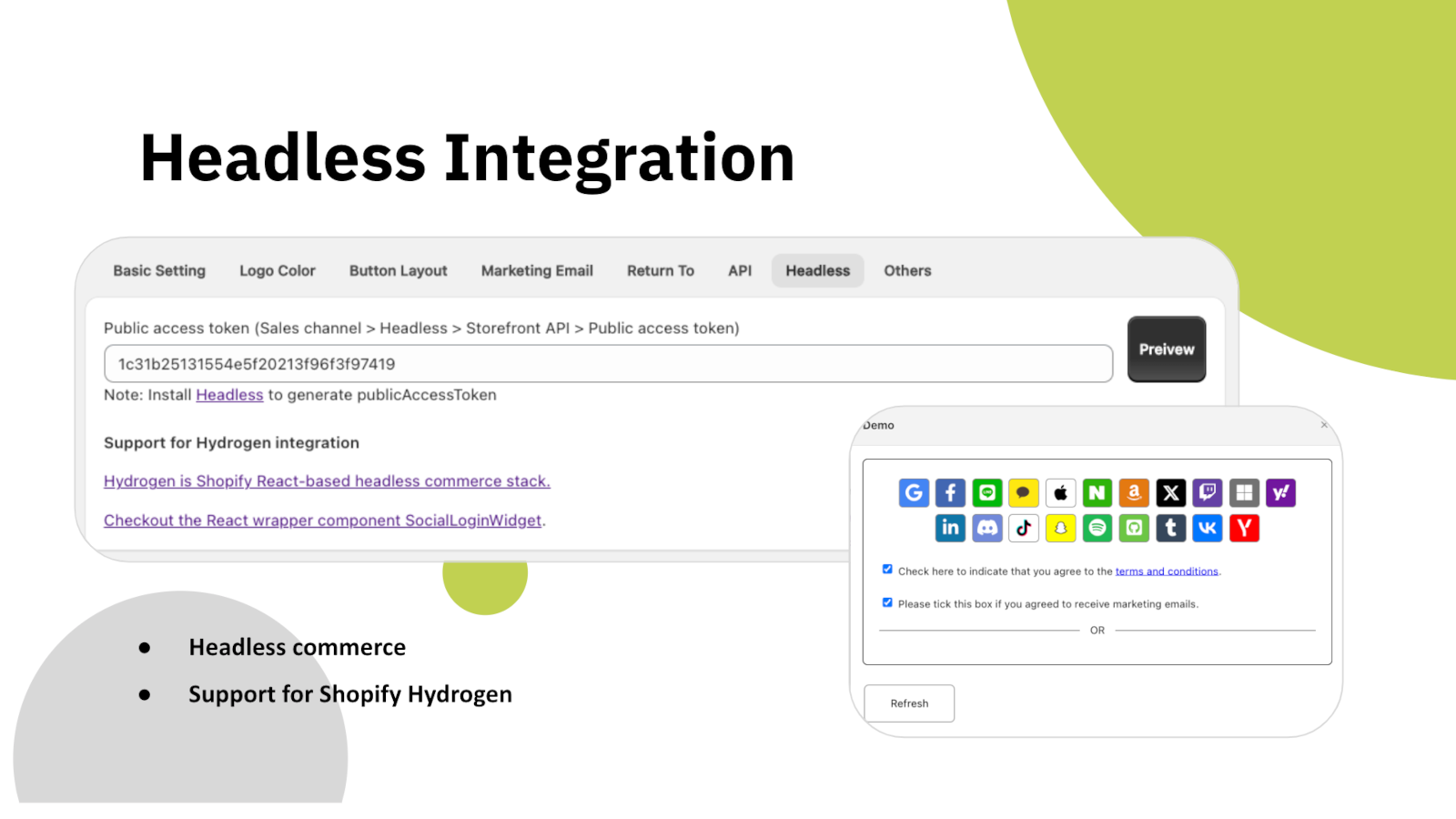
Если витрина построена на Shopify Hydrogen или вашем собственном React-фронтенде, блок входа поставляется как готовый к встраиванию компонент-виджет, а не как блок темы. Он обращается к тому же бэкенду и создаёт те же карточки клиентов.
Есть и REST API для программного чтения данных клиентов — с авторизацией по токену доступа, который вы создаёте сами. Данные о входе через соцсети хранятся в карточке клиента Shopify в метаполях, то есть остаются в вашем магазине, а не у нас.
Под ваш стиль
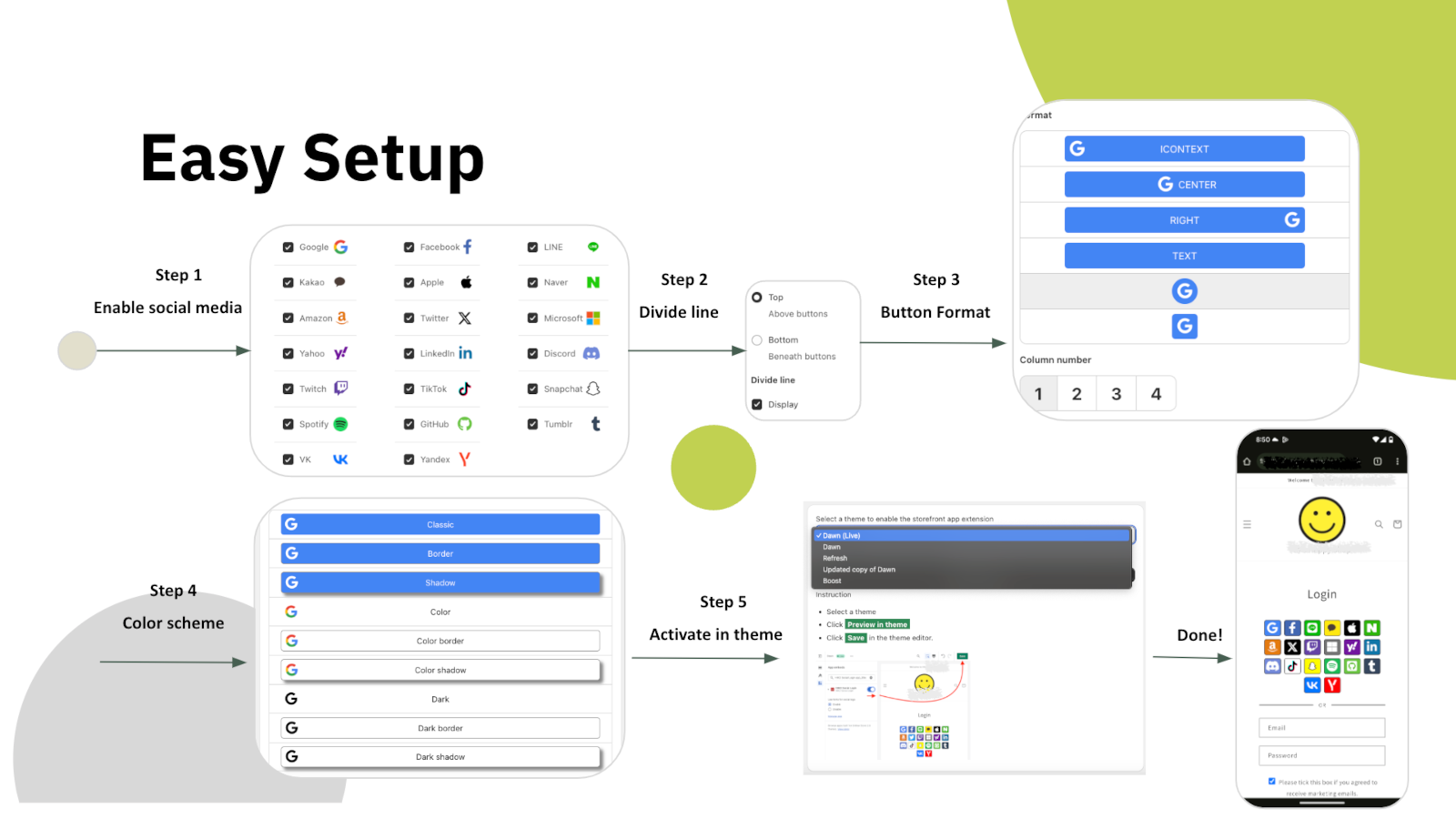
Настройка — пять шагов в самом приложении: выбрать платформы, решить, отделять ли их разделителем от формы e-mail, выбрать формат кнопок, задать цвета и включить блок в теме. Код темы править не нужно.
Дальше настраивается всё: кнопки со значком или с текстом, число колонок, размер и отступы, рамка и тень, цвета логотипа и фона для каждой платформы и порядок их вывода. Если и этого мало — добавьте свой CSS. Интерфейс самого приложения доступен на десяти языках.
Шесть причин добавить его в магазин Shopify уже сегодня
Каждый пароль, который вы не просите, — это клиент, которого вы не теряете на пороге.
Google One Tap сразу возвращает постоянных покупателей — и на мобильном, и на компьютере.
LINE, Kakao, Naver и VK стоят рядом с глобальными платформами, а не за ними.
Новые клиенты попадают в Klaviyo, Mailchimp, Omnisend или Contlo прямо при регистрации.
Hydrogen, React и REST API для витрин без темы Liquid.
Отчёты по платформам, устройствам и регионам показывают, какие кнопки своё место оправдывают.
Начните бесплатно и перейдите на платный тариф, когда появится объём
Всё, чтобы попробовать на действующем магазине
Для магазинов, вышедших за дневной лимит входов
Вход одним касанием, письмо без пароля и синхронизация с маркетингом
Цены указаны в долларах США, оплата списывается Shopify ежемесячно. HIKO Social Login работает с классическими аккаунтами клиентов.
Your store is currently not using legacy customer accounts, which is not compatible with this app.
Non-legacy customer accounts use a completely different authentication system that does not allow third-party apps to customize the login experience. Because of this technical limitation, features such as social login, custom registration fields, and login page customization are only available with legacy customer accounts. Learn more from Shopify's official documentation.
New customer accounts sign in with a one-time code sent by email and give no third-party app a way to complete a login, so social login cannot be offered on them. Switching back from Shopify admin > Settings > Customer accounts restores the classic login form and this app starts working immediately. Your customers and their orders are not affected by the switch.
If you need to stay on new customer accounts, the app can still be used on a headless storefront, where your own code controls the login step.
The app does not support the Shopify Starter plan because that plan has no membership feature.
Automatic installation hardly fits all themes. In such case, the custom tags need to be inserted manually in the proper location in the theme templates. You can try to insert the tags manually:
Optional attributes on the container:
type: register or login, which decides whether the block renders the registration or the login buttons.ignore: skip the automatic layout and keep your own styles and markup.register_tag: the value is added as a tag on every customer who registers through this block, which is how you tell apart sign-ups from different pages.App admin > Logo Color > Sequence , click on the up and down arrows
In some themes the login form is so wide that the login buttons in the block stretch with it. The width can be customized in CSS. For example:
The app will reset the customer password by a randomly generated string when the customer uses the social media account to login, unless Shopify's Multipass protocol is enabled. To restore the password, the customer can use the forget the password flow. The app will never store, log, or display the string in any form or storage. Multipass protocol lets the customer login using an encrypted login token by the multipass secret. Multipass is provided on a Shopify Plus plan only.
Multipass is enabled in Premium > Multipass using the secret from Shopify admin > Settings > Customer accounts. With it the app hands Shopify a signed login token instead of a password, so the customer's own password is never touched. Multipass is only available on a Shopify Plus plan.
Premium > Google One Tap. One Tap shows a Google account chooser on your storefront without the customer clicking anything, so it only appears to visitors who are already signed in to Google.
If you use your own Google API key, your storefront domain must be listed as an authorized JavaScript origin in the Google Cloud console. Without it Google refuses the request with origin_mismatch and nothing is shown at all, with no visible error on the page.
Yes, you can disable it via: Online Store > Preferences > Spam protection > uncheck Enable hCaptcha on login, create account and password recovery pages
You do not have to turn it off. The app goes through Shopify's own captcha protection before submitting the login form, so social login works with hCaptcha left on. Switching it off is a decision about friction at the login step, not a requirement of this app.
This app will request access to your customer's email, first name, last name, phone number, and marketing consent.
The social profile data goes into your own store's customer metafields, not into a copy on our side. Our server keeps only what running the login needs: your store's settings, the link between a social account and a Shopify customer, and the operational logging we are required to keep. Uninstalling removes all of it.
Nothing is removed from Shopify. The social profile data this app writes lives in each customer's hiko.socials metafield, which belongs to your store, so your customers, their orders and that metafield all stay exactly as they are.
On our side, uninstalling removes your store's settings and its social account bindings from our server, and Shopify revokes the app's access to your store at the same moment. Only the minimal logging we are required to keep is retained.
To display your store's name and logo on the social login consent screen, you'll need to register your own app with the social platform and obtain their approval. Once approved, you can integrate the API key and secret into our app: Professional > Custom API Keys, this app will handle the authentication flow for you. For further detail, you can check an industrial standard OAuth2.
To enable social login, you'll need to register an application on the social platform for your store. This involves agreeing to usage terms and requesting necessary permissions. Once approved, the social platform will provide an API key and secret. When a customer signs in using their social account, they'll be redirected to the social platform's authorization server for verification and consent. The authorization server will display your store's name, terms, and requested permissions for the customer to approve.
Below are the references for all social platforms:
Customers signing in with Apple can choose to hide their email address. When choosing hide, Apple will create a unique, random email address to keep the personal email private. The domain of the generated email address will be privaterelay.appleid.com. The emails will be able to send and receive messages to and from customers using Apple's private email relay service.
Yes, it does. Amazon has 3 different regions, North America (amazon.com), Europe (amazon.co.uk), and Far East (amazon.co.jp). Each of them holds customer accounts separately. You can choose one of the 3 regions for your store from Professional > Custom API Keys > Amazon > .
No, it won't. Shopify resumes the original installation's billing cycle and does not charge the merchant until the end of that cycle.
The plan is read from your store's active subscription in Shopify every time the app opens, so it follows Shopify billing rather than a copy kept on our side. Reload the page after any change made in Subscription.
If it still looks wrong, the active charge recorded by Shopify is the authority. Send us a screenshot of Subscription and we will compare it against Shopify's record.
Google has discontinued support for embedded webviews and unknown browsers for logins since September 30, 2021. Embedded webviews are web browsers within mobile apps. For example, clicking a store link from Facebook would open Facebook's own browser, not a standard one like Chrome or Safari. Google considers third-party webviews a security risk. Get more details .
There is nothing to configure away, because the restriction is Google's and applies to every site. The customer needs to open your store in a normal browser rather than the one built into the app they came from, usually through that app's Open in browser menu.
Google One-Tap will not display in the same browser or the last website visited for a period of time if the user closes One Tap with the 'X' button. This is called exponential cool-down. In such case, you can clear all the browser's application data to restore it. In example of Chrome, F12 > Chrome Developer Tools > Application tab > Clear storage in left tree > Select all data items > click Clear site data
One Tap is also hidden on iOS and in Safari unless ITP support is ticked in Premium > Google One Tap. Note that those browsers do not support automatic sign-in even with it on.
Shopify refuses a customer record whose phone number or email already belongs to another customer in the same store, and that refusal is what the customer sees. It is a duplicate in your customer list, not a problem with the social account.
Find the other customer holding that phone number or email in Shopify admin > Customers, then merge the two or clear the duplicated field. A phone number has to be unique across the whole store, which is the most common cause.
The app writes hiko.socials as json. If your store already defines that metafield as another type, Shopify refuses the write and the social profile data is skipped. Signing in still works and the account binding is still recorded, only the metafield copy is left alone.
To get the data back, change the definition in Shopify admin > Settings > Custom data > Customers to the JSON type, or remove your definition entirely and let the app create it.
The data from social media is stored in the customer metafields in JSON format. The JSON schema is:
A liquid example of accessing the social media data in the customer metafields:
The metafield is namespace hiko, key socials, type json. Which fields are present depends on what the social platform returned, so check for a field before using it.
Settings > Headless. Requests are signed with your store's Hydrogen public access token, and for React and Hydrogen storefronts there is a ready-made component package, hiko-social-login-react.
Contact support for the full endpoint reference, including the request signing recipe.
Оценка продавцов Shopify — 4,5 из 5. Начните с бесплатного тарифа, карта не нужна.
Открыть в App Store