Để khách hàng đăng nhập bằng tài khoản họ đã có — hoặc bằng một liên kết gửi tới email của họ.
Xem trước trên kết quả tìm kiếm
Thêm hơn 20 cách đăng nhập bằng mạng xã hội và đăng nhập bằng liên kết email không cần mật khẩu vào cửa hàng Shopify của bạn. Thu thập ngay khi đăng ký những thông tin khách hàng bạn thực sự cần, đồng bộ sang Klaviyo, Mailchimp, Omnisend và Contlo, và xem khách hàng thực sự dùng cách nào. Có gói miễn phí.
Điểm dễ mất khách nhất trong hành trình mua hàng là lúc khách phải tạo tài khoản, và HIKO Social Login gỡ mật khẩu ra khỏi đúng điểm đó. Khách hàng đăng nhập bằng Google, Facebook, Apple, LINE, Kakao, Naver, X và hơn chục nền tảng khác, hoặc bằng một liên kết dùng một lần gửi tới email của họ. Ngay trong bước đó, bạn có thể hỏi đúng những gì cửa hàng cần — số điện thoại, họ tên, quốc gia — và nhận về một hồ sơ khách hàng hoàn chỉnh trong Shopify. Những hồ sơ này đi thẳng sang Klaviyo, Mailchimp, Omnisend hoặc Contlo, còn bảng báo cáo cho bạn thấy lượt đăng nhập thực sự đến từ nền tảng, thiết bị, trình duyệt và khu vực nào. Mọi thứ khách hàng nhìn thấy đều do bạn quyết định: cách sắp xếp nút, màu logo, số cột, CSS riêng, và màn hình đồng ý hiển thị dưới thông tin nhà phát triển của chính bạn. Với những cửa hàng không dùng giao diện Liquid, có sẵn REST API, hỗ trợ Shopify Hydrogen và một thành phần tiện ích React.
Chọn những nền tảng khách hàng của bạn đang dùng. Phần còn lại để tiện ích lo.
Đăng nhập mạng xã hội
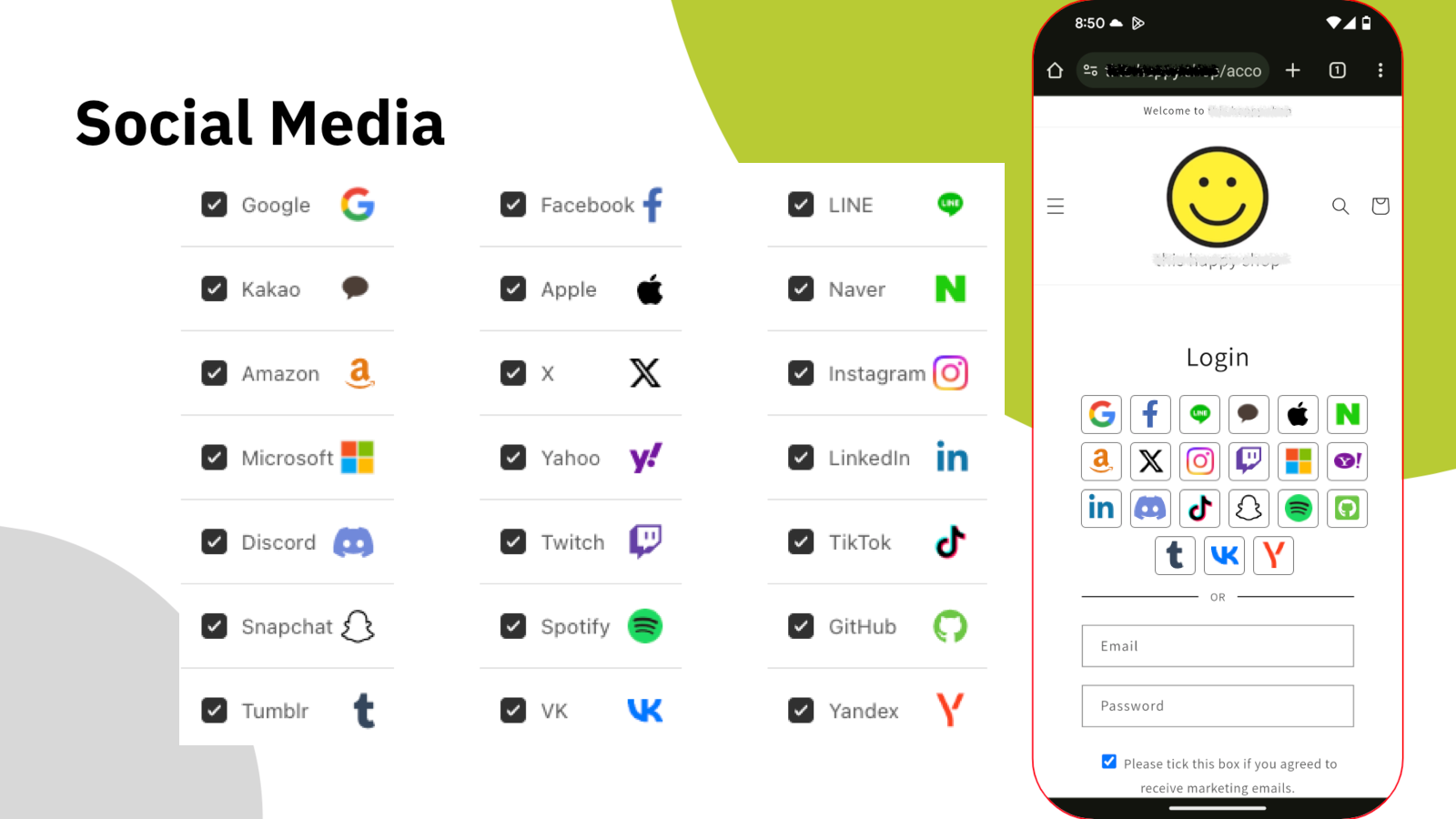
Mỗi mật khẩu mới là thêm một lý do để khách rời đi. HIKO Social Login gom hơn hai mươi nhà cung cấp vào cùng một khối đăng nhập trên cửa hàng của bạn — Google, Facebook, Apple, LINE, Kakao, Naver, Amazon, X, Instagram, Microsoft, LinkedIn, Discord, TikTok và nhiều nữa. Khách chọn cái họ vốn đang đăng nhập sẵn, thế là xong.
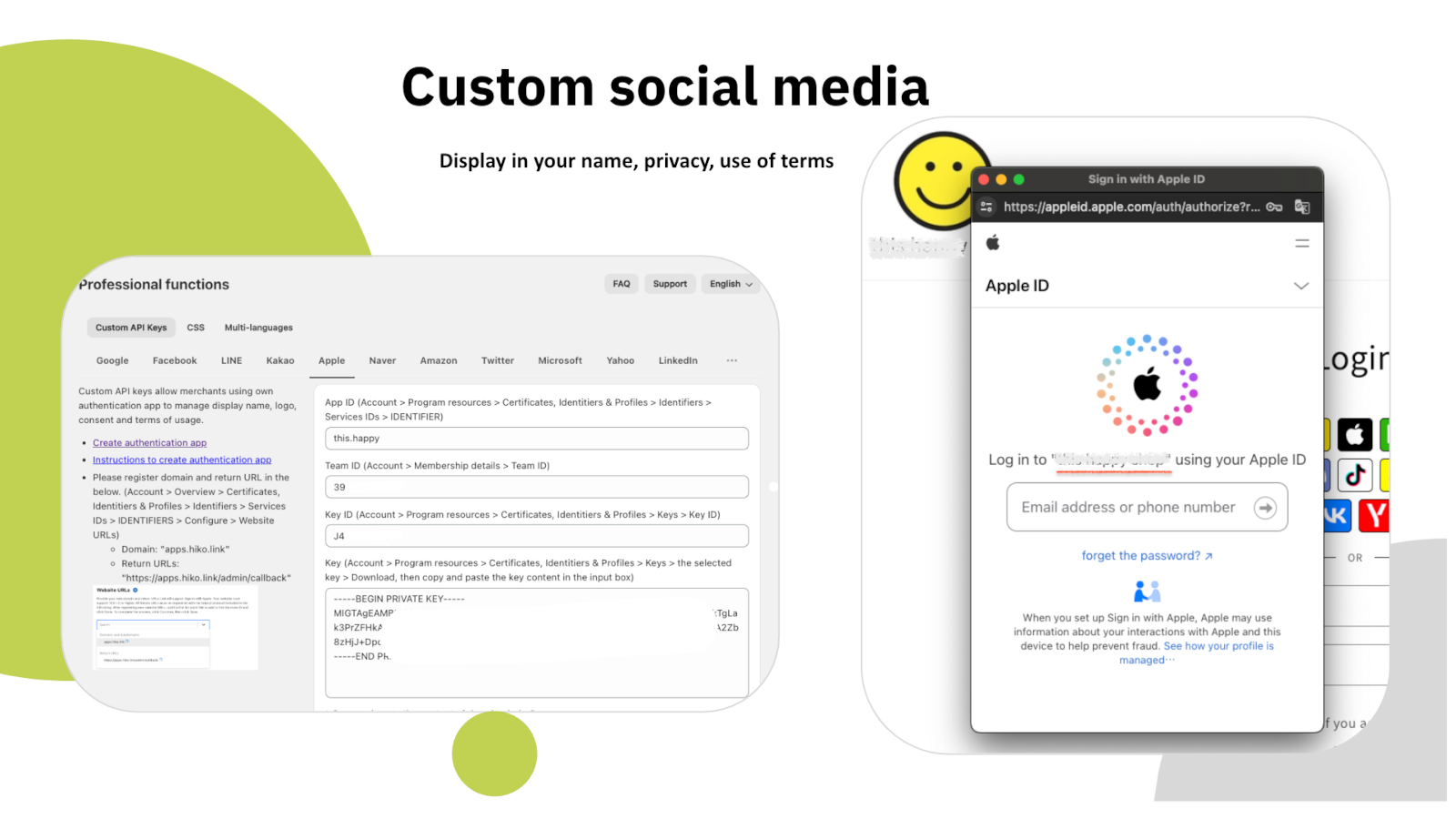
Ở các gói trả phí, bạn có thể đăng ký ứng dụng nhà phát triển của riêng mình với từng nền tảng và nhập khóa API của bạn, để màn hình đồng ý hiển thị tên và logo cửa hàng bạn thay vì của chúng tôi — cùng với chính sách bảo mật và điều khoản sử dụng của bạn.
Quay lại không vướng víu
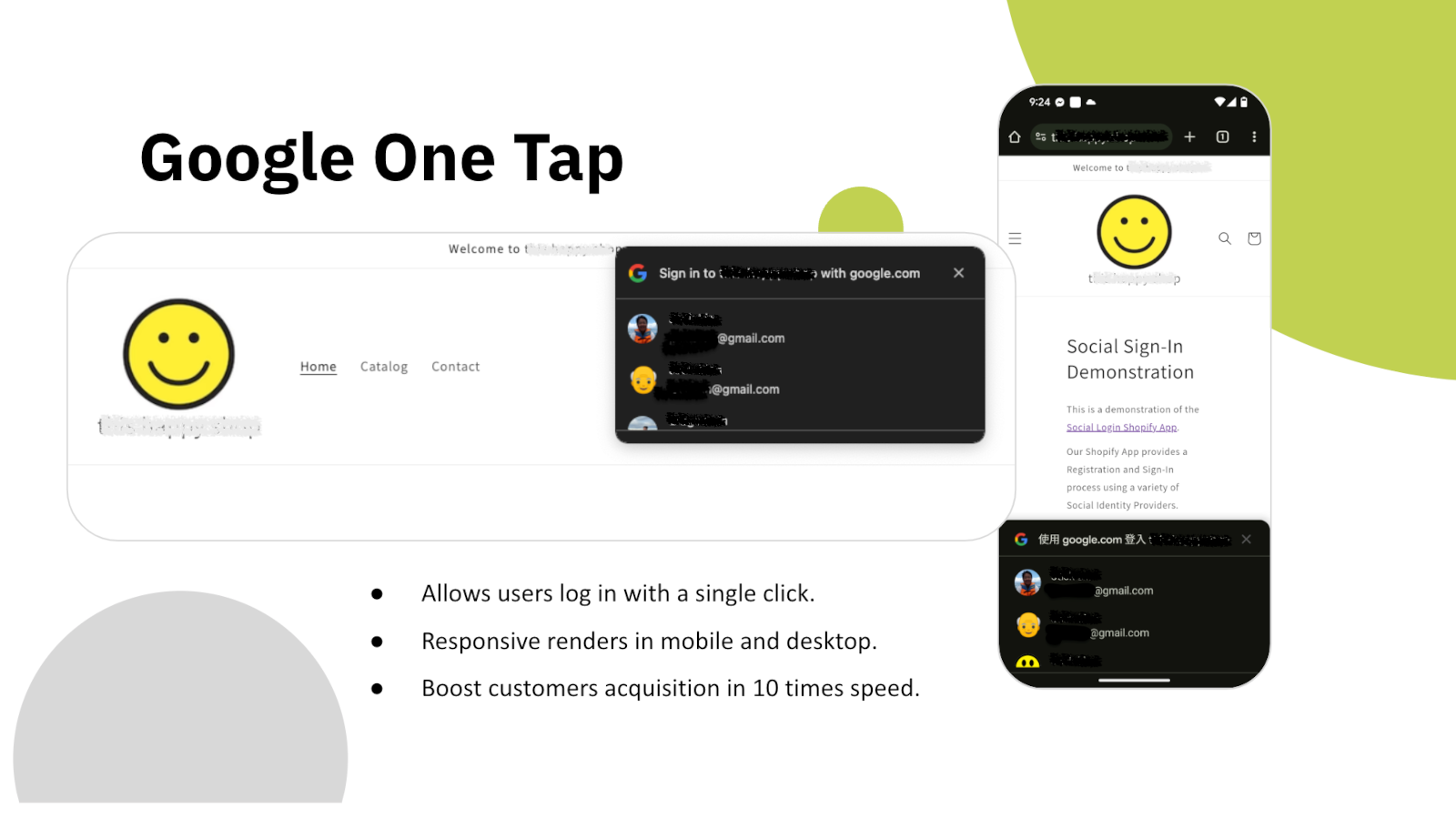
Ngay khi trang tải xong, Google One Tap chào khách quay lại bằng chính tài khoản Google của họ. Không biểu mẫu, không phải chọn nhà cung cấp, không chuyển hướng — một chạm là phiên làm việc trở lại với họ.
Nó hiển thị tốt trên cả di động lẫn máy tính và hoạt động trên bất kỳ giao diện nào bạn đang dùng. Với người đã từng mua hàng của bạn một lần, bước đăng nhập gần như biến mất.
Dữ liệu khách hàng
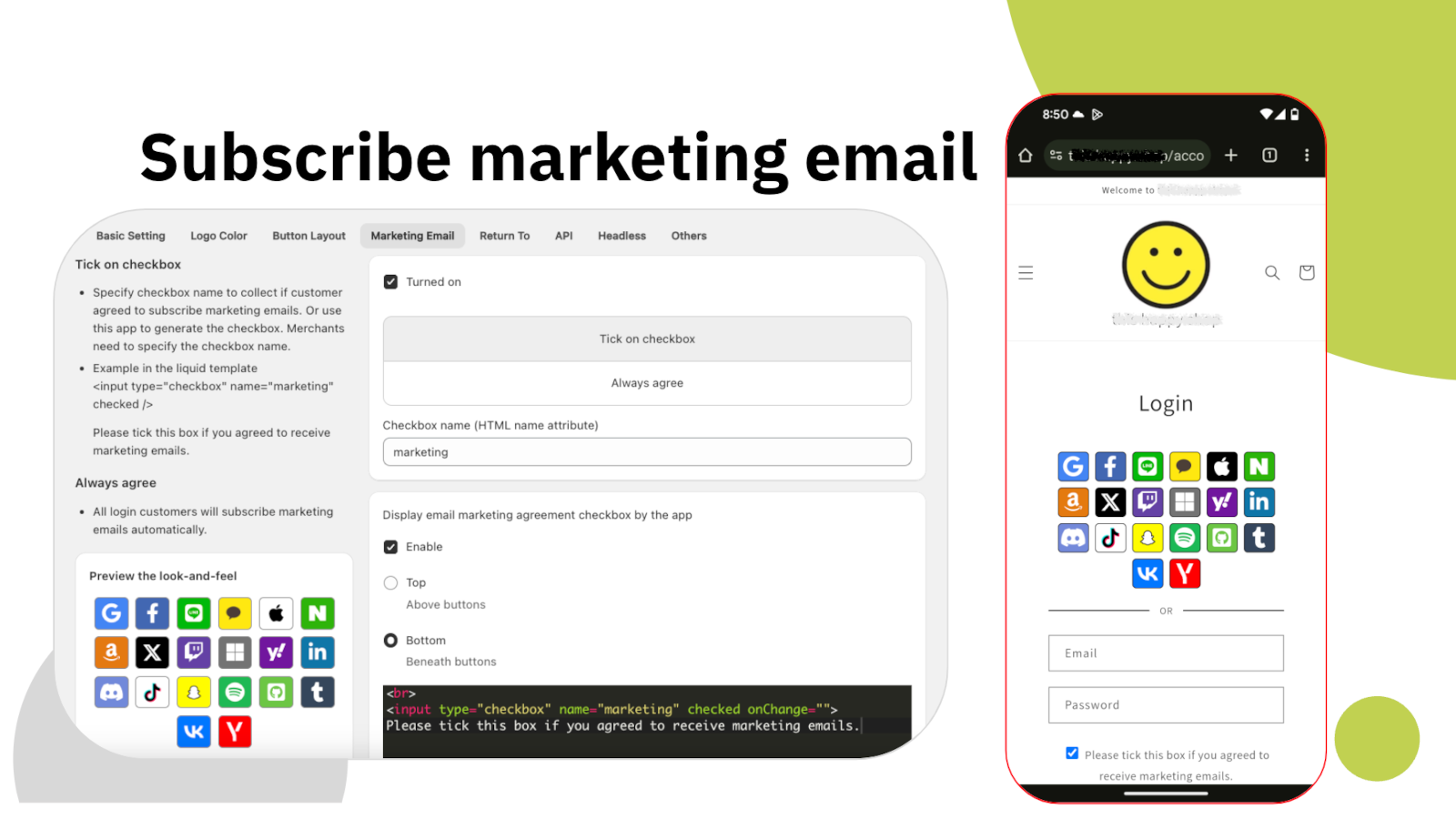
Tài khoản mạng xã hội chỉ cho bạn một địa chỉ email và một cái tên. Phần lớn cửa hàng cần nhiều hơn thế: số điện thoại để giao hàng, quốc gia để áp quy tắc thuế và vận chuyển, và một sự đồng ý nhận tiếp thị thực sự có hiểu biết. HIKO Social Login thu thập những thứ đó ngay khi đăng ký, trong cùng một bước, thay vì phải đi đòi sau.
Ô đồng ý nhận tiếp thị hoàn toàn do bạn cấu hình: đặt ở đâu, ghi gì, có tích sẵn hay không, và gửi đi dưới tên HTML nào. Sự đồng ý được ghi vào hồ sơ khách hàng trên Shopify, nên các công cụ khác của bạn nhìn thấy nó giống hệt như với bất kỳ người đăng ký nào khác.
Tiếp thị
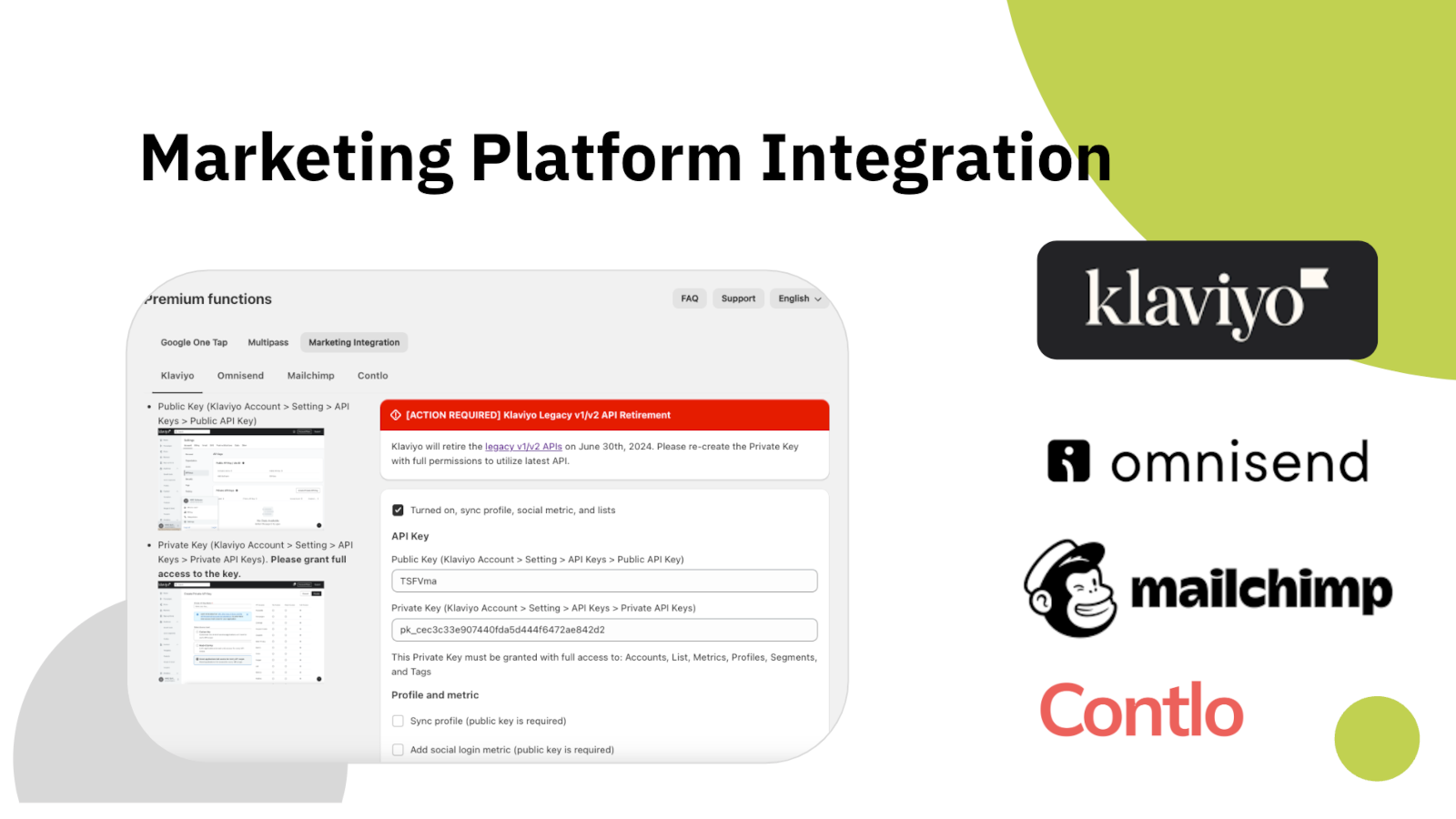
Một khách hàng đăng nhập nhưng không bao giờ xuất hiện trong nền tảng email của bạn là khách hàng bạn không thể trò chuyện cùng. HIKO Social Login đẩy hồ sơ sang Klaviyo, Mailchimp, Omnisend hoặc Contlo ngay khi hồ sơ được tạo, kèm theo nền tảng mà họ đã dùng.
Bạn kết nối từng nền tảng bằng khóa API của riêng mình và tự chọn cái gì được gửi đi: các trường hồ sơ, chỉ số đăng nhập, hoặc cả hai. Không có gì được gửi nếu bạn chưa bật.
Phân tích
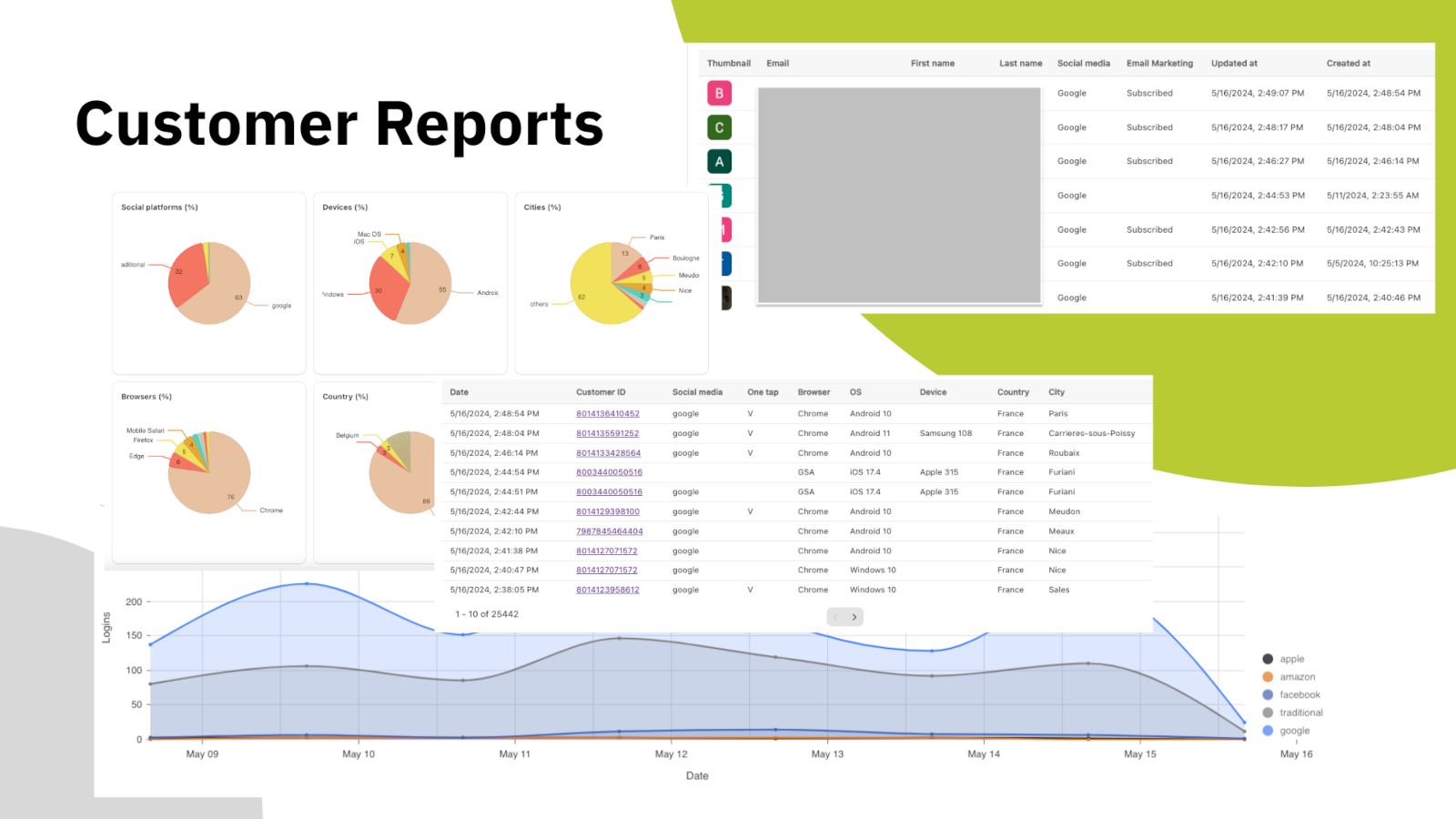
Đoán xem nên mở nhà cung cấp nào là một việc tốn kém — mỗi nút thêm vào là thêm một quyết định bạn bắt khách phải cân nhắc. Bảng điều khiển cho thấy tỷ lệ thật: nền tảng nào được dùng, trên thiết bị và trình duyệt nào, từ quốc gia và thành phố nào, và lượng đăng nhập mỗi ngày thay đổi ra sao.
Bên dưới các biểu đồ chính là danh sách khách hàng, kèm nền tảng mỗi người đã dùng, trạng thái đăng ký tiếp thị và thời điểm đăng nhập lần đầu. Xuất ra và mang đi dùng ở bất cứ đâu bạn làm việc.
Headless và API
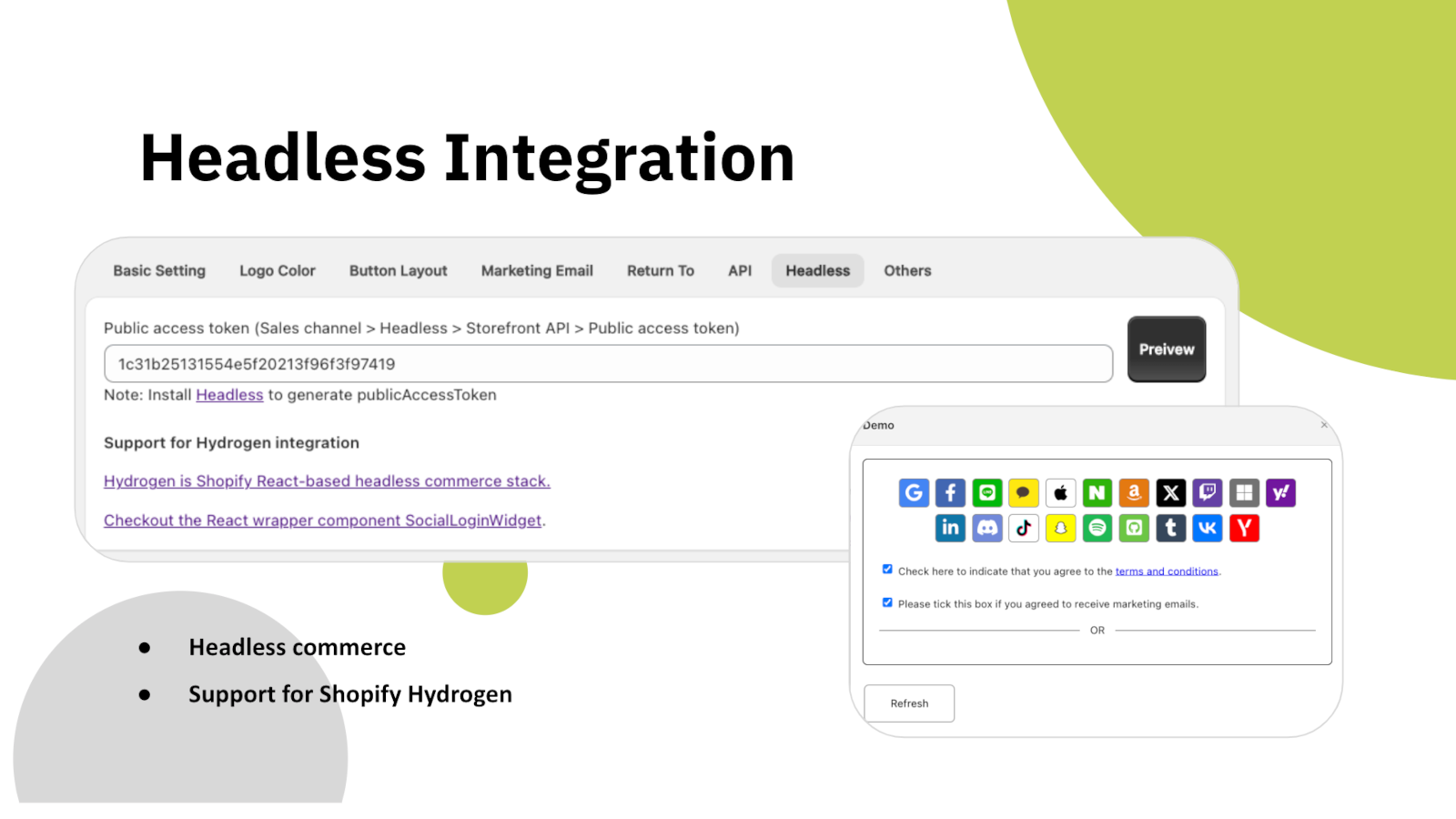
Nếu cửa hàng của bạn dựng trên Shopify Hydrogen hoặc giao diện React của riêng bạn, khối đăng nhập sẽ được cung cấp dưới dạng thành phần tiện ích cắm vào là chạy, thay vì khối của giao diện. Nó kết nối tới cùng một backend và tạo ra cùng loại hồ sơ khách hàng.
Ngoài ra còn có REST API để đọc dữ liệu khách hàng bằng mã, xác thực bằng mã truy cập do chính bạn tạo. Dữ liệu đăng nhập mạng xã hội được lưu trên hồ sơ khách hàng Shopify thông qua metafield, nên nó nằm trong cửa hàng của bạn chứ không phải ở chỗ chúng tôi.
Biến nó thành của bạn
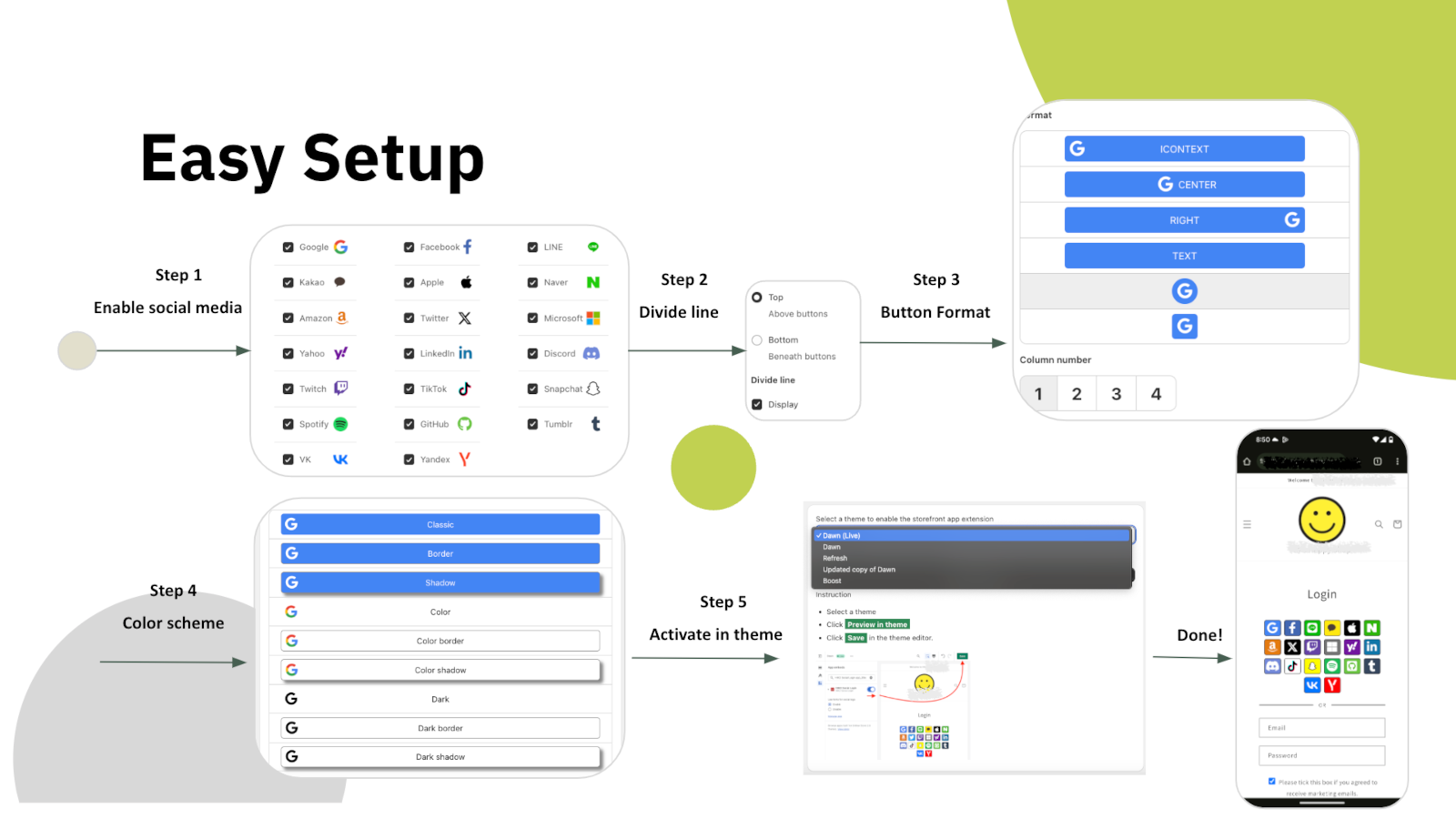
Việc thiết lập gồm năm bước ngay trong phần cài đặt của ứng dụng: chọn nền tảng, quyết định có đường phân cách giữa chúng với biểu mẫu email hay không, chọn kiểu nút, đặt màu, rồi bật khối trong giao diện của bạn. Không phải sửa mã giao diện.
Từ đó, mọi thứ của khối đều chỉnh được — nút dạng biểu tượng hay chữ, bao nhiêu cột, kích thước và khoảng cách nút, viền và bóng đổ, màu logo và màu nền của từng nền tảng, cùng thứ tự xuất hiện. Nếu vẫn chưa đủ, hãy thêm CSS của riêng bạn. Bản thân giao diện ứng dụng cũng có mười ngôn ngữ.
Sáu lý do để thêm vào cửa hàng Shopify của bạn ngay hôm nay
Mỗi mật khẩu bạn không hỏi là một khách hàng bạn không đánh mất ngay trước cửa.
Google One Tap đưa khách quen quay lại ngay lập tức, trên cả di động và máy tính.
LINE, Kakao, Naver và VK đứng ngang hàng với các nền tảng toàn cầu, không bị xếp sau.
Khách hàng mới đến Klaviyo, Mailchimp, Omnisend hoặc Contlo ngay khi đăng ký.
Hydrogen, React và REST API cho những cửa hàng không dùng giao diện Liquid.
Báo cáo theo nền tảng, thiết bị và khu vực cho thấy nút nào xứng đáng được giữ lại.
Bắt đầu miễn phí, nâng cấp khi lượng truy cập tăng lên
Mọi thứ cần thiết để thử trên cửa hàng đang hoạt động
Dành cho cửa hàng đã vượt giới hạn đăng nhập mỗi ngày
Đăng nhập một chạm, email không mật khẩu và đồng bộ tiếp thị
Giá hiển thị bằng USD và được Shopify thu hằng tháng. HIKO Social Login hoạt động với tài khoản khách hàng cổ điển.
Your store is currently not using legacy customer accounts, which is not compatible with this app.
Non-legacy customer accounts use a completely different authentication system that does not allow third-party apps to customize the login experience. Because of this technical limitation, features such as social login, custom registration fields, and login page customization are only available with legacy customer accounts. Learn more from Shopify's official documentation.
New customer accounts sign in with a one-time code sent by email and give no third-party app a way to complete a login, so social login cannot be offered on them. Switching back from Shopify admin > Settings > Customer accounts restores the classic login form and this app starts working immediately. Your customers and their orders are not affected by the switch.
If you need to stay on new customer accounts, the app can still be used on a headless storefront, where your own code controls the login step.
The app does not support the Shopify Starter plan because that plan has no membership feature.
Automatic installation hardly fits all themes. In such case, the custom tags need to be inserted manually in the proper location in the theme templates. You can try to insert the tags manually:
Optional attributes on the container:
type: register or login, which decides whether the block renders the registration or the login buttons.ignore: skip the automatic layout and keep your own styles and markup.register_tag: the value is added as a tag on every customer who registers through this block, which is how you tell apart sign-ups from different pages.App admin > Logo Color > Sequence , click on the up and down arrows
In some themes the login form is so wide that the login buttons in the block stretch with it. The width can be customized in CSS. For example:
The app will reset the customer password by a randomly generated string when the customer uses the social media account to login, unless Shopify's Multipass protocol is enabled. To restore the password, the customer can use the forget the password flow. The app will never store, log, or display the string in any form or storage. Multipass protocol lets the customer login using an encrypted login token by the multipass secret. Multipass is provided on a Shopify Plus plan only.
Multipass is enabled in Premium > Multipass using the secret from Shopify admin > Settings > Customer accounts. With it the app hands Shopify a signed login token instead of a password, so the customer's own password is never touched. Multipass is only available on a Shopify Plus plan.
Premium > Google One Tap. One Tap shows a Google account chooser on your storefront without the customer clicking anything, so it only appears to visitors who are already signed in to Google.
If you use your own Google API key, your storefront domain must be listed as an authorized JavaScript origin in the Google Cloud console. Without it Google refuses the request with origin_mismatch and nothing is shown at all, with no visible error on the page.
Yes, you can disable it via: Online Store > Preferences > Spam protection > uncheck Enable hCaptcha on login, create account and password recovery pages
You do not have to turn it off. The app goes through Shopify's own captcha protection before submitting the login form, so social login works with hCaptcha left on. Switching it off is a decision about friction at the login step, not a requirement of this app.
This app will request access to your customer's email, first name, last name, phone number, and marketing consent.
The social profile data goes into your own store's customer metafields, not into a copy on our side. Our server keeps only what running the login needs: your store's settings, the link between a social account and a Shopify customer, and the operational logging we are required to keep. Uninstalling removes all of it.
Nothing is removed from Shopify. The social profile data this app writes lives in each customer's hiko.socials metafield, which belongs to your store, so your customers, their orders and that metafield all stay exactly as they are.
On our side, uninstalling removes your store's settings and its social account bindings from our server, and Shopify revokes the app's access to your store at the same moment. Only the minimal logging we are required to keep is retained.
To display your store's name and logo on the social login consent screen, you'll need to register your own app with the social platform and obtain their approval. Once approved, you can integrate the API key and secret into our app: Professional > Custom API Keys, this app will handle the authentication flow for you. For further detail, you can check an industrial standard OAuth2.
To enable social login, you'll need to register an application on the social platform for your store. This involves agreeing to usage terms and requesting necessary permissions. Once approved, the social platform will provide an API key and secret. When a customer signs in using their social account, they'll be redirected to the social platform's authorization server for verification and consent. The authorization server will display your store's name, terms, and requested permissions for the customer to approve.
Below are the references for all social platforms:
Customers signing in with Apple can choose to hide their email address. When choosing hide, Apple will create a unique, random email address to keep the personal email private. The domain of the generated email address will be privaterelay.appleid.com. The emails will be able to send and receive messages to and from customers using Apple's private email relay service.
Yes, it does. Amazon has 3 different regions, North America (amazon.com), Europe (amazon.co.uk), and Far East (amazon.co.jp). Each of them holds customer accounts separately. You can choose one of the 3 regions for your store from Professional > Custom API Keys > Amazon > .
No, it won't. Shopify resumes the original installation's billing cycle and does not charge the merchant until the end of that cycle.
The plan is read from your store's active subscription in Shopify every time the app opens, so it follows Shopify billing rather than a copy kept on our side. Reload the page after any change made in Subscription.
If it still looks wrong, the active charge recorded by Shopify is the authority. Send us a screenshot of Subscription and we will compare it against Shopify's record.
Google has discontinued support for embedded webviews and unknown browsers for logins since September 30, 2021. Embedded webviews are web browsers within mobile apps. For example, clicking a store link from Facebook would open Facebook's own browser, not a standard one like Chrome or Safari. Google considers third-party webviews a security risk. Get more details .
There is nothing to configure away, because the restriction is Google's and applies to every site. The customer needs to open your store in a normal browser rather than the one built into the app they came from, usually through that app's Open in browser menu.
Google One-Tap will not display in the same browser or the last website visited for a period of time if the user closes One Tap with the 'X' button. This is called exponential cool-down. In such case, you can clear all the browser's application data to restore it. In example of Chrome, F12 > Chrome Developer Tools > Application tab > Clear storage in left tree > Select all data items > click Clear site data
One Tap is also hidden on iOS and in Safari unless ITP support is ticked in Premium > Google One Tap. Note that those browsers do not support automatic sign-in even with it on.
Shopify refuses a customer record whose phone number or email already belongs to another customer in the same store, and that refusal is what the customer sees. It is a duplicate in your customer list, not a problem with the social account.
Find the other customer holding that phone number or email in Shopify admin > Customers, then merge the two or clear the duplicated field. A phone number has to be unique across the whole store, which is the most common cause.
The app writes hiko.socials as json. If your store already defines that metafield as another type, Shopify refuses the write and the social profile data is skipped. Signing in still works and the account binding is still recorded, only the metafield copy is left alone.
To get the data back, change the definition in Shopify admin > Settings > Custom data > Customers to the JSON type, or remove your definition entirely and let the app create it.
The data from social media is stored in the customer metafields in JSON format. The JSON schema is:
A liquid example of accessing the social media data in the customer metafields:
The metafield is namespace hiko, key socials, type json. Which fields are present depends on what the social platform returned, so check for a field before using it.
Settings > Headless. Requests are signed with your store's Hydrogen public access token, and for React and Hydrogen storefronts there is a ready-made component package, hiko-social-login-react.
Contact support for the full endpoint reference, including the request signing recipe.
Được người bán Shopify chấm 4,5 trên 5. Bắt đầu với gói miễn phí — không cần thẻ.
Xem trên App Store