תנו ללקוחות להתחבר עם החשבון שכבר יש להם — או בקישור שנשלח למייל שלהם.
תצוגה מקדימה בחיפוש
הוסיפו לחנות ה-Shopify שלכם יותר מ-20 דרכי התחברות ברשתות חברתיות והתחברות בקישור במייל ללא סיסמה. אספו בהרשמה את פרטי הלקוח שאתם באמת צריכים, סנכרנו אותם ל-Klaviyo, Mailchimp, Omnisend ו-Contlo, וראו באילו דרכים הלקוחות באמת משתמשים. קיימת תוכנית חינמית.
הרגע הקשה ביותר במסע הקנייה הוא הרגע שבו הלקוח נדרש לפתוח חשבון, ומשם בדיוק HIKO Social Login מסיר את הסיסמה. הלקוחות מתחברים עם Google, Facebook, Apple, LINE, Kakao, Naver, X ועוד תריסר פלטפורמות, או בקישור חד-פעמי שנשלח לכתובת המייל שלהם. באותו שלב עצמו תוכלו לבקש בדיוק את מה שהחנות צריכה — מספר טלפון, שם מלא, מדינה — ולקבל רשומת לקוח מלאה ב-Shopify. הנתונים זורמים ישירות ל-Klaviyo, Mailchimp, Omnisend או Contlo, ולוח מחוונים מראה מהיכן מגיעות ההתחברויות בפועל: פלטפורמות, מכשירים, דפדפנים ואזורים. כל מה שהלקוח רואה נקבע על ידכם: סידור הכפתורים, צבעי הלוגו, מספר העמודות, CSS משלכם ומסך ההסכמה תחת פרטי המפתח שלכם. לחנויות שאינן מבוססות ערכת Liquid יש ממשקי REST API, תמיכה ב-Shopify Hydrogen ורכיב Widget ב-React.
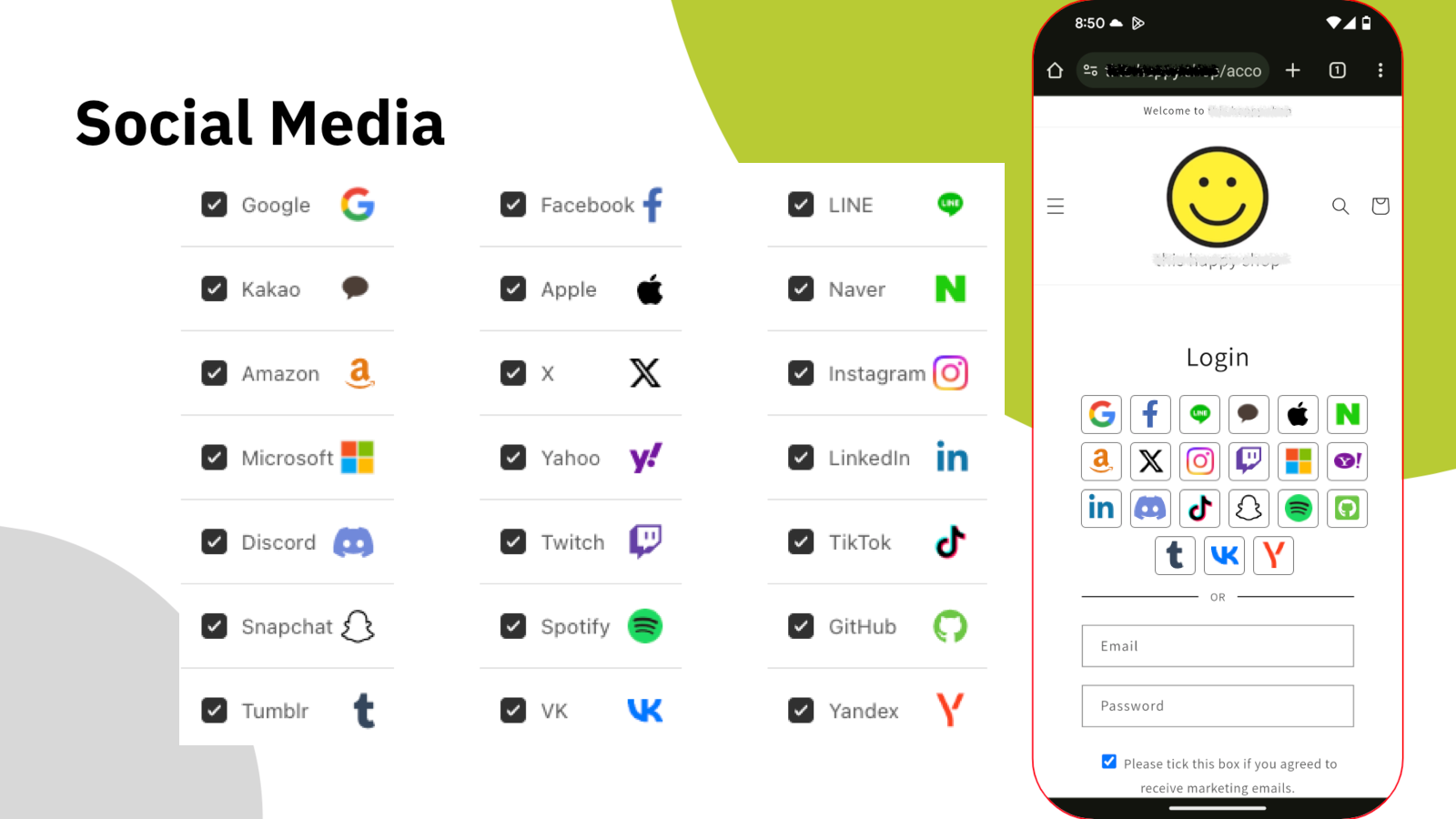
בחרו את הפלטפורמות שהלקוחות שלכם משתמשים בהן. את השאר הרכיב עושה.
התחברות חברתית
כל סיסמה נוספת היא עוד סיבה לעזוב. HIKO Social Login מרכז יותר מעשרים ספקים בבלוק התחברות אחד בחנות שלכם — Google, Facebook, Apple, LINE, Kakao, Naver, Amazon, X, Instagram, Microsoft, LinkedIn, Discord, TikTok ועוד. הלקוח בוחר את זה שהוא כבר מחובר אליו, וזהו.
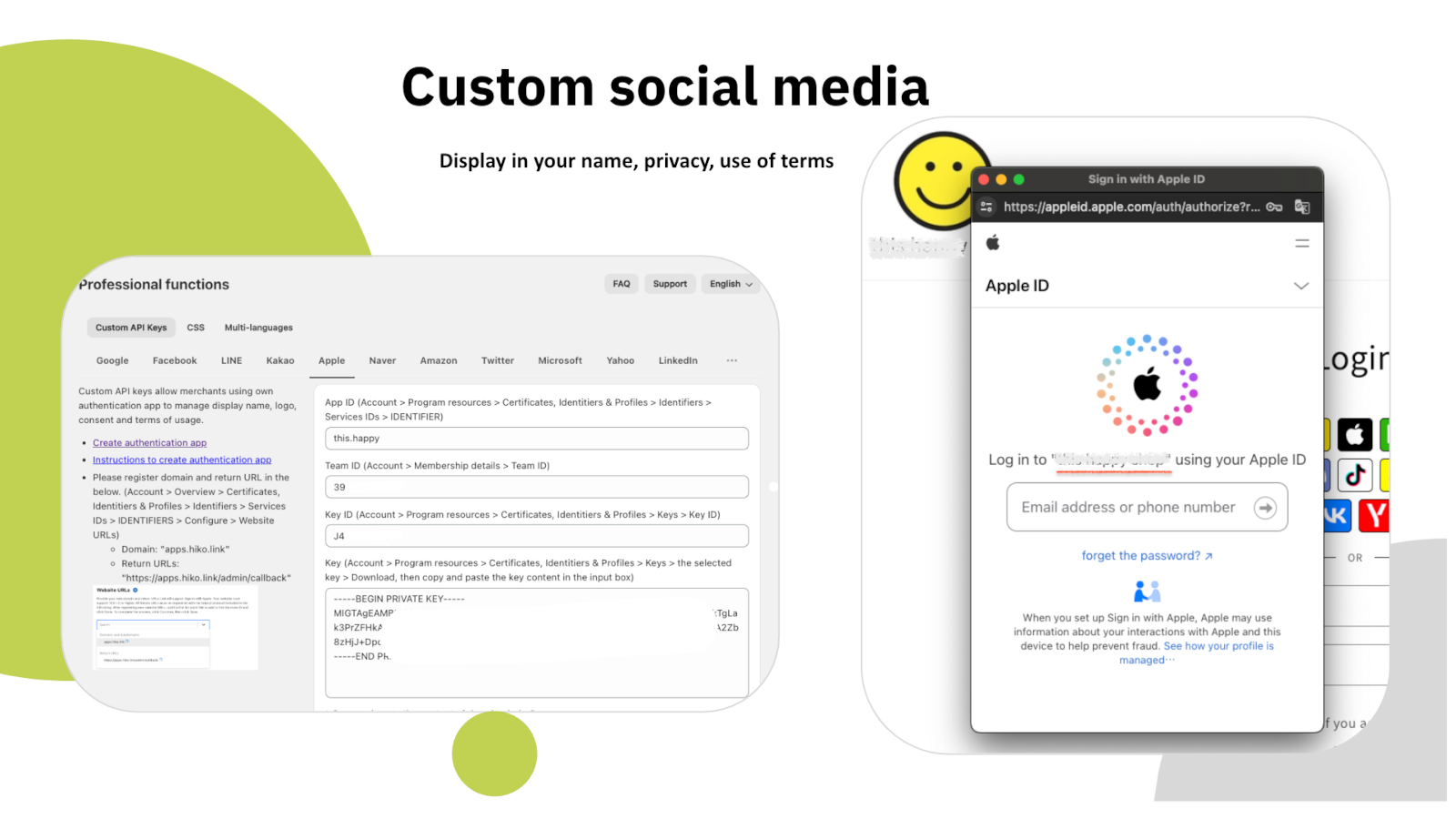
בתוכניות בתשלום תוכלו לרשום אפליקציית מפתח משלכם מול כל פלטפורמה ולהזין מפתחות API משלכם, כך שבמסך ההסכמה יופיעו שם החנות והלוגו שלכם במקום שלנו — יחד עם מדיניות הפרטיות ותנאי השימוש שלכם.
חזרה בלי חיכוך
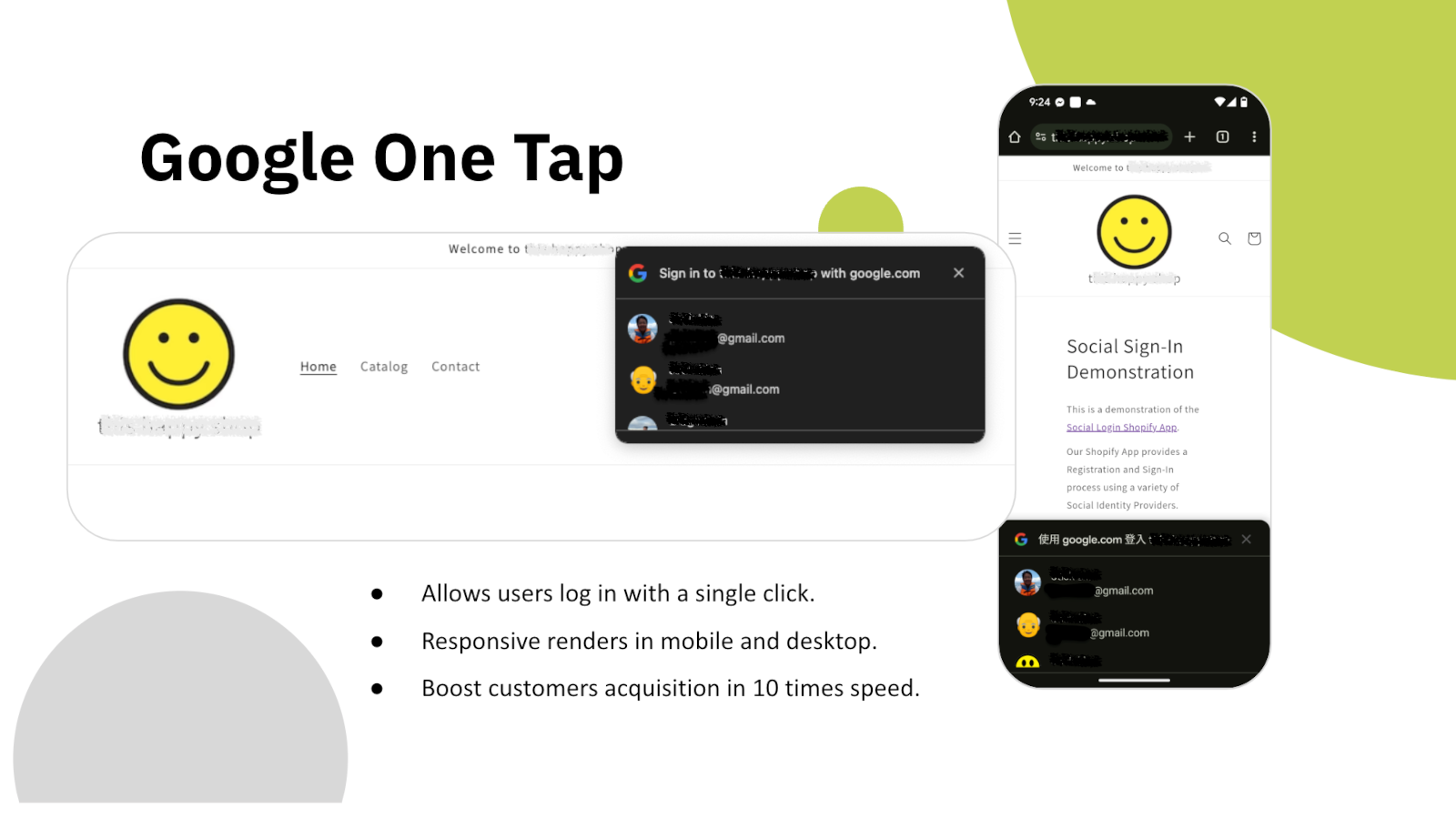
ברגע שהעמוד נטען, Google One Tap מקבל את הלקוח החוזר עם חשבון ה-Google שלו עצמו. בלי טופס, בלי בחירת ספק, בלי הפניה — נגיעה אחת והחיבור חוזר אליו.
הוא מוצג גם במובייל וגם בדסקטופ, ופועל מעל כל ערכת עיצוב שתבחרו. עבור מי שכבר קנה אצלכם פעם אחת, שלב ההתחברות כמעט נעלם.
נתוני לקוחות
חשבון ברשת חברתית נותן לכם כתובת מייל ושם בלבד. רוב החנויות צריכות יותר: מספר טלפון למשלוח, מדינה לכללי מס ומשלוח, והסכמה שיווקית מתוך הבנה אמיתית. HIKO Social Login אוסף את אלה בהרשמה, באותו שלב, במקום לרדוף אחריהם אחר כך.
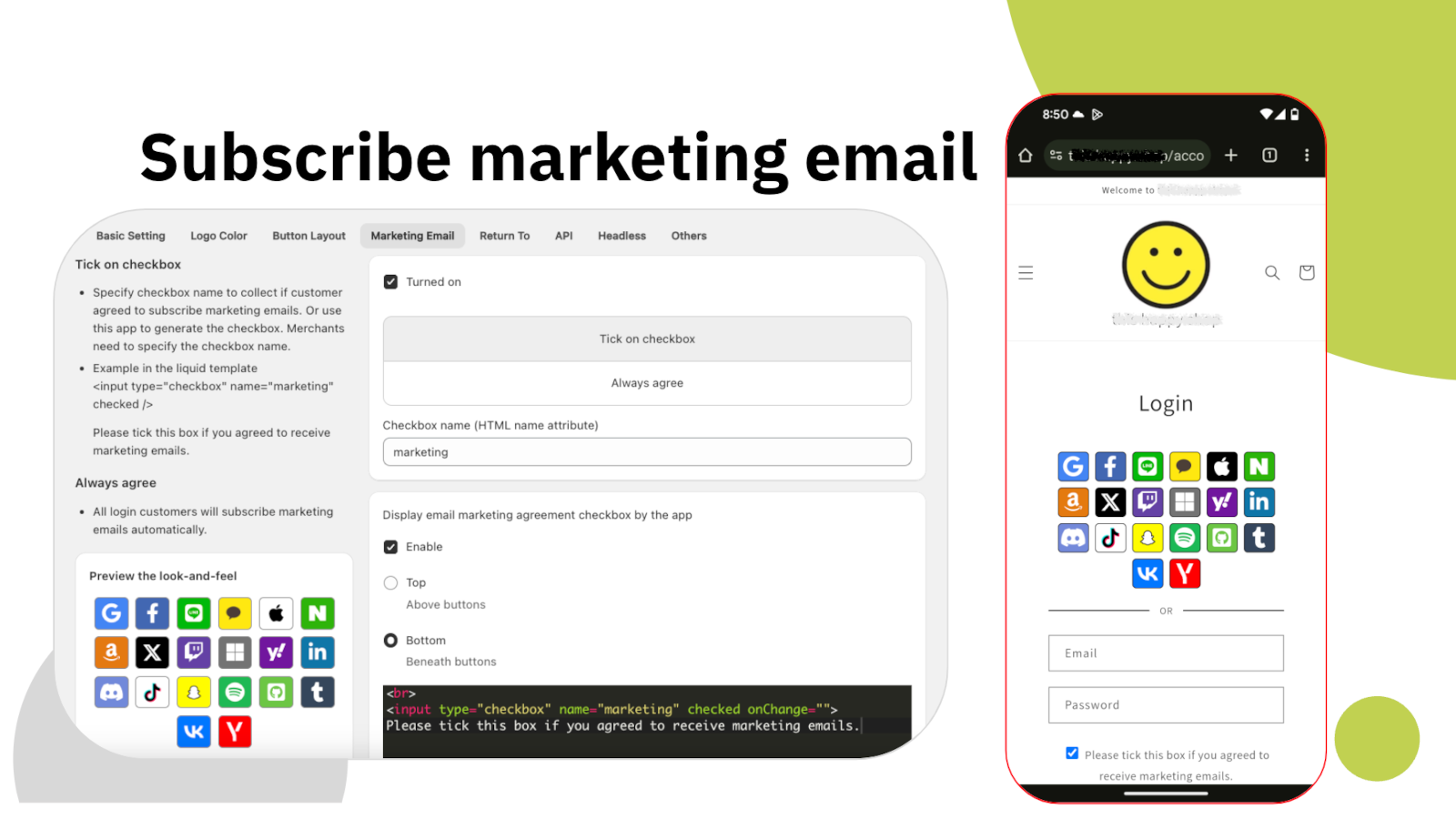
תיבת ההסכמה השיווקית נתונה כולה להגדרה שלכם: איפה היא יושבת, מה כתוב בה, אם היא מסומנת כברירת מחדל ובאיזה שם HTML היא נשלחת. ההסכמה נרשמת ברשומת הלקוח ב-Shopify, כך ששאר הכלים שלכם רואים אותה בדיוק כמו אצל כל נרשם אחר.
שיווק
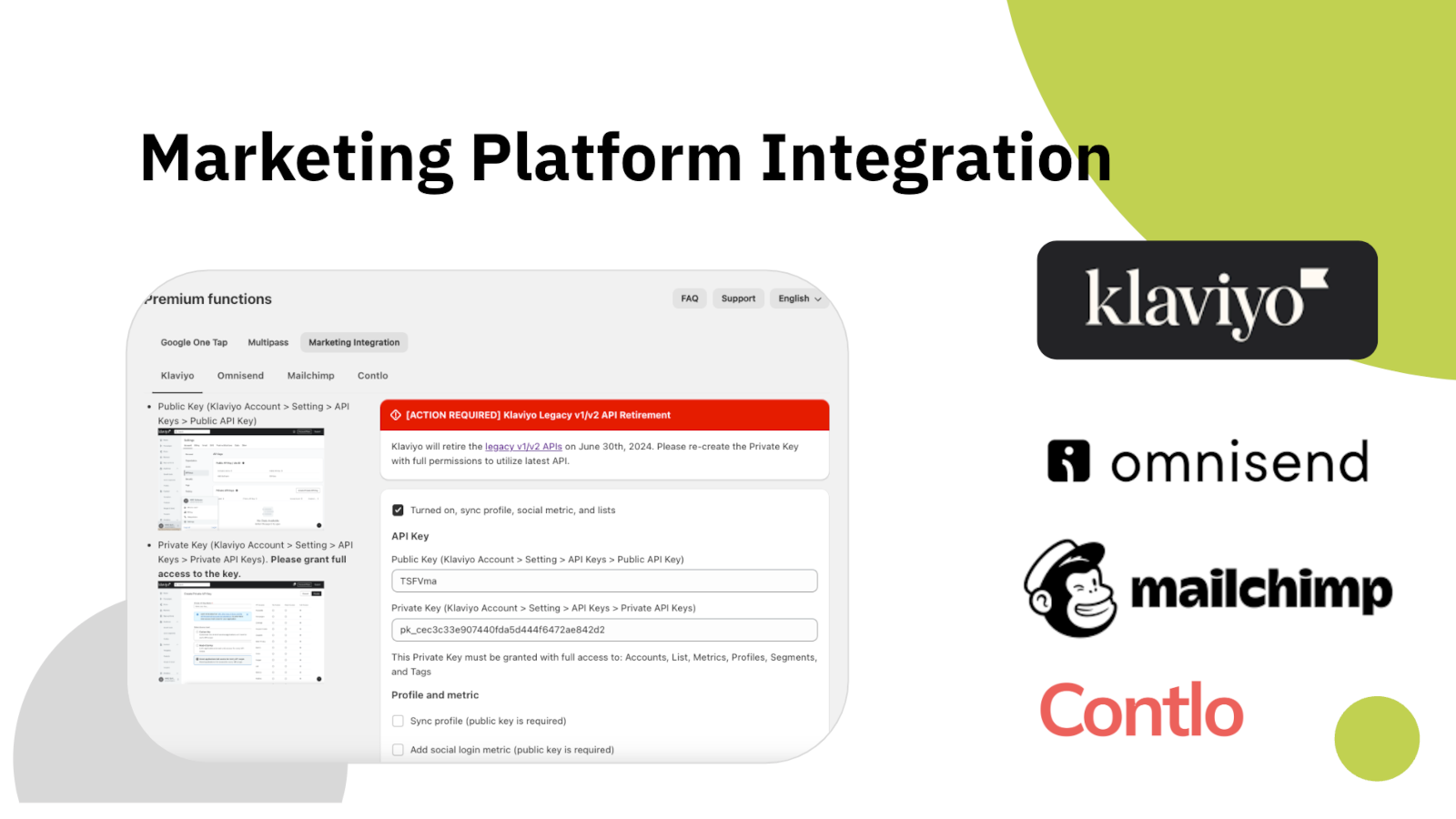
לקוח שמתחבר ולעולם לא מגיע למערכת הדיוור שלכם הוא לקוח שאי אפשר לדבר אתו. HIKO Social Login שולח את הפרופיל ל-Klaviyo, Mailchimp, Omnisend או Contlo ברגע יצירתו, ורושם לצדו גם את הפלטפורמה שבה השתמש.
כל פלטפורמה מתחברת במפתח API משלכם, ואתם בוחרים מה נשלח: שדות הפרופיל, מדדי ההתחברות, או שניהם. דבר לא נשלח בלי שהפעלתם אותו.
ניתוח נתונים
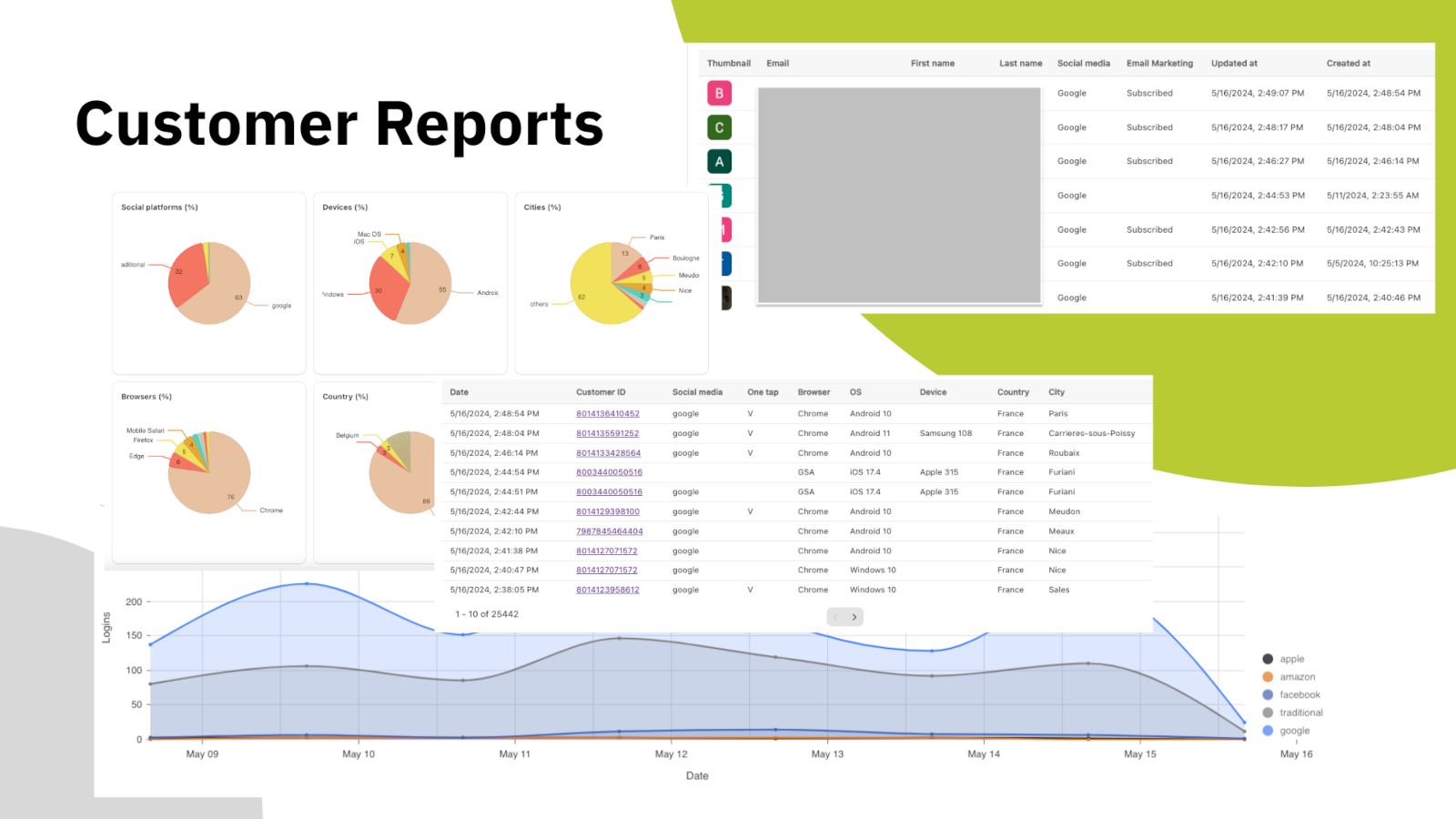
לנחש אילו ספקים להציע זה יקר — כל כפתור נוסף הוא עוד החלטה שאתם מבקשים מהלקוח לקבל. לוח המחוונים מציג את הפילוח האמיתי: אילו רשתות חברתיות בשימוש, באילו מכשירים ודפדפנים, מאילו מדינות וערים, וכיצד משתנה נפח ההתחברויות היומי לאורך זמן.
מתחת לגרפים נמצאת רשימת הלקוחות עצמה, ובה הפלטפורמה שכל אחד השתמש בה, מצב ההרשמה לדיוור ומועד ההתחברות הראשונה. ייצאו אותה וקחו אותה לכל מקום שבו אתם עובדים.
Headless ו-API
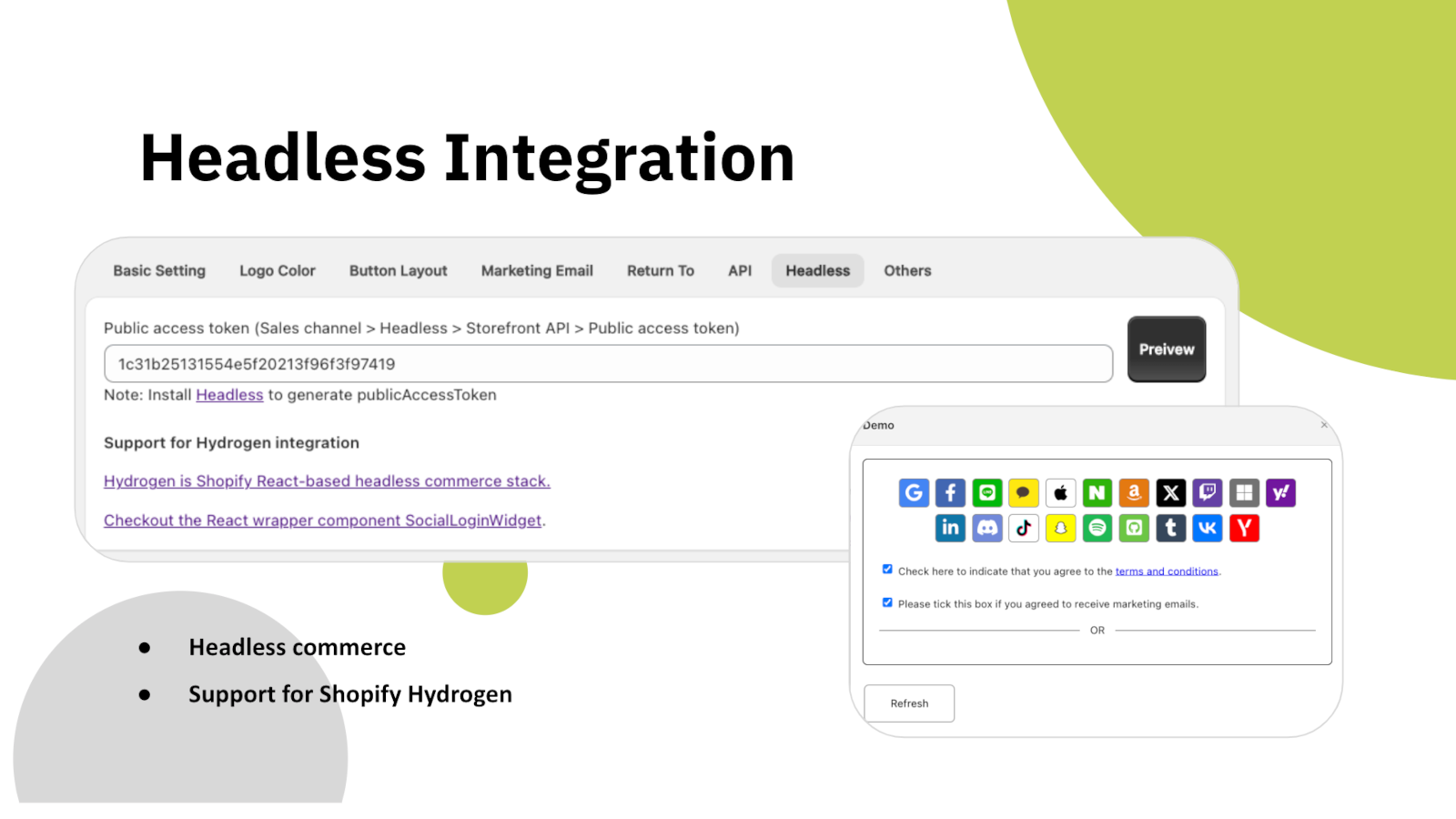
אם החנות שלכם בנויה על Shopify Hydrogen או על צד-לקוח React משלכם, בלוק ההתחברות מגיע כרכיב Widget מוכן להטמעה ולא כבלוק של ערכת עיצוב. הוא פונה לאותו שרת ויוצר את אותן רשומות לקוח.
יש גם ממשק REST API לקריאת נתוני לקוחות באופן תוכנתי, עם אימות באמצעות אסימון גישה שאתם מייצרים בעצמכם. נתוני ההתחברות החברתית נשמרים ברשומת הלקוח ב-Shopify דרך שדות מטא, כך שהם נשארים בחנות שלכם ולא אצלנו.
שיהיה שלכם
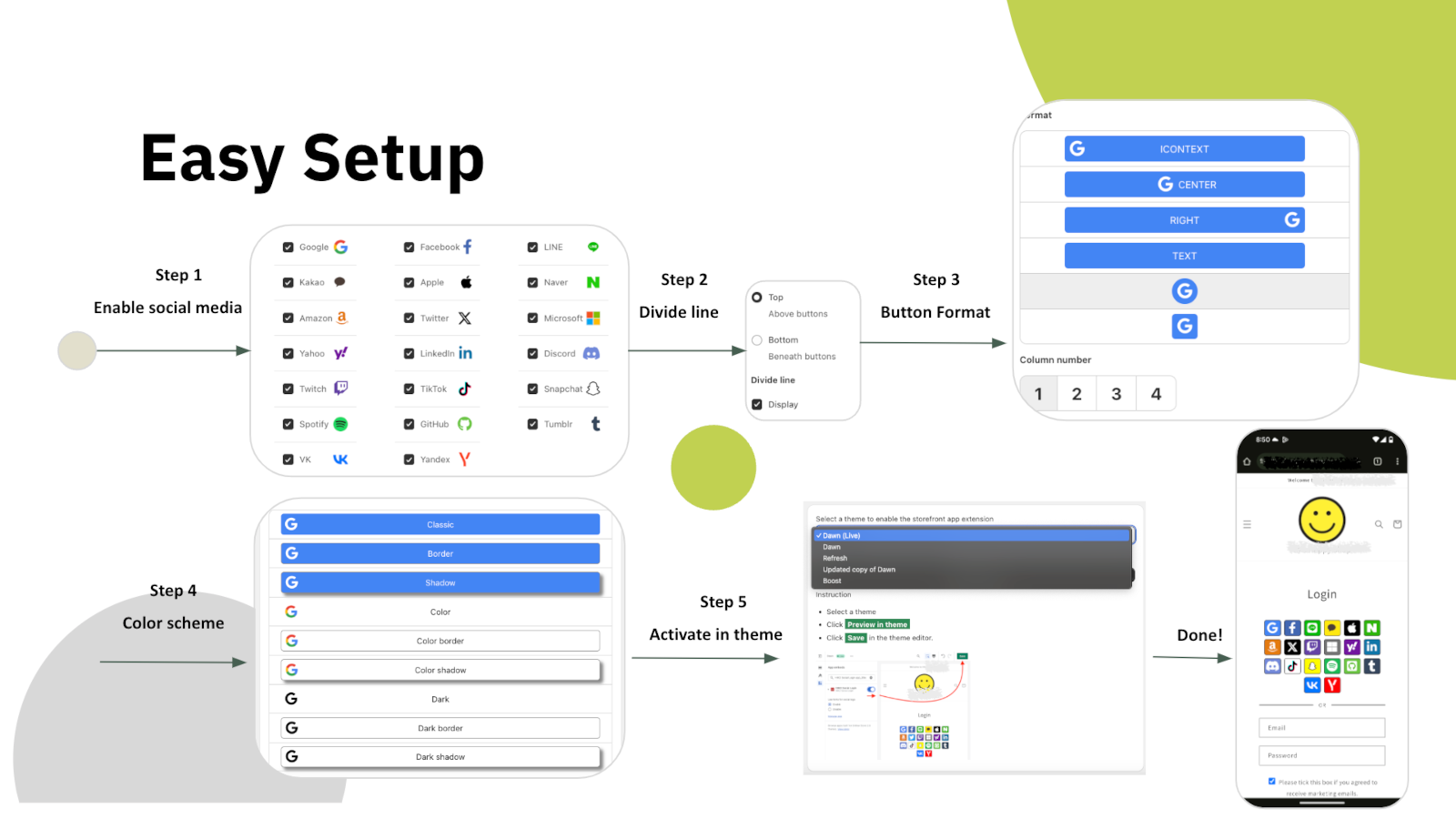
ההגדרה היא חמישה שלבים בתוך האפליקציה עצמה: לבחור פלטפורמות, להחליט אם קו מפריד ביניהן לבין טופס המייל, לבחור את צורת הכפתורים, לקבוע צבעים, ולבסוף להפעיל את הבלוק בערכת העיצוב. בלי לערוך קוד בערכה.
משם הכול בבלוק ניתן להתאמה: כפתורי אייקון או טקסט, מספר העמודות, גודל הכפתורים והמרווחים, מסגרת וצל, צבעי לוגו ורקע לכל פלטפורמה, וסדר ההופעה. ואם זה עדיין לא מספיק, הוסיפו CSS משלכם. ממשק האפליקציה עצמו זמין בעשר שפות.
שש סיבות להוסיף אותו לחנות ה-Shopify שלכם כבר היום
כל סיסמה שאתם לא מבקשים היא לקוח שאתם לא מאבדים בפתח.
Google One Tap מחזיר לקוחות חוזרים ישר פנימה, במובייל ובדסקטופ.
LINE, Kakao, Naver ו-VK יושבות לצד הפלטפורמות הגלובליות, לא מאחוריהן.
לקוחות חדשים מגיעים ל-Klaviyo, Mailchimp, Omnisend או Contlo כבר בהרשמה.
Hydrogen, React וממשק REST API לחנויות שאינן מבוססות ערכת Liquid.
דוחות לפי פלטפורמה, מכשיר ואזור מראים אילו כפתורים מצדיקים את מקומם.
התחילו בחינם ושדרגו כשהנפח מגיע
כל מה שצריך כדי לנסות בחנות פעילה
לחנויות שעברו את מגבלת ההתחברויות היומית
התחברות בנגיעה, מייל ללא סיסמה וסנכרון שיווקי
המחירים בדולר ארה"ב ונגבים חודשית על ידי Shopify. HIKO Social Login עובד עם חשבונות לקוח קלאסיים.
Your store is currently not using legacy customer accounts, which is not compatible with this app.
Non-legacy customer accounts use a completely different authentication system that does not allow third-party apps to customize the login experience. Because of this technical limitation, features such as social login, custom registration fields, and login page customization are only available with legacy customer accounts. Learn more from Shopify's official documentation.
New customer accounts sign in with a one-time code sent by email and give no third-party app a way to complete a login, so social login cannot be offered on them. Switching back from Shopify admin > Settings > Customer accounts restores the classic login form and this app starts working immediately. Your customers and their orders are not affected by the switch.
If you need to stay on new customer accounts, the app can still be used on a headless storefront, where your own code controls the login step.
The app does not support the Shopify Starter plan because that plan has no membership feature.
Automatic installation hardly fits all themes. In such case, the custom tags need to be inserted manually in the proper location in the theme templates. You can try to insert the tags manually:
Optional attributes on the container:
type: register or login, which decides whether the block renders the registration or the login buttons.ignore: skip the automatic layout and keep your own styles and markup.register_tag: the value is added as a tag on every customer who registers through this block, which is how you tell apart sign-ups from different pages.App admin > Logo Color > Sequence , click on the up and down arrows
In some themes the login form is so wide that the login buttons in the block stretch with it. The width can be customized in CSS. For example:
The app will reset the customer password by a randomly generated string when the customer uses the social media account to login, unless Shopify's Multipass protocol is enabled. To restore the password, the customer can use the forget the password flow. The app will never store, log, or display the string in any form or storage. Multipass protocol lets the customer login using an encrypted login token by the multipass secret. Multipass is provided on a Shopify Plus plan only.
Multipass is enabled in Premium > Multipass using the secret from Shopify admin > Settings > Customer accounts. With it the app hands Shopify a signed login token instead of a password, so the customer's own password is never touched. Multipass is only available on a Shopify Plus plan.
Premium > Google One Tap. One Tap shows a Google account chooser on your storefront without the customer clicking anything, so it only appears to visitors who are already signed in to Google.
If you use your own Google API key, your storefront domain must be listed as an authorized JavaScript origin in the Google Cloud console. Without it Google refuses the request with origin_mismatch and nothing is shown at all, with no visible error on the page.
Yes, you can disable it via: Online Store > Preferences > Spam protection > uncheck Enable hCaptcha on login, create account and password recovery pages
You do not have to turn it off. The app goes through Shopify's own captcha protection before submitting the login form, so social login works with hCaptcha left on. Switching it off is a decision about friction at the login step, not a requirement of this app.
This app will request access to your customer's email, first name, last name, phone number, and marketing consent.
The social profile data goes into your own store's customer metafields, not into a copy on our side. Our server keeps only what running the login needs: your store's settings, the link between a social account and a Shopify customer, and the operational logging we are required to keep. Uninstalling removes all of it.
Nothing is removed from Shopify. The social profile data this app writes lives in each customer's hiko.socials metafield, which belongs to your store, so your customers, their orders and that metafield all stay exactly as they are.
On our side, uninstalling removes your store's settings and its social account bindings from our server, and Shopify revokes the app's access to your store at the same moment. Only the minimal logging we are required to keep is retained.
To display your store's name and logo on the social login consent screen, you'll need to register your own app with the social platform and obtain their approval. Once approved, you can integrate the API key and secret into our app: Professional > Custom API Keys, this app will handle the authentication flow for you. For further detail, you can check an industrial standard OAuth2.
To enable social login, you'll need to register an application on the social platform for your store. This involves agreeing to usage terms and requesting necessary permissions. Once approved, the social platform will provide an API key and secret. When a customer signs in using their social account, they'll be redirected to the social platform's authorization server for verification and consent. The authorization server will display your store's name, terms, and requested permissions for the customer to approve.
Below are the references for all social platforms:
Customers signing in with Apple can choose to hide their email address. When choosing hide, Apple will create a unique, random email address to keep the personal email private. The domain of the generated email address will be privaterelay.appleid.com. The emails will be able to send and receive messages to and from customers using Apple's private email relay service.
Yes, it does. Amazon has 3 different regions, North America (amazon.com), Europe (amazon.co.uk), and Far East (amazon.co.jp). Each of them holds customer accounts separately. You can choose one of the 3 regions for your store from Professional > Custom API Keys > Amazon > .
No, it won't. Shopify resumes the original installation's billing cycle and does not charge the merchant until the end of that cycle.
The plan is read from your store's active subscription in Shopify every time the app opens, so it follows Shopify billing rather than a copy kept on our side. Reload the page after any change made in Subscription.
If it still looks wrong, the active charge recorded by Shopify is the authority. Send us a screenshot of Subscription and we will compare it against Shopify's record.
Google has discontinued support for embedded webviews and unknown browsers for logins since September 30, 2021. Embedded webviews are web browsers within mobile apps. For example, clicking a store link from Facebook would open Facebook's own browser, not a standard one like Chrome or Safari. Google considers third-party webviews a security risk. Get more details .
There is nothing to configure away, because the restriction is Google's and applies to every site. The customer needs to open your store in a normal browser rather than the one built into the app they came from, usually through that app's Open in browser menu.
Google One-Tap will not display in the same browser or the last website visited for a period of time if the user closes One Tap with the 'X' button. This is called exponential cool-down. In such case, you can clear all the browser's application data to restore it. In example of Chrome, F12 > Chrome Developer Tools > Application tab > Clear storage in left tree > Select all data items > click Clear site data
One Tap is also hidden on iOS and in Safari unless ITP support is ticked in Premium > Google One Tap. Note that those browsers do not support automatic sign-in even with it on.
Shopify refuses a customer record whose phone number or email already belongs to another customer in the same store, and that refusal is what the customer sees. It is a duplicate in your customer list, not a problem with the social account.
Find the other customer holding that phone number or email in Shopify admin > Customers, then merge the two or clear the duplicated field. A phone number has to be unique across the whole store, which is the most common cause.
The app writes hiko.socials as json. If your store already defines that metafield as another type, Shopify refuses the write and the social profile data is skipped. Signing in still works and the account binding is still recorded, only the metafield copy is left alone.
To get the data back, change the definition in Shopify admin > Settings > Custom data > Customers to the JSON type, or remove your definition entirely and let the app create it.
The data from social media is stored in the customer metafields in JSON format. The JSON schema is:
A liquid example of accessing the social media data in the customer metafields:
The metafield is namespace hiko, key socials, type json. Which fields are present depends on what the social platform returned, so check for a field before using it.
Settings > Headless. Requests are signed with your store's Hydrogen public access token, and for React and Hydrogen storefronts there is a ready-made component package, hiko-social-login-react.
Contact support for the full endpoint reference, including the request signing recipe.
דירוג 4.5 מתוך 5 מסוחרי Shopify. התחילו בתוכנית החינמית — בלי כרטיס אשראי.
לצפייה ב-App Store